6-28
DCR-HC39E/HC41/HC42/HC42E/HC43/HC43E
7. Picture Frame Setting
(Color reproduction adjustment frame)
Subject Color bar chart
(Color reproduction adjustment
frame)
(1 m (PTB-450) or 40 cm (PTB-
1450) from the front of lens)
Measurement Point Video terminal of A/V jack
(75 Ω terminated)
Measuring Instrument Oscilloscope and monitor TV
Specified Value A=B, C=D, E=F
Note 1: Perform “Hall Adjustment” and “Flange Back Adjust-
ment” before this adjustment.
Note 2: Check that the data of page: 0, address: 10 is “00”.
Switch setting
1) POWER ............................................. CAMERA-TAPE mode
2) NIGHTSHOT PLUS ........................................................ OFF
3) DIGITAL ZOOM (Menu setting) .................................... OFF
4) STEADY SHOT (Menu setting) ..................................... OFF
5) FOCUS (Menu Setting) ......................................... MANUAL
6) WIDE SELECT .................................................................4: 3
Setting method:
Order Procedure
1
Adjust the zoom and the camera direction, and set
the specified position.
2
Mark the position of the picture frame on the monitor
TV, and adjust the picture frame to the this position
in following adjustment using “Color reproduction
adjustment frame”.
How to read the XH, XL, YH and YL data:
Order Page Address Data Procedure
10 0318
21
Read XH data and XL data.
(Note 3)
30 0322
41
Read YH data and YL data.
(Note 3)
Note 3: The right four digits of the page: 1 displayed data of the
adjusting remote commander.
1:
XX : XX
XL or YL data
XH or YH data
How to reset the zoom and focus when they deviated:
If the zoom and focus deviated due to some reason, reset them in
the following method.
Order Page Address Data Procedure
16 90XL
26 91XH
36 92YL
46 93YH
56 01 79 Press PAUSE button.
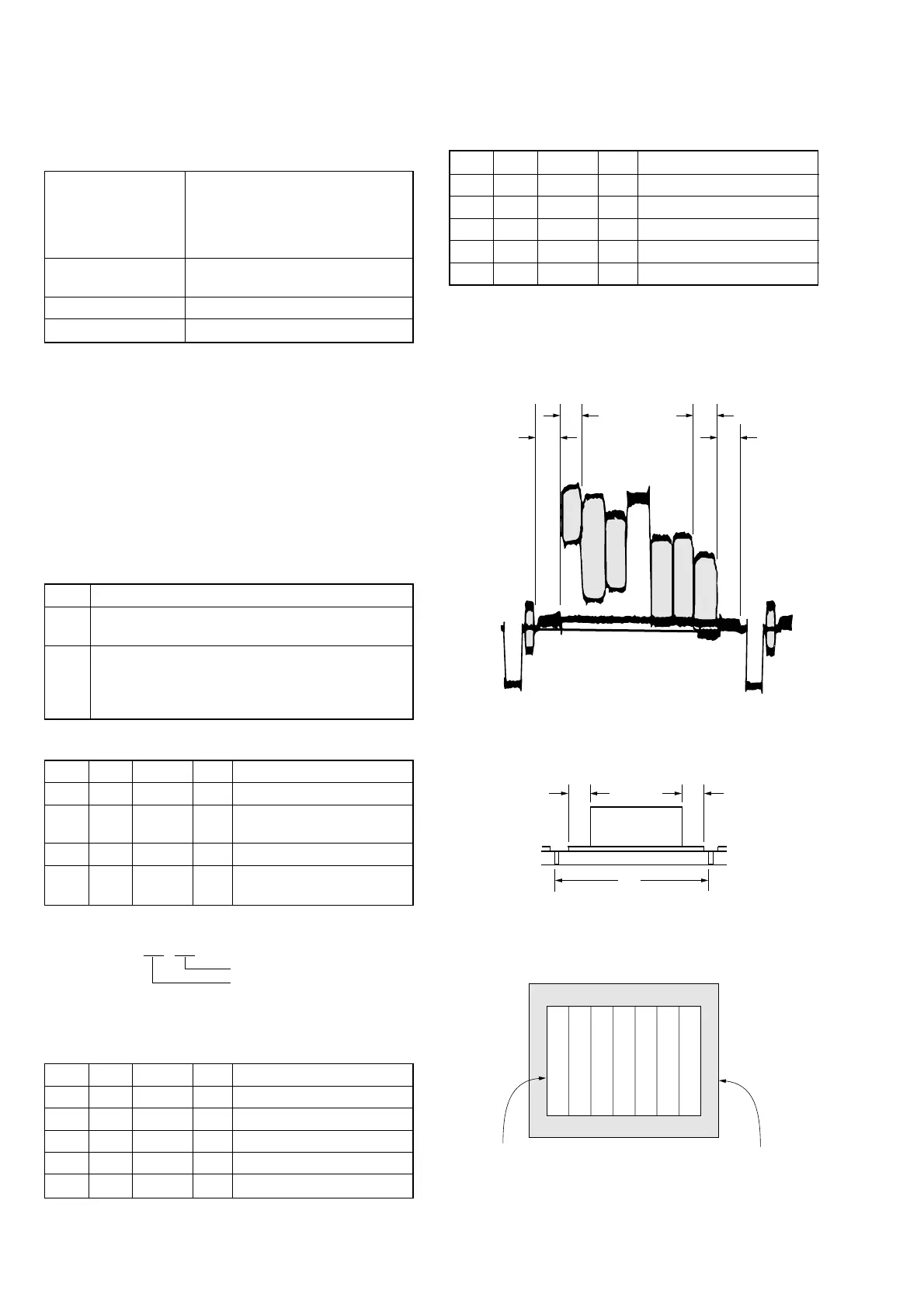
Check on the oscilloscope
1. Horizontal period
A=B
C=D
A
BC
D
Color bar chart picture frame
Monitor TV picture frame
Fig. 6-1-11
2. Vertical period
Fig. 6-1-12
Check on the monitor TV (Underscanned mode)
Fig. 6-1-13
How to release the picture frame setting:
Order Page Address Data Procedure
16 01 00 Press PAUSE button.
26 9000
36 9100
46 9200
56 9300






 To Next Page