6-54
DCR-HC39E/HC41/HC42/HC42E/HC43/HC43E
5. IC4701 Automatic Adjustment (VC-378 board)
Mode CAMERA-TAPE
Subject Arbitrary
Measuring Instrument Adjusting remote commander
Adjustment Page C
Adjustment Address 83 to 8A, 99, A1 to A3
Note 1: Perform “S VIDEO OUT Y level adjustment (1)/(2)” and
“S VIDEO OUT chroma level adjustment (1)/(2)” be-
fore this adjustment.
Note 2: Check that the data of page: 0, address: 10 is “00”.
Note 3: Connect the multi-cable and make a check with the panel
lighting.
Switch setting
LCD panel ........................................................................... OPEN
Adjusting method:
Order Page Address Data Procedure
10 0101
23 01 78 Press PAUSE button. (Note 4)
33
04 Check the data is “78”.
(Note 5)
43 01 00 Press PAUSE button.
50 0100
Note 4: The adjustment data will be automatically input to page:
C, address: 83 to 8A, 99, A1 to A3.
Note 5: If the data is other than “78”, adjustment has errors. Con-
tents of error is written into Page: 3, address: 03. See the
following Table.
Data of page:3,
Contents fo error
address: 03
72
S VIDEO OUT Y level adjustment (1)
error
74
IC4701 Panel Clamp level adjustment
error
75
IC4001 Panel Output Gain adjustment
error
76
IC4701 Panel Output Gain adjustment
error
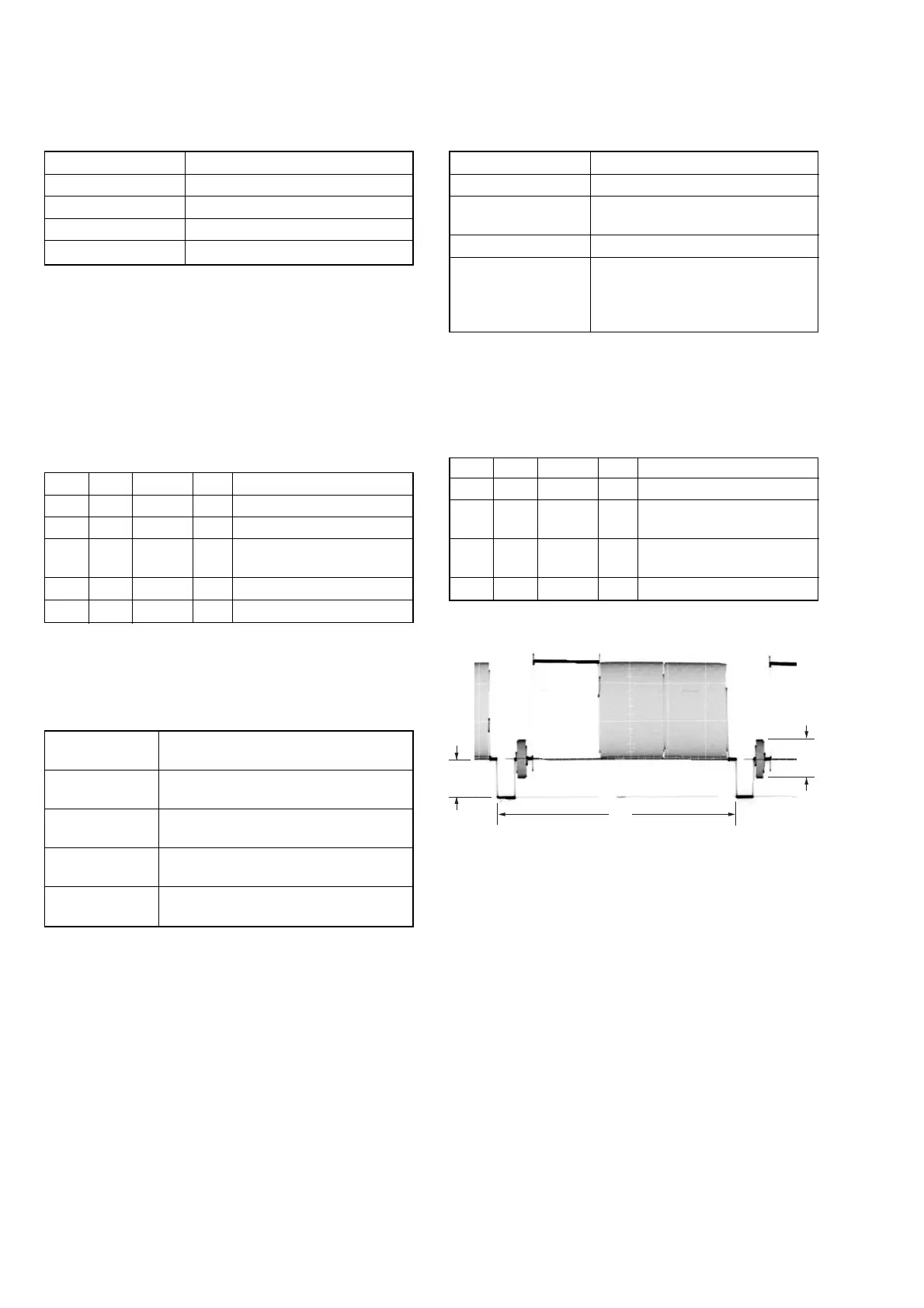
6. VIDEO OUT Level Check (VC-378 board)
Mode CAMERA-TAPE
Subject Arbitrary
Measurement Point Video terminal of A/V OUT jack or
A/V jack (75 Ω terminated)
Measuring Instrument Oscilloscope
Specified value Sync level: A = 286 ± 18 mVp-p (NTSC)
A = 300 ± 18 mVp-p (PAL)
Burst level:B = 286 ± 18 mVp-p (NTSC)
B = 300 ± 18 mVp-p (PAL)
Note: Check that the data of page: 0, address: 10 is “00”.
Switch setting
1) DEMO MODE (Menu setting) ........................................ OFF
Checking method:
Order Page Address Data Procedure
13 01 71 Press PAUSE button.
2
Check the sync signal level
(A) to the specified value.
3
Check the burst signal level
(B) to the specified value.
43 01 00 Press PAUSE button.
Fig. 6-3-8
H
B
A
05








 To Next Page