12
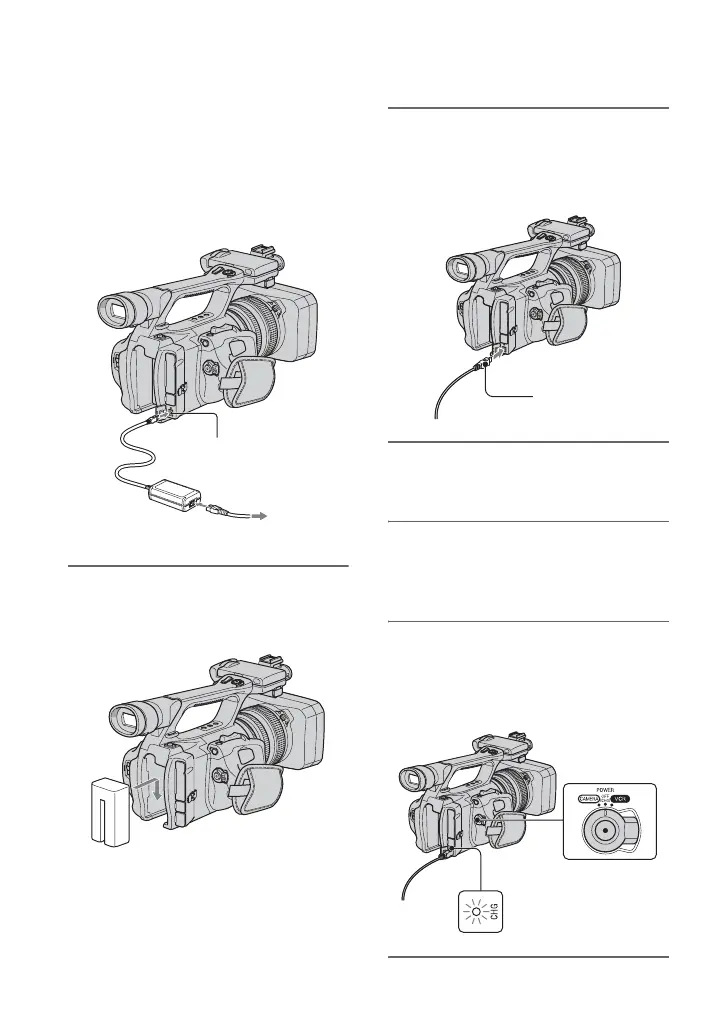
Step 3: Charging the battery pack
You can charge the “InfoLITHIUM”
battery pack (L series) with the
supplied AC Adaptor.
b Notes
• You cannot use batteries other than the
“InfoLITHIUM” battery pack (L series)
(p. 91).
1 Press the battery pack against the
back of your camcorder and slide
it down.
2 With the B mark on the DC plug
facing outwards, connect the DC
plug to the DC IN jack on your
camcorder.
3 Connect the power cord (mains
lead) to the AC Adaptor.
4 Connect the power cord (mains
lead) to the wall outlet (wall
socket).
5 Set the POWER switch to
OFF (CHG).
The CHG lamp lights up and charging
starts.
DC IN jack
DC plug
AC Adaptor
Power cord (mains lead)
To the wall outlet
(wall socket)
B mark















 To Next Page