47
Recording/Playback
Locating a scene on a tape
b Notes
• See page 105 for details on how to use the
Remote Commander.
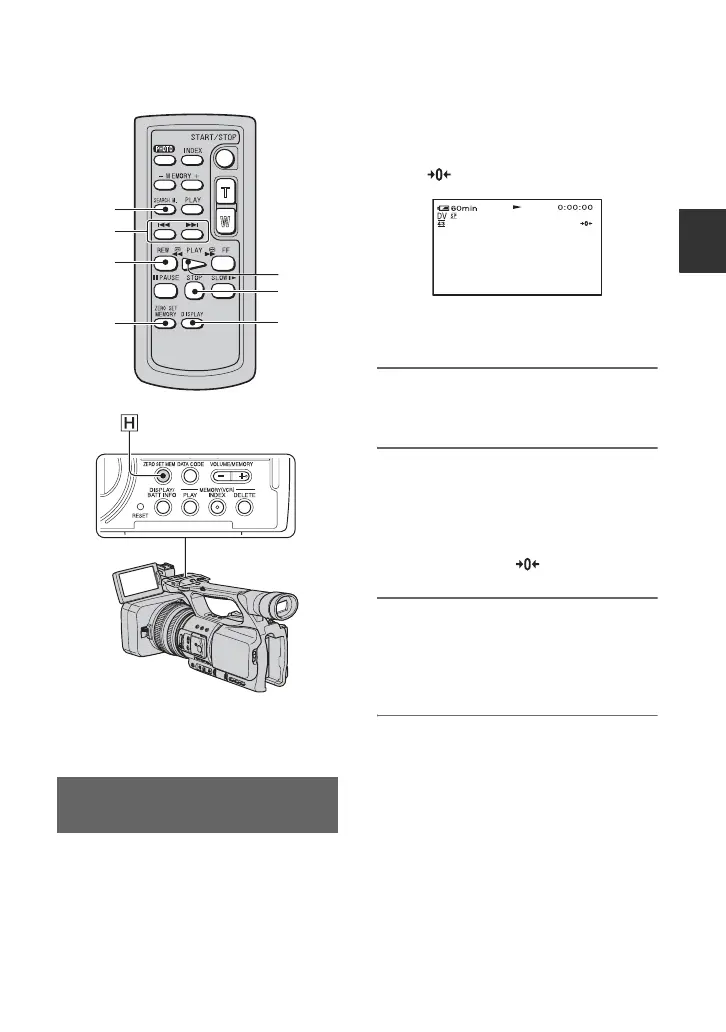
1 During playback, press the ZERO
SET MEM button H on your
camcorder or the ZERO SET
MEMORY button D on the
Remote Commander at the scene
where you want to create a cue
point.
The tape counter is reset to “0:00:00”
and
appears on the screen.
If the tape counter is not displayed,
press the DISPLAY button G.
2 Press the STOP button F when
you want to stop playback.
3 Press the mREW button C.
The tape stops automatically when the
tape counter reaches “0:00:00.”
The tape counter returns to the time
code display, and
disappears.
4 Press the PLAY button E.
Playback starts from the point
designated “0:00:00” on the tape
counter.
To cancel the operation
Press the ZERO SET MEM button H or
the ZERO SET MEMORY button D again
before rewinding.
b Notes
• There may be a discrepancy of several seconds
between the time code and the tape counter.
• Zero set memory will not function correctly if
there is a blank section between recorded
sections on the tape.
Searching quickly for a desired
scene (Zero set memory)
F
G
A
B
C
D
E
Continued ,















 To Next Page