73
Dubbing/Editing
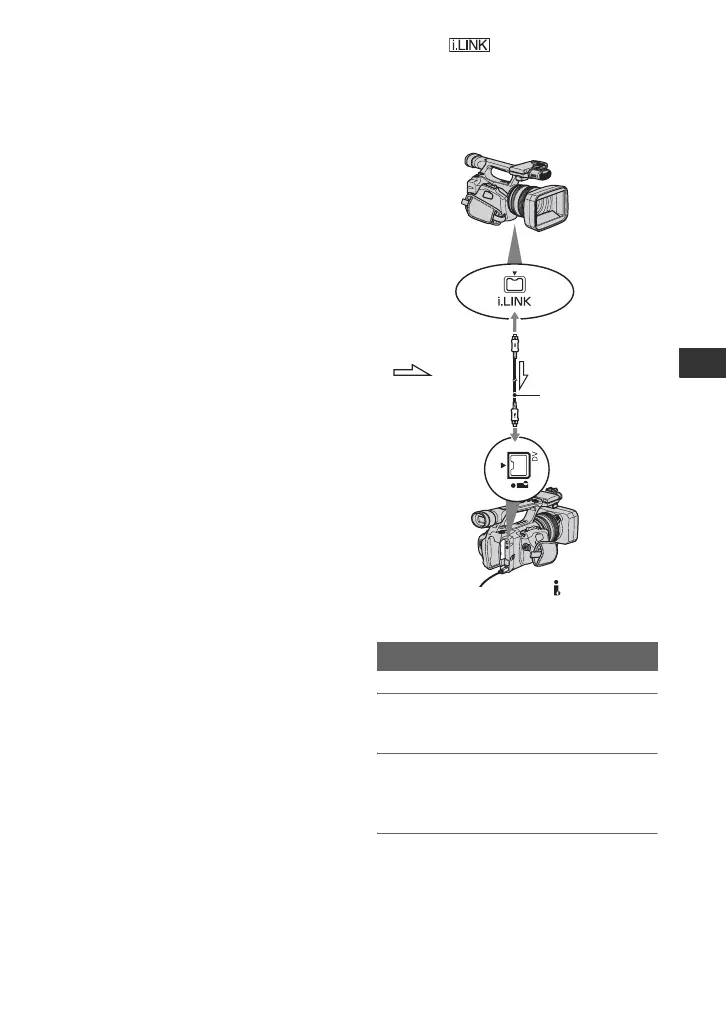
Recording pictures from a VCR
You can record pictures from a VCR on a
tape. You can record a scene as a still image
on a “Memory Stick Duo” media. Be sure
to insert a cassette or a “Memory Stick
Duo” media for recording in your
camcorder beforehand.
You can connect your camcorder to a VCR
device using an i.LINK cable.
Connect your camcorder to the wall outlet
(wall socket) using the supplied AC
Adaptor for this operation (
p. 12). Refer
also to the instruction manuals supplied
with the devices to be connected.
b Notes
• You need an i.LINK cable for this operation.
• You cannot perform this operation with the A/V
connecting cable.
• Your camcorder has a 4-pin i.LINK terminal.
Select a cable that fits the terminal on the device
to be attached.
1 Set the POWER switch to VCR.
2 Connect your VCR as a player to
your camcorder.
3 Insert a cassette into the VCR.
Recording movies
AV device with
i.LINK jack
To i.LINK
connector
i.LINK cable
(optional)
To DV interface
(i.LINK)
: Signal
flow
Continued ,















 To Next Page