37
Recording/Playback
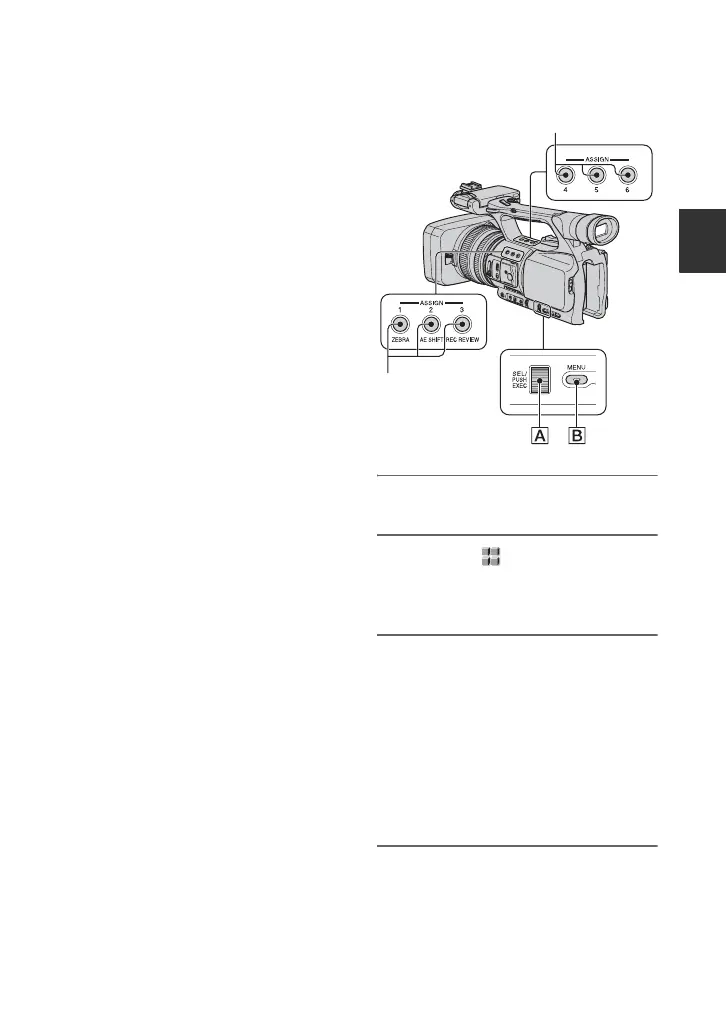
Assigning the functions to the ASSIGN buttons
Some functions need to be assigned to the
ASSIGN buttons for use. You can assign a
single function to any one of the ASSIGN 1
to 6 buttons.
Functions you can assign to the
ASSIGN buttons
The buttons in parentheses indicate that the
functions are assigned to the buttons by
default.
• EXP.FOCUS (p. 69)
• D.EXTENDER (p. 58)
• RING ROTATE (p. 55)
•AE SHIFT (p. 56) (ASSIGN 2 button)
• INDEX MARK (p. 38)
• STEADYSHOT (p. 57)
• BACK LIGHT (p. 57)
• SPOTLIGHT (p. 57)
• FADER (p. 58)
• SMTH SLW REC (p. 58)
• COLOR BAR (p. 61)
• REC REVIEW (p. 38) (ASSIGN 3 button)
• END SEARCH (p. 38)
•ZEBRA (p. 63) (ASSIGN 1 button)
• MARKER (p. 64)
• PEAKING (p. 63)
• Picture profile (p. 30)
• SHOT TRANSITION (p. 39)
1 Press the MENU button B.
2 Select the (OTHERS) t
[ASSIGN BTN] with the SEL/PUSH
EXEC dial A.
3 Select the ASSIGN button to
which you want to assign a
function from [ASSIGN1] to
[ASSIGN6] with the SEL/PUSH
EXEC dial A.
• [------] appears if no function is assigned to
the ASSIGN button.
• Select [YES] when you select [SHOT
TRANSITION], then do step 6.
4 Select the function that you want
to assign with the SEL/PUSH
EXEC dial A.
ASSIGN 4-6 buttons
ASSIGN 1-3
buttons
Continued ,















 To Next Page