42
Playback
You can play back movies as follows.
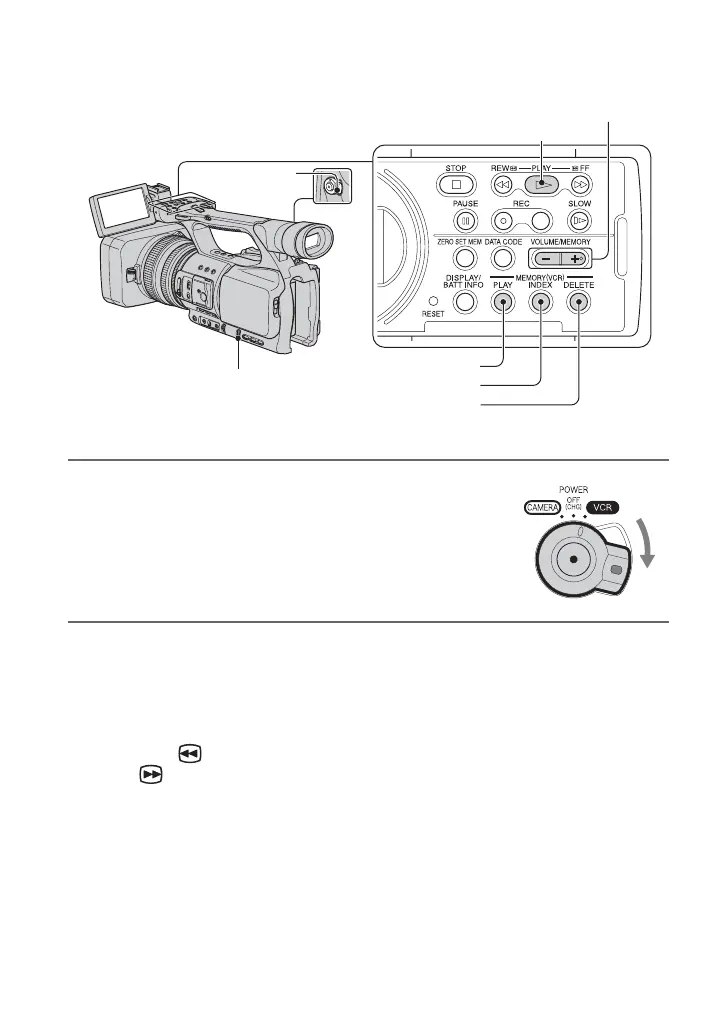
1 Slide the POWER switch to VCR while pressing the
green button.
2 Start playing back.
Press m (rewind) to go to the point you want to view, then press N (play) to start
playback.
• x : STOP
• X : PAUSE (Press N or X again to restart the playback)
• m : REW (Rewind, review)
• M : FF (Cue, fast forward)
• y : SLOW
b Notes
• Your camcorder automatically goes into a stopped state when it is in pause for more than 3 minutes.
PLAY button
MEMORY/PLAY button
SEL/PUSH EXEC dial
MEMORY/INDEX button
VOLUME/
MEMORY button
MEMORY/DELETE button
POWER
switch




 To Next Page