14
GB
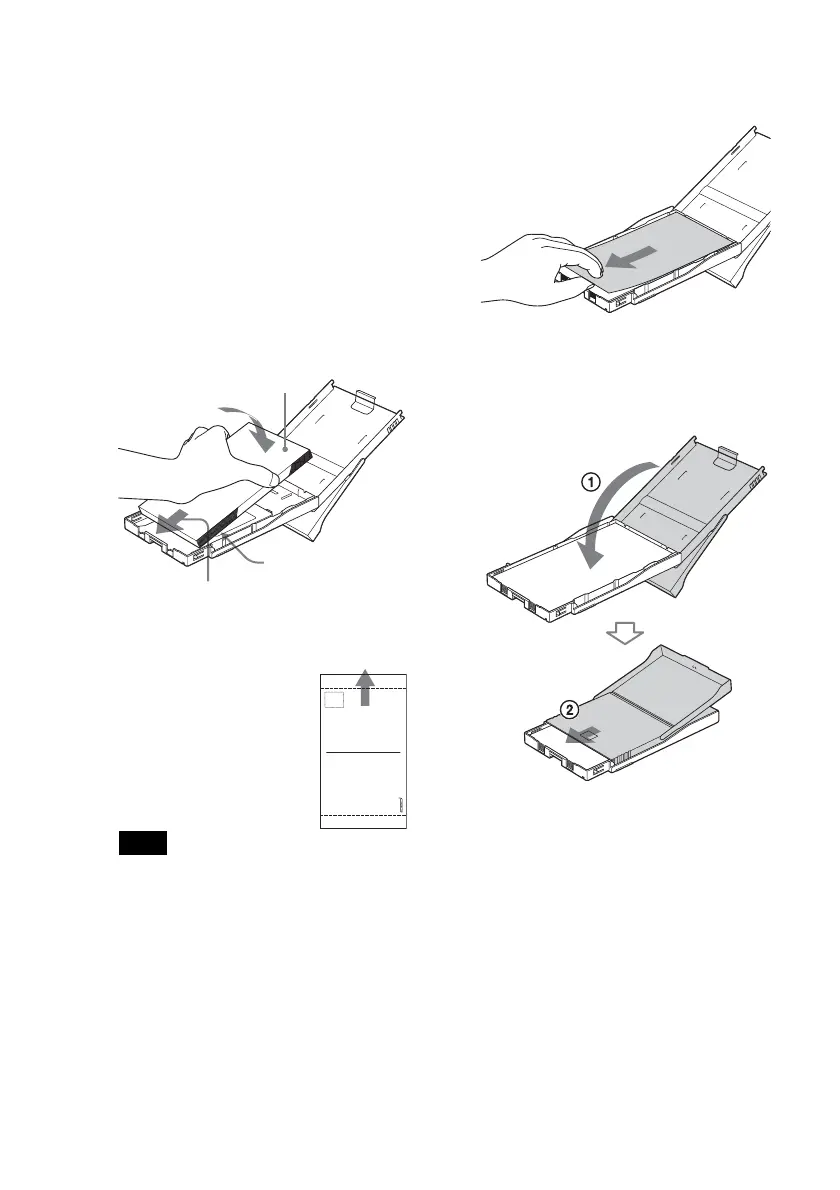
3 Set the print paper into the tray.
You can set up to 20 sheets of print
paper.
Riffle the print paper thoroughly.
Insert the print paper into the tray,
with the protective sheet at the top.
If there is no protective sheet: Riffle
the print paper thoroughly. Then
insert the print paper with its printing
surface (the side with no imprint)
facing up.
To set the print paper,
face the stamp marker
toward the paper
feeding direction.
Note
Do not touch the printing surface.
Fingerprints on the printing surface may
result in imperfect printing.
4 Remove the protective sheet.
5 Close the paper tray lid (1) and
slide it to the paper feeding
direction (2).
Keep the paper eject tray open.
Face stamp marker
toward the paper
feeding direction.
Printing surface
Paper feeding
direction



 To Next Page