44
GB
Changing the printer
preferences (Option)
The Option menu allows you to change
the preferences listed on page 45.
Buttons to be used in this section
g/G/f/F/ENTER
CANCEL
MENU
1
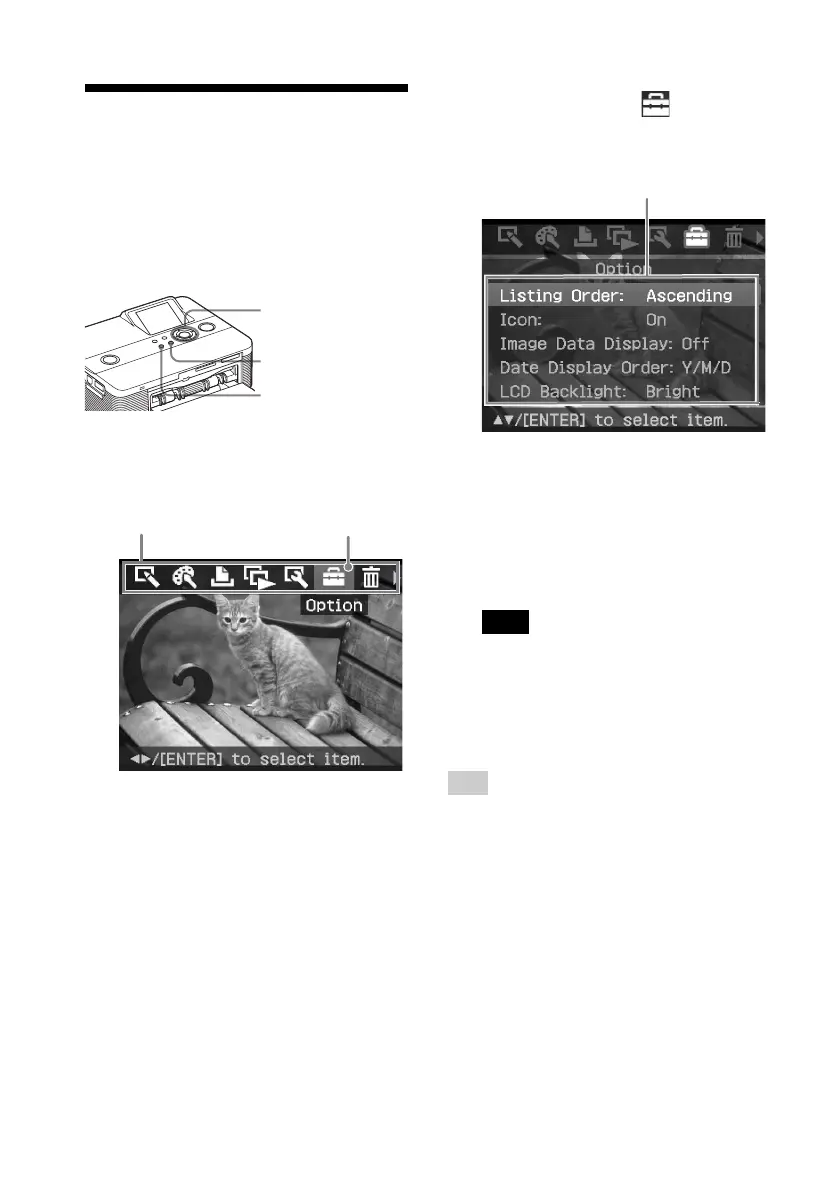
Press MENU.
The menu bar is displayed.
Menu bar Option menu icon
To exit the menu mode, press MENU.
The previous window is displayed.
2
Press g/G to select (Option)
and then press ENTER.
The Option menu is displayed.
Option menu
3
Press f/F to select the desired
setting item, and press ENTER.
The setting window for the selected
item is displayed (next page).
To display the hidden setting items,
scroll the window with f/F.
Note
Items which cannot be changed are
displayed in gray and cannot be selected.
4
Press f/F to select the desired
setting and press ENTER.
The setting is fixed.
Tip
To exit the Set Up menu, press MENU.



 To Next Page