26
GB
Making various printing
Editing an image
Displaying the Edit menu
You can display the Edit menu and edit or
add an effect to an image.
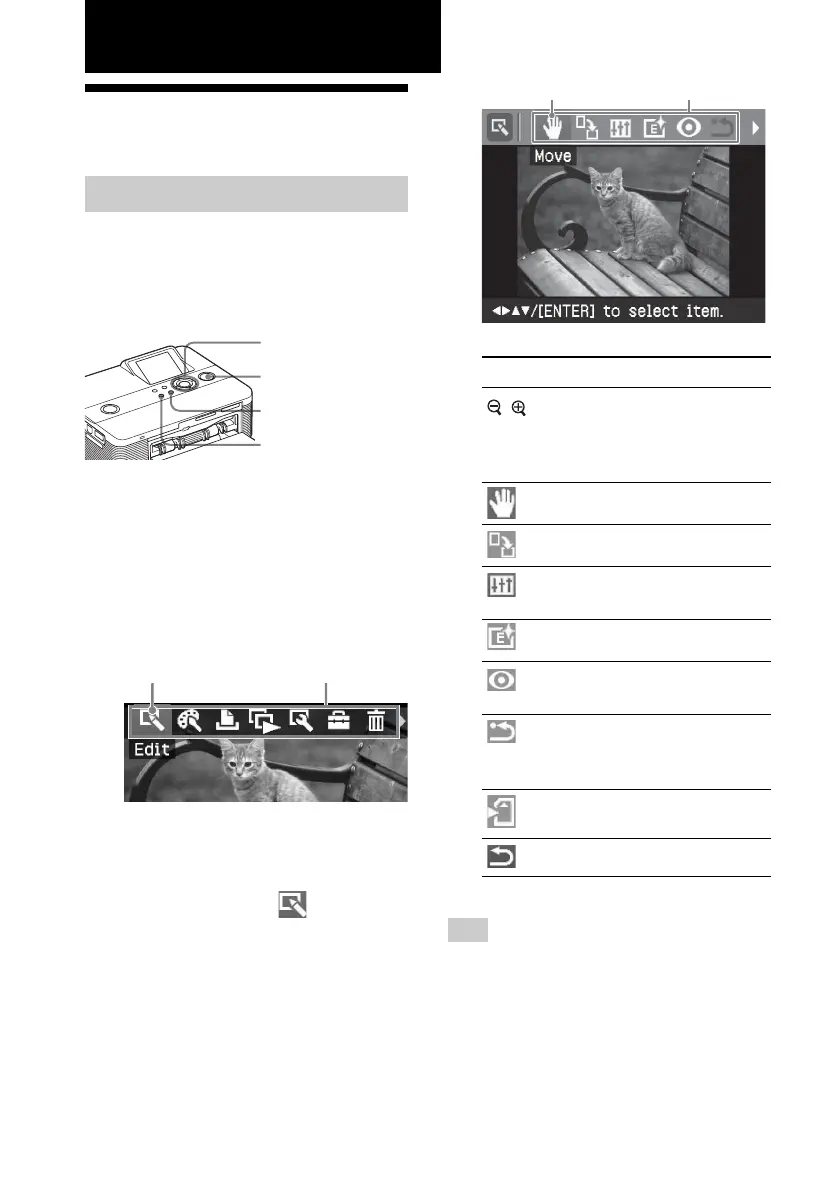
Buttons to be used in the Edit menu
g/G/f/F/ENTER
PRINT
CANCEL
MENU
1
Display the image that you want
to edit.
Display the image in the image
preview window or move the Cursor
to the desired image in the image list.
2
Press MENU on the printer.
The menu bar is displayed.
Edit menu icon Menu bar
To exit the menu mode
Press MENU again. The previous
window is displayed.
3
Press g/G to select (Edit) and
then press ENTER.
The Edit menu is displayed.
Cursor Edit menu
Items Procedures
/ Increases or reduces the
size of an image by
pressing the buttons on the
printer.
Moves an image.
Rotates an image.
Adjusts the picture quality
of an image.
Adds an filter to an image.
Reduces the red-eye
phenomenon.
Undoes the editing just
done and resets the image
to the status before editing.
Saves the edited image.
Exits the Edit menu.
Tip
You can press MENU while editing an image
and set part of the Set Up menu items.



 To Next Page