38
GB
3
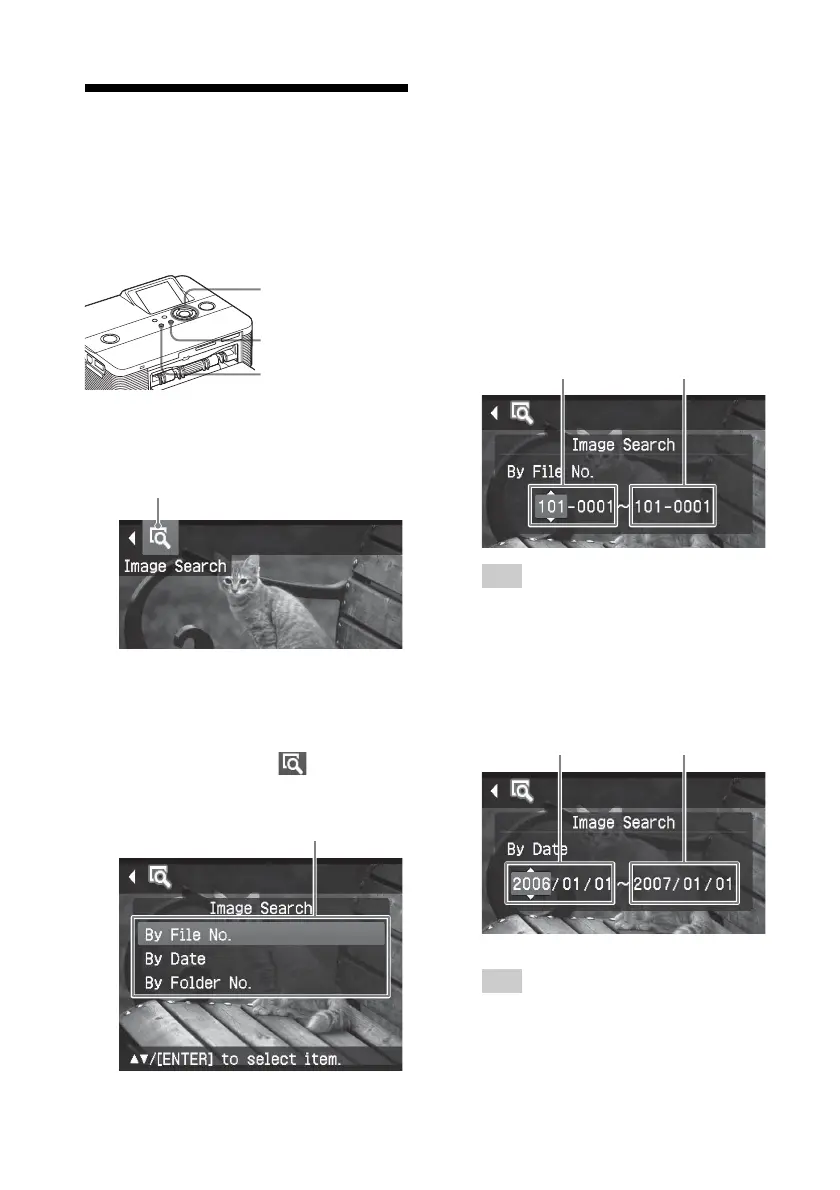
Press f/F to select the search key
and press ENTER.
The dialog box used for specifying
the criteria for searching is displayed.
4
Press g/G to select an item and
press f/F to specify numbers.
• When you select “By File No.”:
Specify the starting and ending
numbers of the files (folder and file
numbers) that you want to search for:
Starting image Ending image
number number
Tip
To search for a specific file, enter the same
file number in both the boxes.
• When you select “By Date”:
Specify the starting and ending
dates of the files that you want to
search for:
Starting date Ending date
Tip
To search for images of a specific day,
enter the same date in both the boxes.
Searching for an image
The Search menu allows you to search a
memory card or an external device for an
image by image number or date.
Buttons to be used in this section
g/G/f/F/ENTER
CANCEL
MENU
1
Press MENU.
The menu bar is displayed.
Image Search menu icon
To exit the menu mode
Press MENU. The previous window
is displayed.
2
Press g/G to select (Image
Search) and then press ENTER.
The Image Search menu is displayed.
Image Search menu



 To Next Page