33
GB
Making various printing
4
Press g/G/f/F to select the
desired image area and press
ENTER.
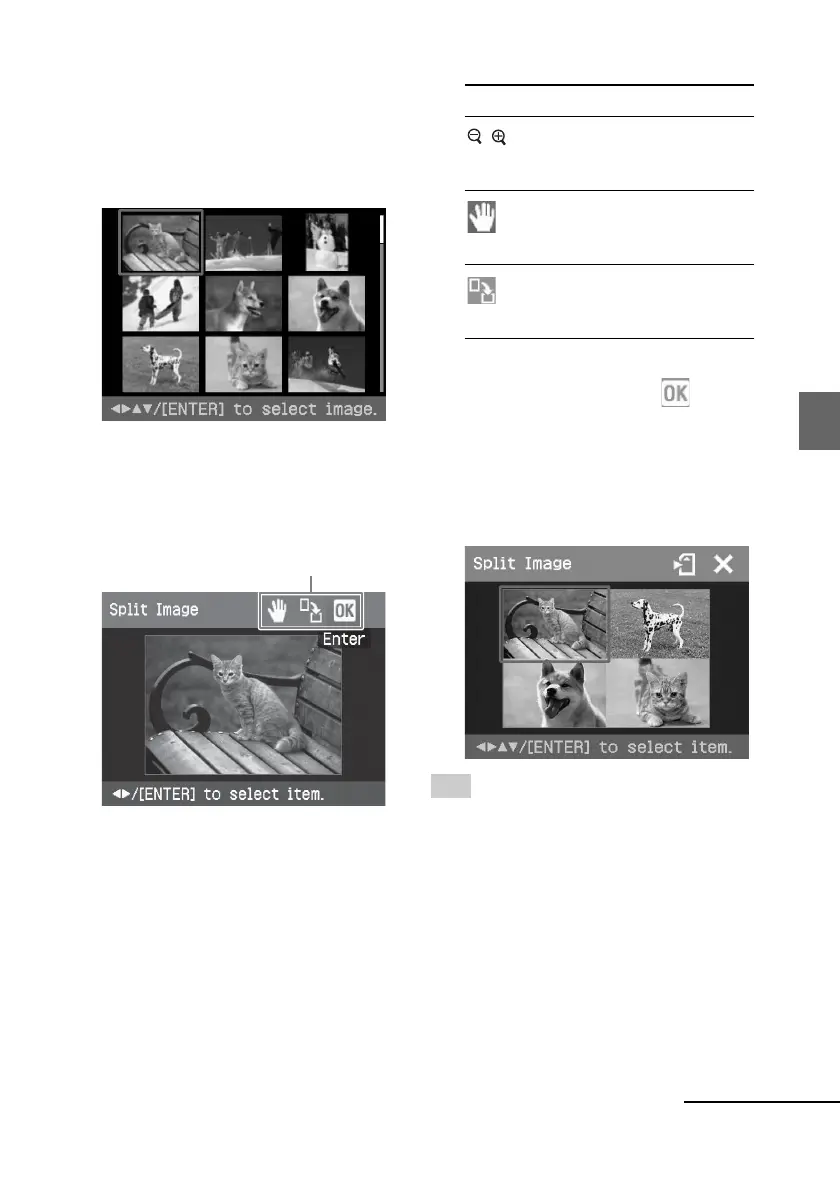
The window for selecting an image is
displayed.
5
Press g/G/f/F to select the
desired image, and then press
ENTER.
The window used for adjusting the
image position is displayed.
Adjustment tools
6
Adjust the size and position of the
selected image.
Press g/G to select the desired
adjustment item, then press ENTER.
Items Procedures
/ Increases or reduces the size of
an image by pressing the
buttons on the printer.
Move the adjustment frame
with g/G/f/F, and then
press ENTER.
Each time you press ENTER,
the image rotates 90°
clockwise.
7
Press g/G/f/F to select and
press ENTER.
The selected image is added to the
image area. When you select a
template with multiple images, repeat
the steps 3 through 7 to select an
image for each area.
Tip
To print the image previewed, press PRINT
(page 30).
Continued



 To Next Page