46
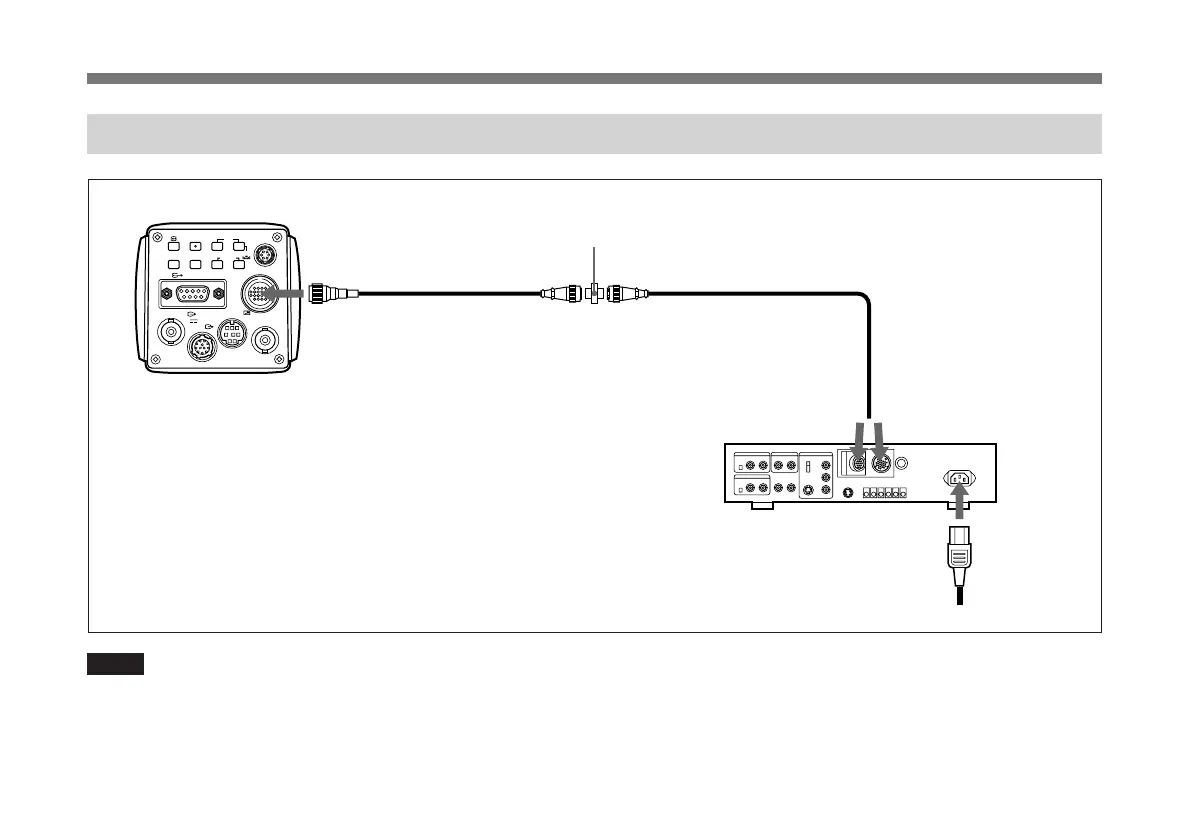
Connecting to a Camera Control Unit (For Non-Medical Use)
VIDEO OUT
EXT CTRL
DC IN/
REMOTE
CCU
LENS
MENU FUNCTION DATA
UP
WHITE
BARS
RGB/SYNC
VBS
SCAN
DOWN
FREEZE
SOURCE
DXC-9100P
CCU
CCZZ-1E cable extension adaptor (supplied with CCTZ-3RGB/3YC), or
CCQQ-1 (supplied with CCTQ-3RGB)
CCTZ-3RGB cable
or
CCTZ-3YC cable/CCTQ-3RGB cable
CAMERA
(14-pin or 26-pin)
CCZA cable (max. 300 m)
or
CCQ-AM cable (max. 100 m)
CCU-M5P camera
control unit
AC IN
Power cord
Basic System Connection
Notes
• Never connect the CCU-M5P camera control unit and the
CMA-D2CE/D2MDCE camera adaptor at the same time.
Doing so could damage equipment.
• Operation through menus of the DXC-9100P cannot be
performed when the unit is controlled from the remote
control unit.



 To Next Page