51
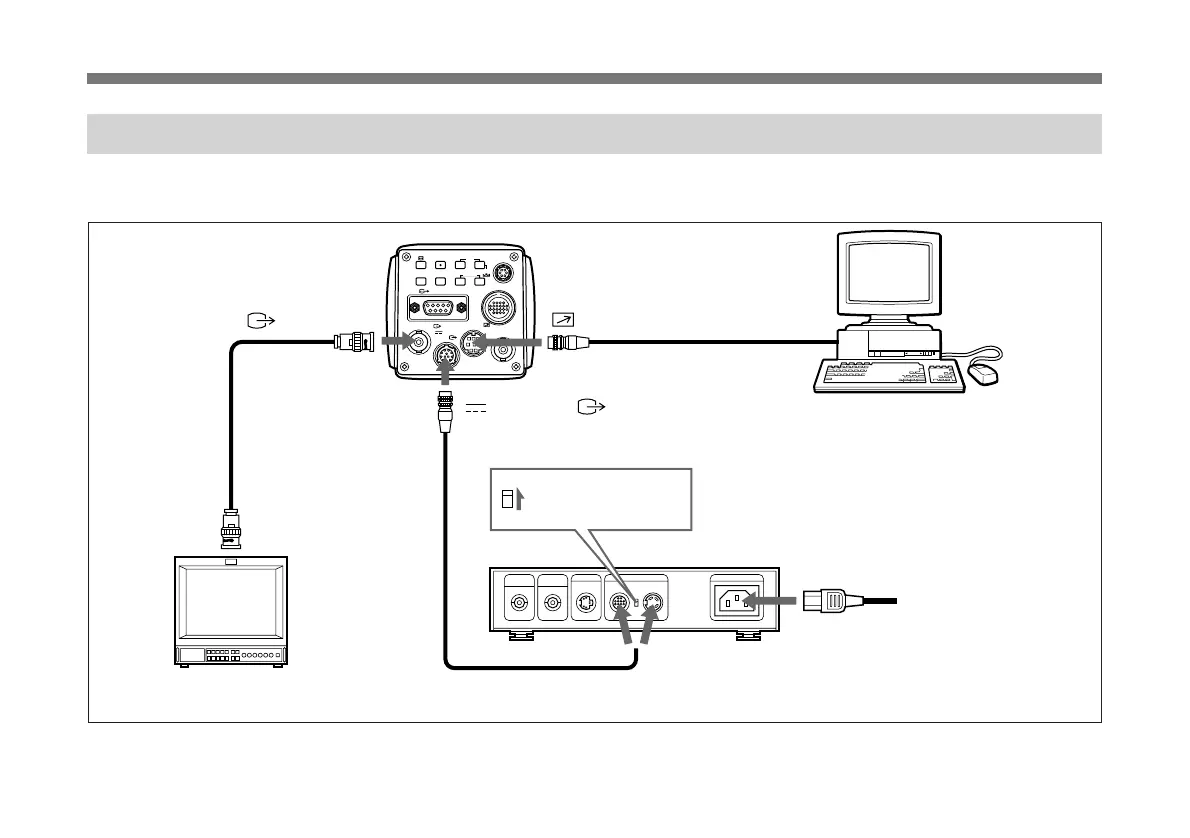
Connecting to a Computer
The figure below shows the system for controlling the unit
via the RS-232C interface.
a) Use the shielded connecting cable for connecting to a computer.
VIDEO OUT
EXT CTRL
DC IN/
REMOTE
CCU
LENS
MENU FUNCTION DATA
UP
WHITE
BARS
RGB/SYNC
VBS
SCAN
DOWN
FREEZE
SOURCE
1
2
VIDEO OUT
75Ω coaxial cable
Video monitor, VCR, etc.
Video input connector
DC IN/VBS
REMOTE
Connecting cable
a)
Serial interface
connector
CMA-D2CE/D2MDCE camera adaptor
CCDC-5/10/25/50A/100A cable or
CCMC-12P02/05/20/25 cable
Set the MODE
selector to the “1”
position.
AC IN
Power cord
CAMERA (4-pin or 12-pin)
For more details on RS-232C protocol and cables for connection
to a computer, contact your authorized Sony dealer.
Computer



 To Next Page