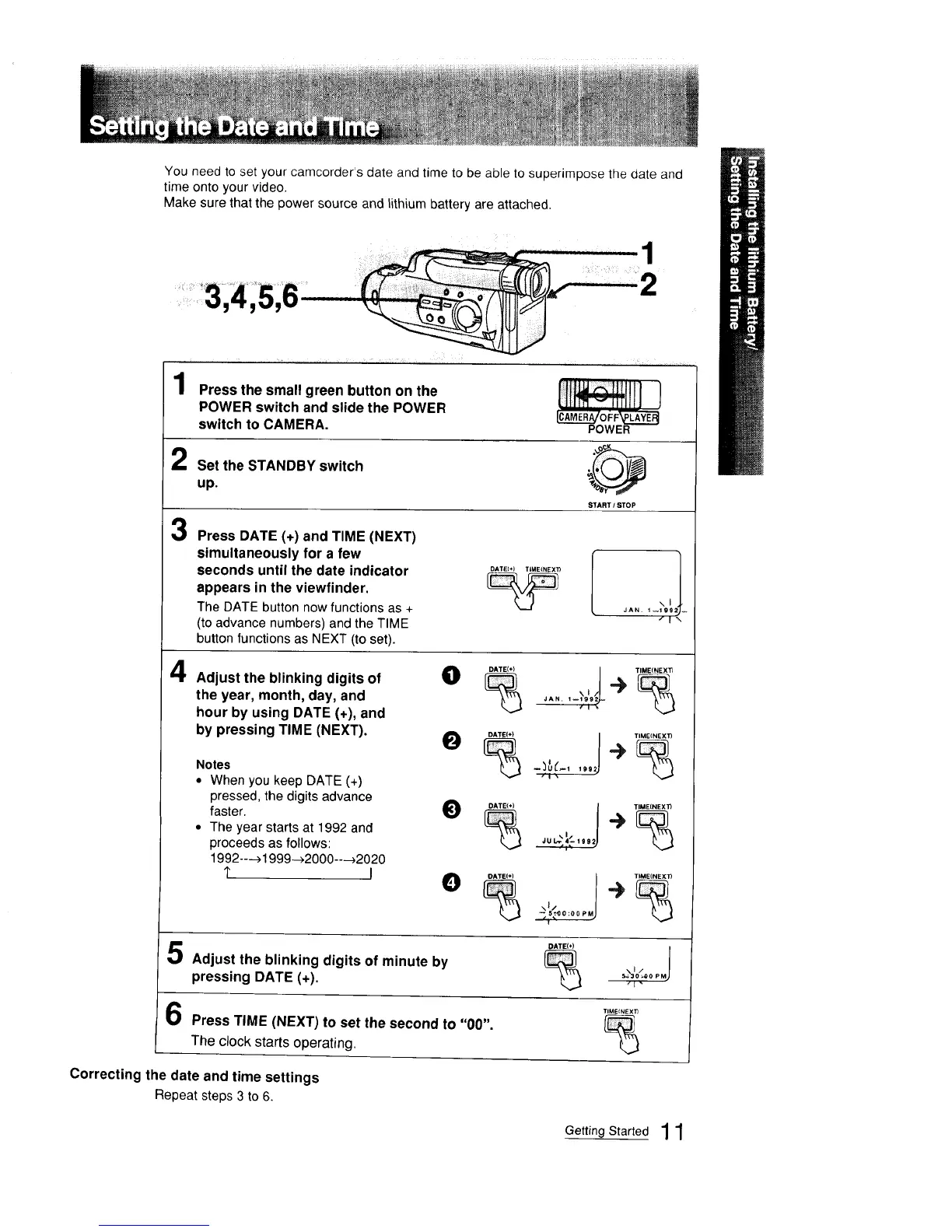
You need to set your camcorder's date and time to be able to superimpose the date and
time onto your video.
Make sure that the power source and lithium battery are attached.
I
2
1 Press,.esma,,greenha,tonon,.e Ill'Ill] }
POWER switch and slide the POWER
switch to CAMERA. ' "" "_'""'_LCAMER_/OI'F_'LAxi:_
POWER
Set the STANDBY switch
3
4
up.
STARTISTOP
Press DATE (+) and TIME (NEXT)
simultaneously for a few
seconds until the date indicator
appears in the viewfinder.
The DATE buttonnow functions as +
(to advance numbers) and the TIME
button functions as NEXT (to set).
Adjust the blinking digits of
the year, month, day, and
hour by using DATE (+), and
by pressing TIME (NEXT).
Notes
• When you keep DATE (+)
pressed, the digits advance
faster.
• The year starts at 1992 and
proceeds as follows:
1992----_1999-_2000---_2020
1" I
O DATE(+) / TIMEiNEXT)
,,i÷
¢
JAN. 1_1199 _
O
DATE(+)
TIME(NEXT)
Adjust the blinking digits of minute by
pressing DATE (+).
Press TIME (NEXT) to set the second to "00".
The clock starts operating.
DATE(+)
%
Correcting the date and time settings
Repeat steps 3 to 6.
TIME{NEXI_
%
Getting Started 11



 To Next Page