In the prewous chapter 'Basic Camera Operation", you learned the basic recording
operations. This section shows you how to record the date or time, record an age,
re-record a picture and more.
P
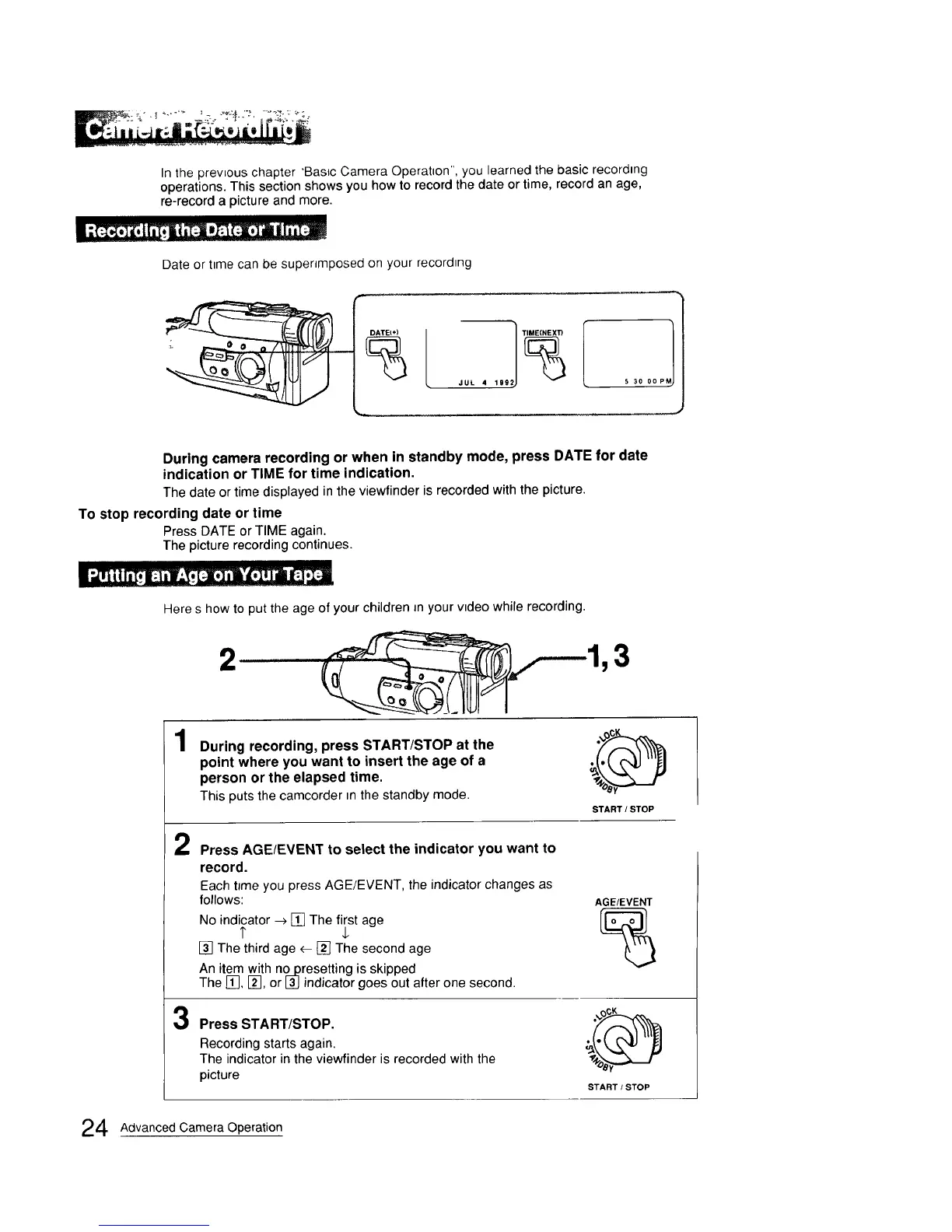
Date or time can be superimposed on your recording
DATE_÷)
5 30 0o PM)
During camera recording or when in standby mode, press DATE for date
indication or TIME for time indication.
The date or time displayed in the viewfinder is recorded with the picture.
To stop recording date or time
Press DATE or TIME again.
The picture recording continues.
Here s how to put the age of your children Jn your video while recording.
,, i
3
1
During recording, press START/STOP at the
point where you want to insert the age of a
person or the elapsed time.
This puts the camcorder in the standby mode.
START / STOP
2
Press AGE/EVENT to select the indicator you want to
record.
Each tJme you press AGE/EVENT, the indicator changes as
follows:
No indicator -->[] The first age
I" $
[] The third age <--[] The second age
An item with no presetting is skipped
The [], [], or [_] indicator goes out after one second.
AGE/EVENT
3
Press START/STOP.
Recording starts again.
The indicator in the viewfinder is recorded with the
picture
START / STOP
4 Advanced Camera Operation



 To Next Page