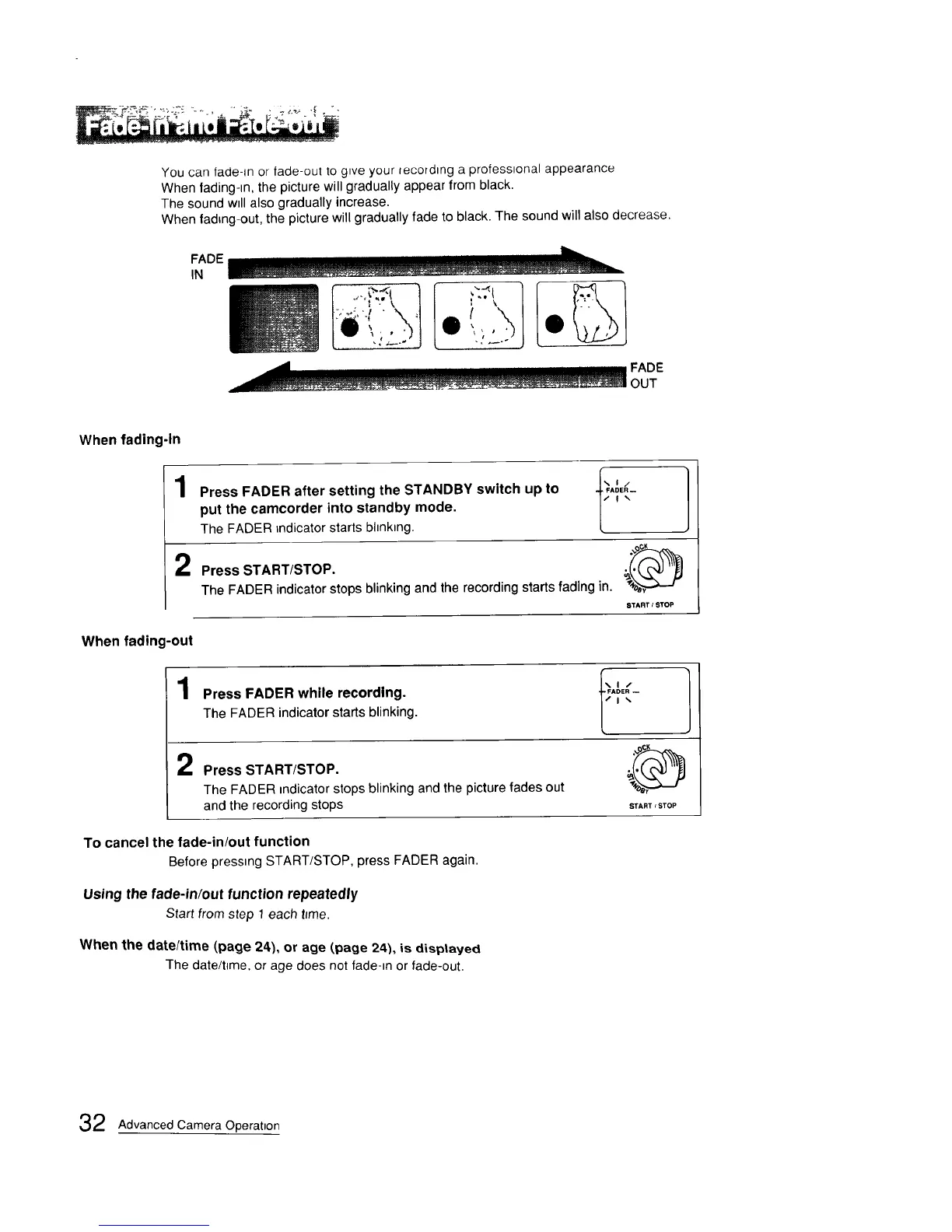
You can fade-m or fade-out to gwe your tecordtng a professtonal appearance
When fading-tn, the picture will gradually appear from black.
The sound wtll also gradually increase.
When fading-out, the picture will gradually fade to black. The sound will also decrease.
FADE
IN
FADE
OUT
When fading-in
1
Press FADER after setting the STANDBY switch up to _,_,_-
put the camcorder into standby mode.
The FADER indicator starts bhnktng.
Press START/STOP.
The FADER indicator stops blinking and the recording starts fading in.
STARTISTOP
When fading-out
1
Press FADER while recording.
TheFADERindicatorstartsblinking.
Press START/STOP.
The FADER mdicator stops blinking and the picture fades out
and the recording stops
To cancel the fade-in/out function
Before pressing START/STOP, press FADER again
Using the fade-in/out function repeatedly
Start from step 1 each t_me.
When the date/time (page 24), or age (,page 24), is disptayed
The date/t_me, or age does not fade-=n or fade-out.
START s STOP
2 Advanced Camera Operation








 To Next Page