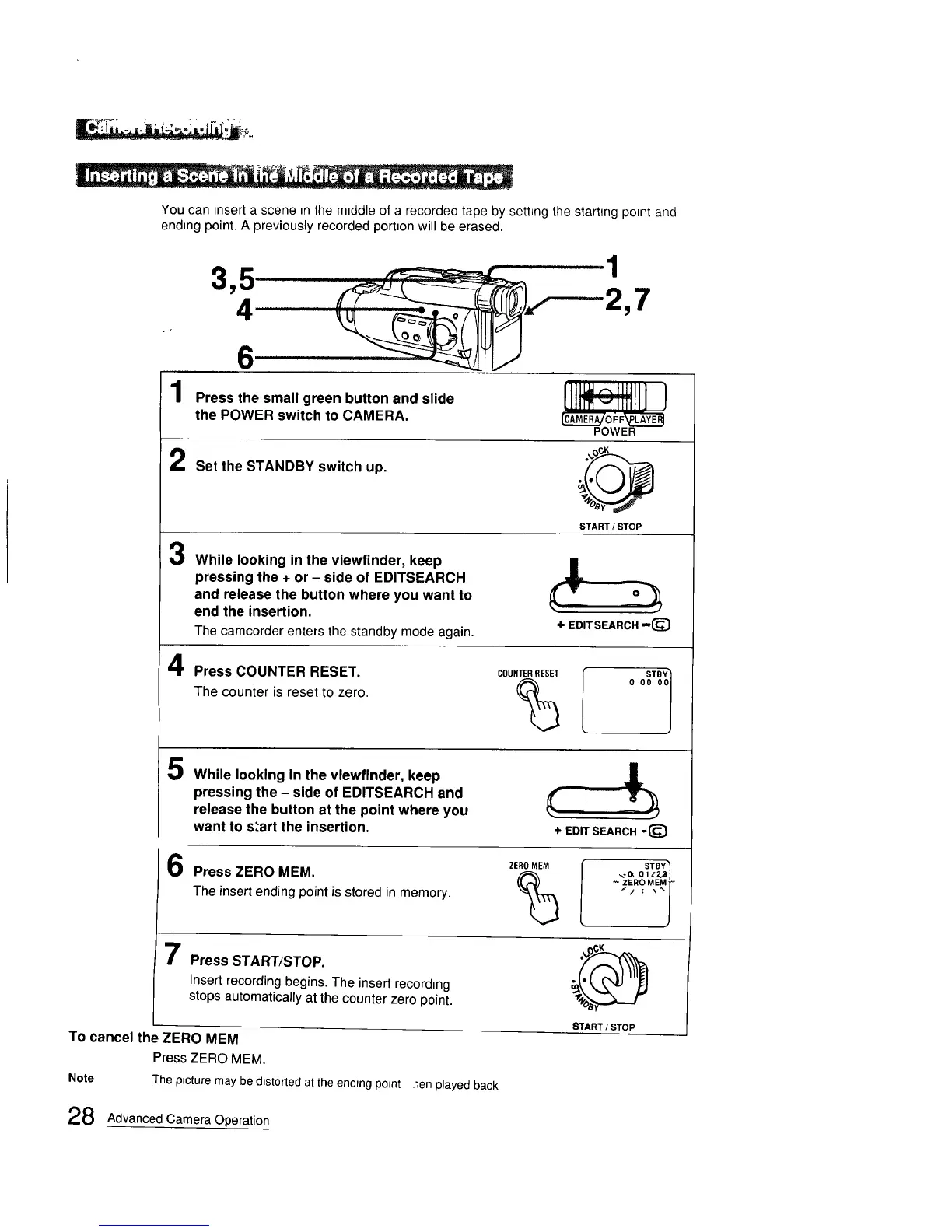
You can _nserta scene m the m_ddleof a recorded tape by settLngthe starting point and
ending point. A previously recorded portion will be erased.
1
2
3
4
2,7
6
Press the small green button and slide
the POWER switch to CAMERA.
Set the STANDBY switch up.
[]t 111 ]
CAML_.._ o I_F LA'_..._Y._
POWER
START/STOP
While looking in the viewfinder, keep
pressing the + or - side of EDITSEARCH
and release the button where you want to
end the insertion.
The camcorder enters the standby mode again.
+ EDITSEARCH --(_
Press COUNTER RESET.
The counter is reset to zero.
COUNTERRESET
%
5
While looking in the vlewfinder, keep
pressing the - side of EDITSEARCH and
release the button at the point where you
want to s,'art the insertion.
+ EDIT SEARCH -(_
Press ZERO MEM.
The insert ending point is stored in memory.
ZEROMEM
%
STBY'_
_,- lY. 0 lt2_3J
ZERO MEMt-
Press START/STOP.
Insert recording begins. The insert recording
stops automatically at the counter zero point.
To cancel the ZERO MEM
Press ZERO MEM.
Note The p_cture may be d=storted at the ending po=nt ,len played back
D
8TART / STOP
28 Advanced Camera Operation





 To Next Page