6
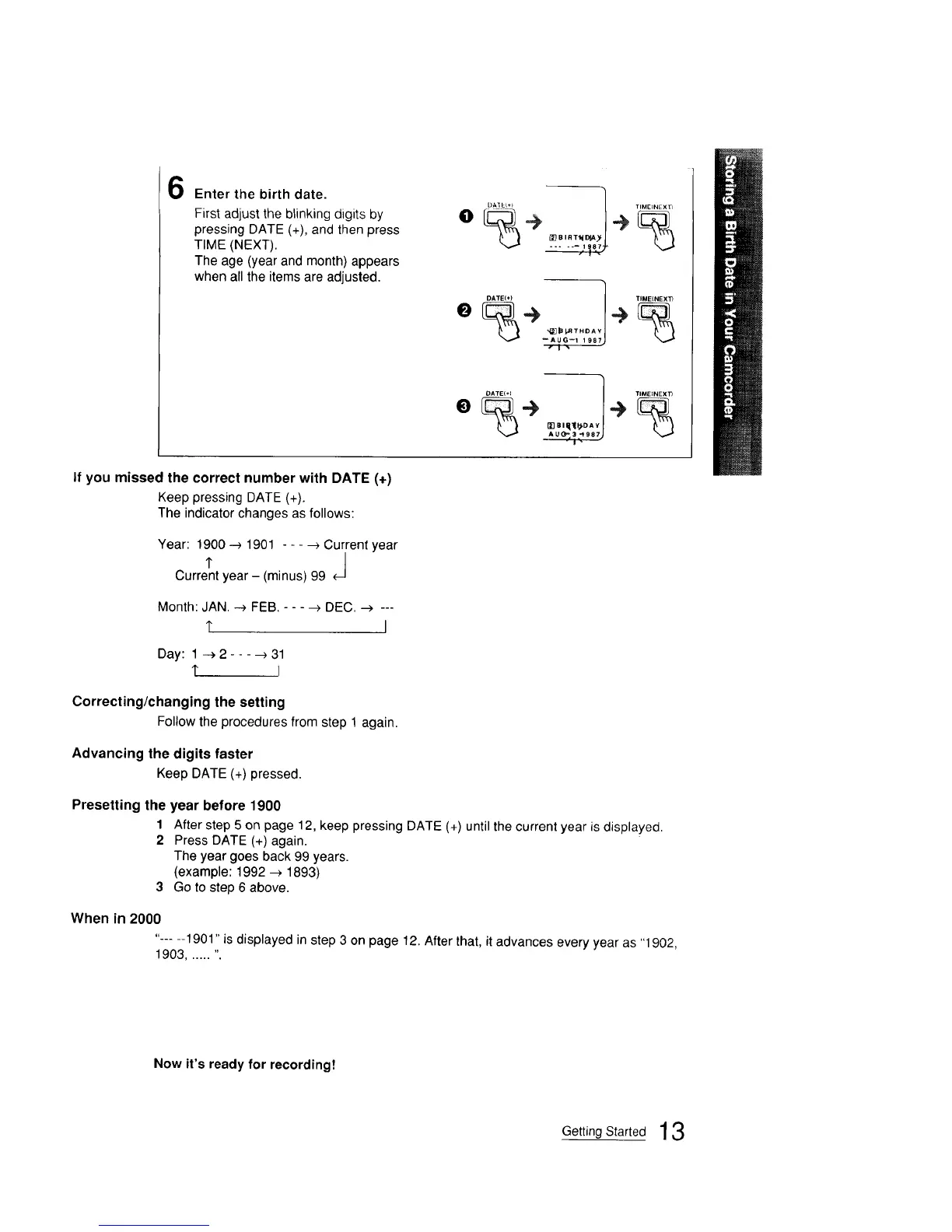
Enter the birth date.
First adjust the blinking digits by
pressing DATE (+), and then press
TIME (NEXT).
The age (year and month) appears
when all the items are adjusted.
0%÷ ÷_BIRT_D_
e%_> _>
--AVG--I., % 1987)
O
_ei_IpoA
if you missed the correct number with DATE (+)
Keep pressing DATE (+).
The indicator changes as follows:
Year: 1900 --> 1901 - - - -->Current year
, J
Current year - (minus) 99
Month: JAN. _ FEB. - - - _ DEC. _ ---
1" I
Day: 1 -->2----)31
t I
Correcting/changing the setting
Followthe procedures fromstep 1 again.
Advancing the digits faster
Keep DATE (+) pressed.
Presetting the year before 1900
1 After step 5 on page 12, keep pressing DATE (+) until the current year is displayed.
2 Press DATE (+) again.
The year goes back 99 years.
(example: 1992 --> 1893)
3 Go to step 6 above.
When in 2000
"-.... 1901" is displayed in step 3 on page 12. After that, it advances every year as "1902,
1903 ...... ".
Now it's ready for recording!
Getting Started 13







 To Next Page