You can create a professional-looking home video using these sepcial effects; zoom,
close-up, fade-in and fade-out.
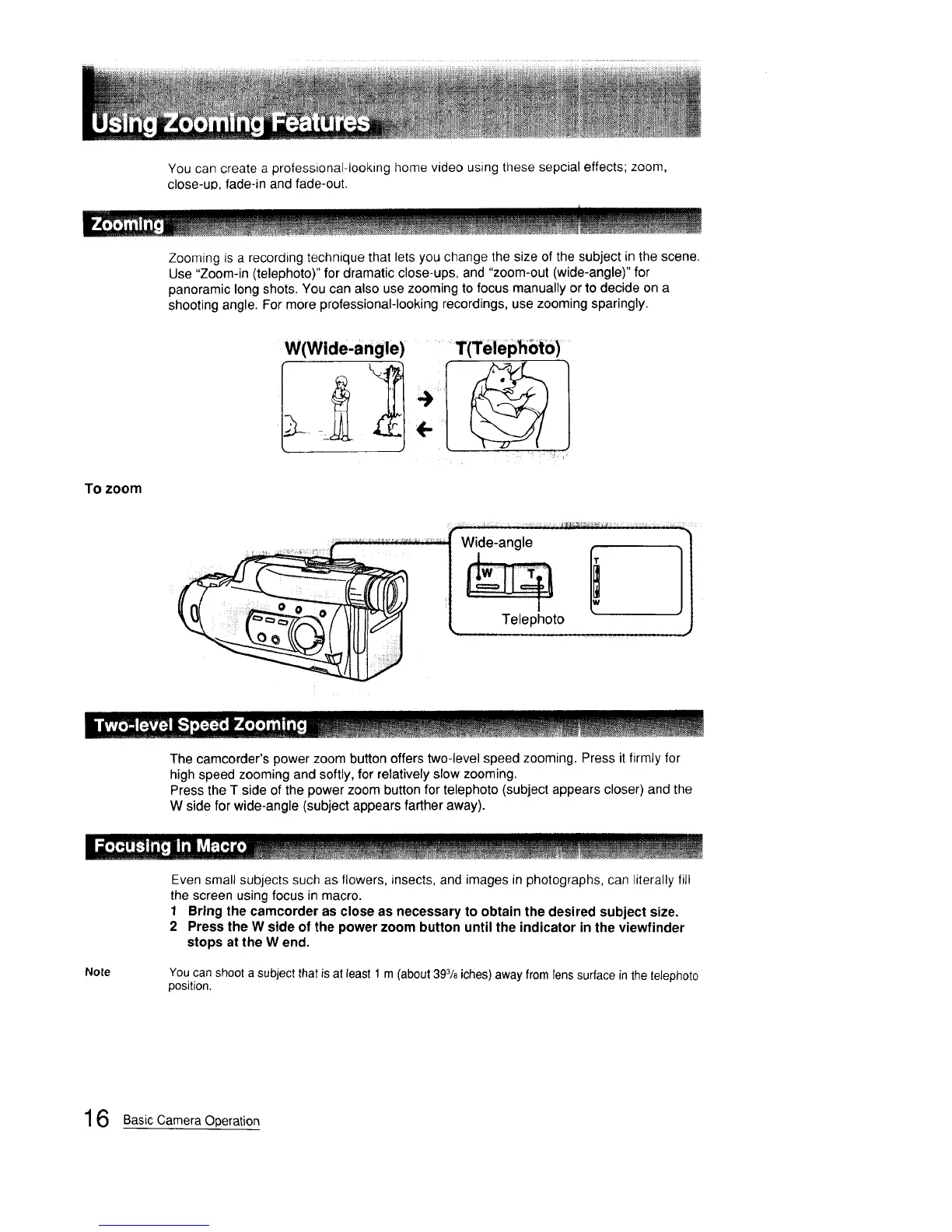
Zooming is a recording technique that lets you change the size of the subject in the scene.
Use "Zoom-in (telephoto)" for dramatic close-ups, and "zoom-out (wide-angle)" for
panoramic long shots. You can also use zooming to focus manually or to decide on a
shooting angle. For more professional-looking recordings, use zooming sparingly.
To zoom
W(Widelangle) T(Teiephoto) .....
Wide-angle , q
11
ph°t°
The camcorder's power zoom button offers two-level speed zooming. Press it firmly for
high speed zooming and softly, for relatively slow zooming.
Press the T side of the power zoom button for telephoto (subject appears closer) and the
W side for wide-angle (subject appears farther away).
__ m___I ..................... !.lJ!.l!!It!l.l.!ll.lll.tl.!!l.Ul.[l.l.l
Even small subjects such as flowers, insects, and images in photographs, can literally fill
the screen using focus in macro.
1 Bring the camcorder as close as necessary to obtain the desired subject size.
2 Press the W side of the power zoom button until the indicator in the viewfinder
stops at the W end.
Note
You can shoot a subject that is at least 1 m (about 393/8iches)away from lens surface in the telephoto
position.
16 Basic Camera Operation



 To Next Page