Note
You cannot add the age later during playing back or editing.
To stop recording the age
Press AGE/EVENT until the indicator goes out.
To change the display while recording
Press AGE/EVENT until the indicator you want to record is displayed. Recording of the
indicator you select starts when [_, _-_,or [] goes out.
To cancel the stored birth date
1 Perform steps 1 to 4 _n"Storing a Birth Date in Your Camcorder" on page 12, to select
the memory number to be canceled.
2 Press TIME (NEXT) twice. The month indicator blinks.
3 Press DATE (+) until "-.... "appears.
4 Press TIME (NEXT).
The birth date is deleted from the memory and is not displayed when you press AGE/
EVENT.
About memory back-up
The camcorder usesthe lithiumbattery on the bottomto keep the birthdate in memory.
The lithiumbattery life isapproximately 1 year
When you connect the camcorder to a TV during recording
Ifyou do not use the data-screen function by the Remote Commander, the age indicatior
will appear on the TV screen when the [_, [], or [] indicatorgoes out inthe viewfinder
and recording starts.
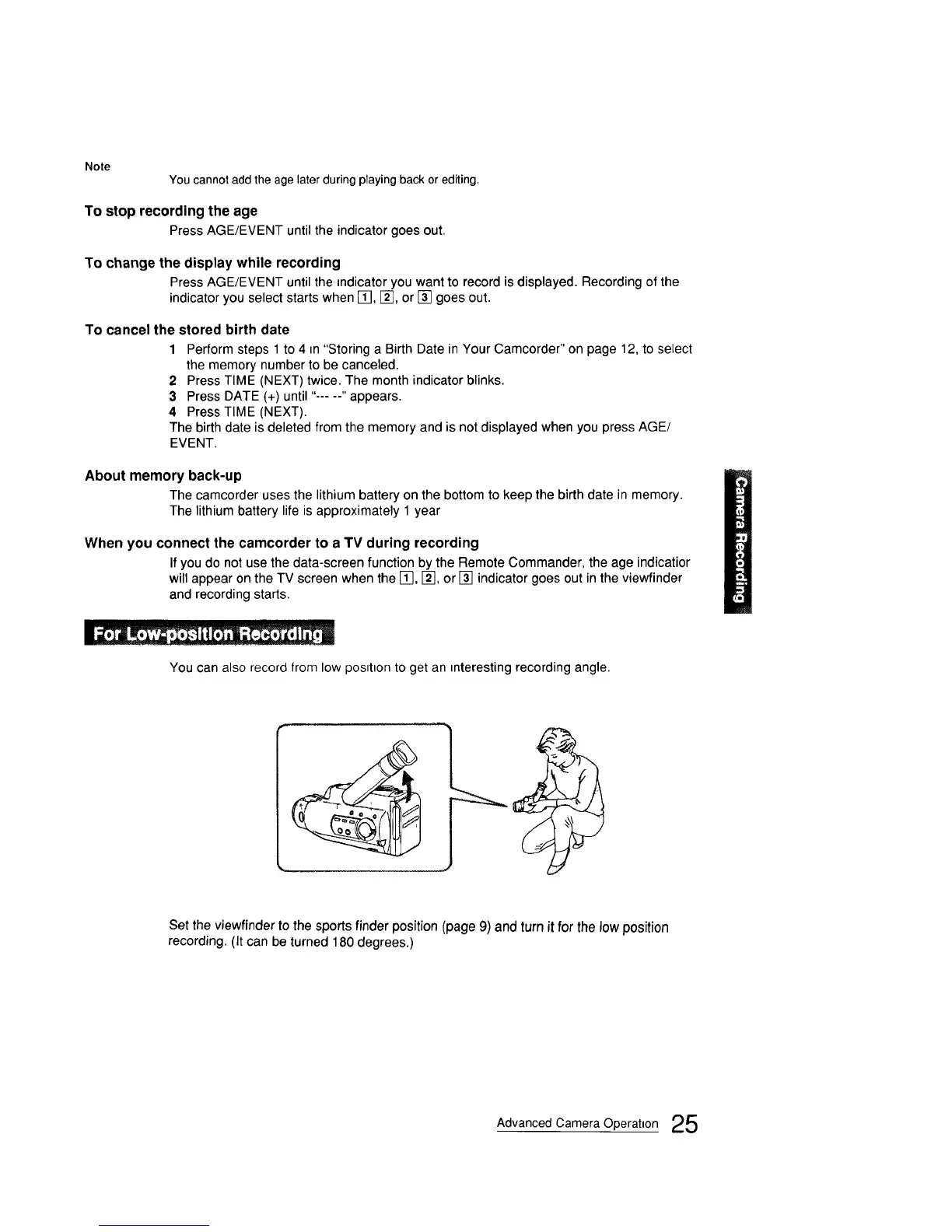
You can also record from low pos=t=onto get an interesting recording angle.
Set the viewfinderto the sports finder position (page 9) and turn it for the low position
recording. (It can be turned 180 degrees.)
Advanced Camera Operation 25



 To Next Page