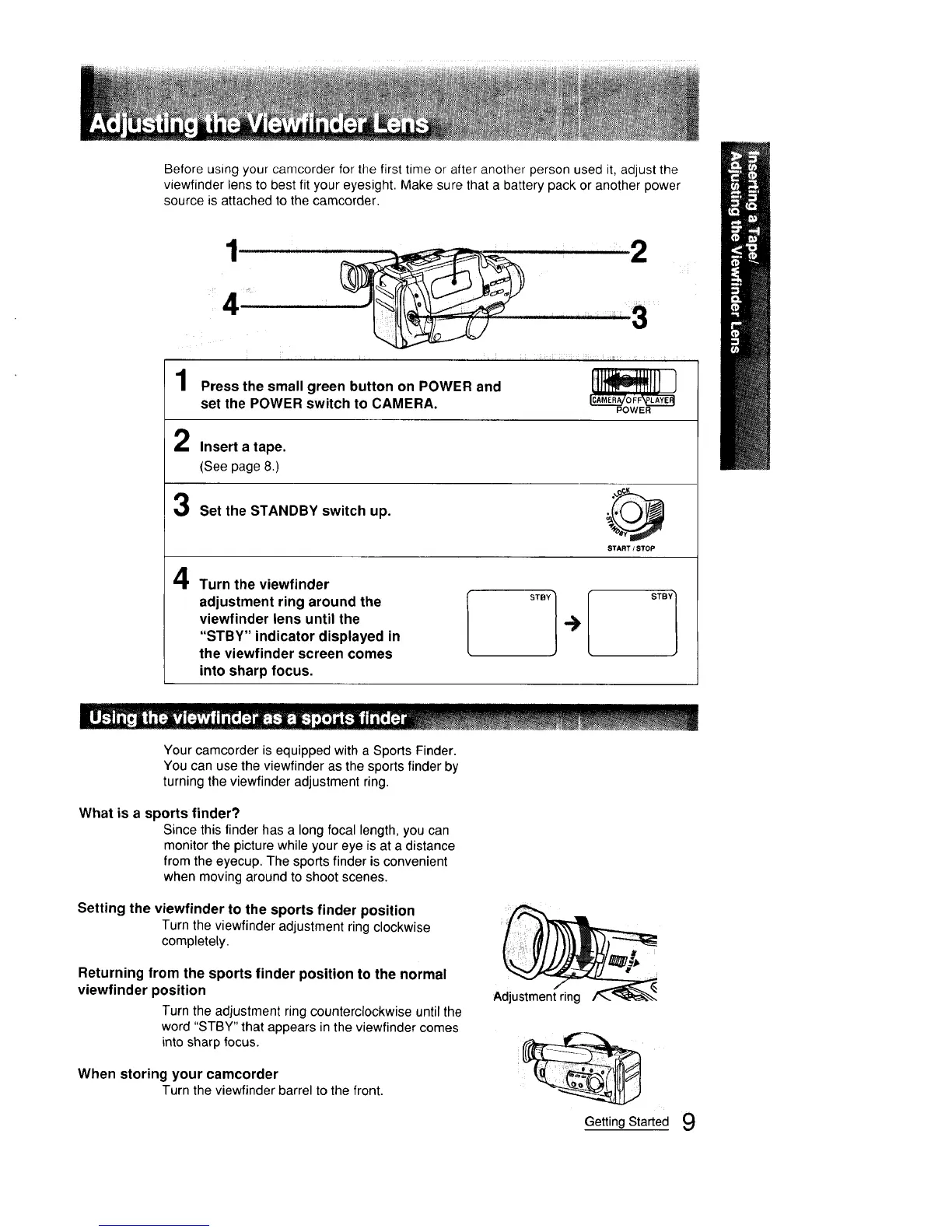
Before using your camcorder for the first time or after another person used it, adjust the
viewfinder lens to best fit your eyesight. Make sure that a battery pack or another power
source is attached to the camcorder.
1 Press the small green button on POWER and It1 111]
set the POWER switch tO CAMERA. _v_
2
2
Insert a tape.
(See page 8.)
Set the STANDBY switch up. _
START / STOP
4
Turn the viewfinder
adjustment ring around the
viewfinder lens until the
"STBY" indicator displayed in
the viewfinder screen comes
into sharp focus.
STBY 1
Your camcorder is equipped with a Sports Finder.
You can use the viewfinder as the sports finder by
turning the viewfinder adjustment ring.
What is a sports finder?
Since this finder has a long focal length, you can
monitor the picture while your eye is at a distance
from the eyecup. The sports finder is convenient
when moving around to shoot scenes.
Setting the viewfinder to the sports finder position
Turn the viewfinderadjustment ringclockwise
completely.
Returning from the sports finder position to the normal
viewfinder position
Turn the adjustment ring counterclockwise until the
word "STBY" that appears in the viewfinder comes
into sharp focus.
When storing your camcorder
Turn the viewfinder barrel to the front.
Adjustment ring
Getting Started 9



 To Next Page