In the earher section (page 17) we explatned the bastc connection to your TV w_th the RFU
adaptor. In this section we discuss several other ways of connecting to your TV.
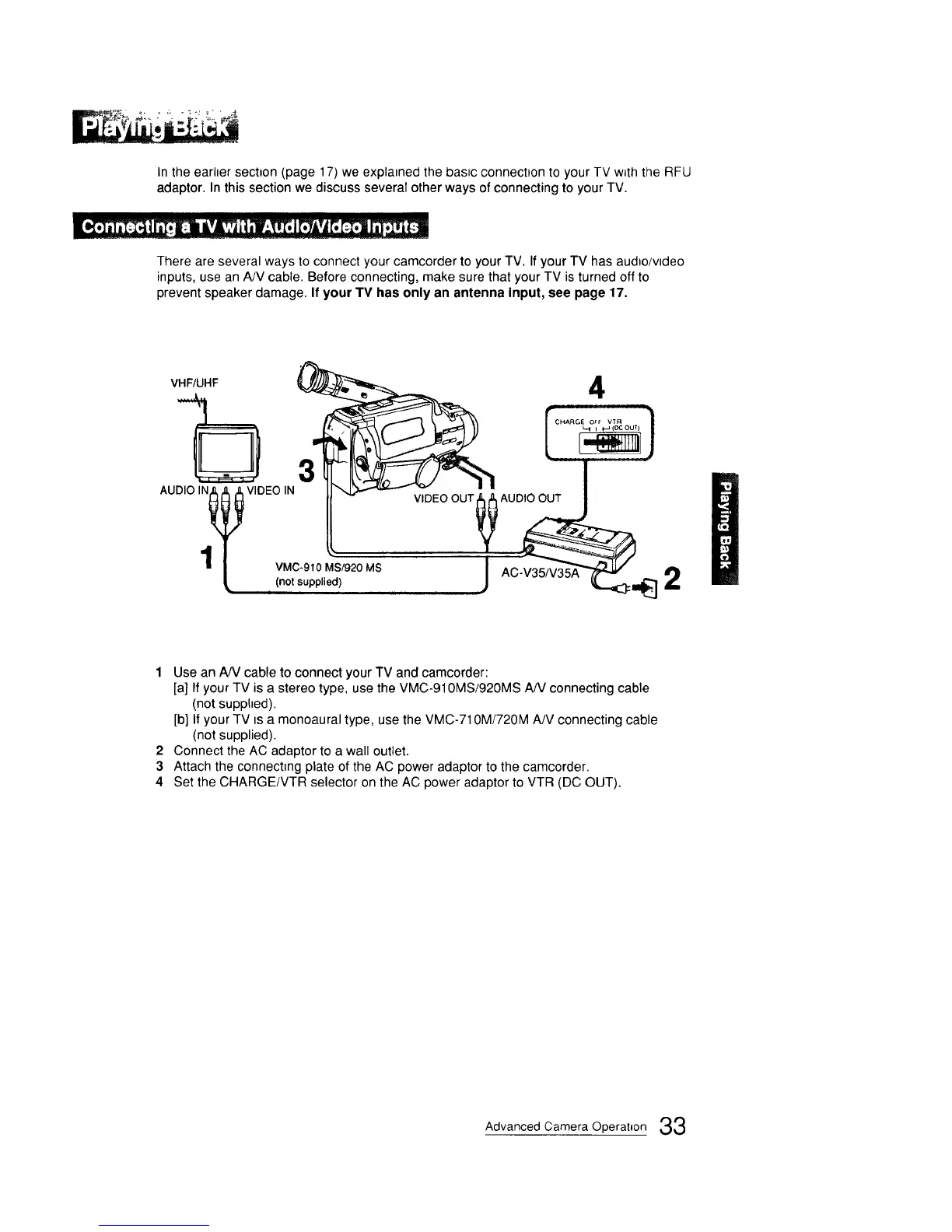
There are several ways to connect your camcorder to your TV. If your TV has aud_o/vtdeo
inputs, use an A/V cable. Before connecting, make sure that your TV is turned off to
prevent speaker damage. If your TV has only an antenna input, see page 17.
VHF/UHF
3
AUDIO IN_ VIDEOIN
,T
' VMC-910 MS/920
_, _(not supplied) MS
4
AC-V35/V35A 2
1 Use an A/V cable to connect your TV and camcorder:
[a] If your TV is a stereo type, use the VMC-910MS/920MS A/V connecting cable
(not supphed).
[b] If your TV tsa monoaural type, use the VMC-710M/720M A/V connecting cable
(not supplied).
2 Connect the AC adaptor to a wall outlet.
3 Attach the connecting plate of the AC power adaptor to the camcorder.
4 Set the CHARGE/VTR selector on the AC power adaptor to VTR (DC OUT).
Advanced Camera Operation 33



 To Next Page