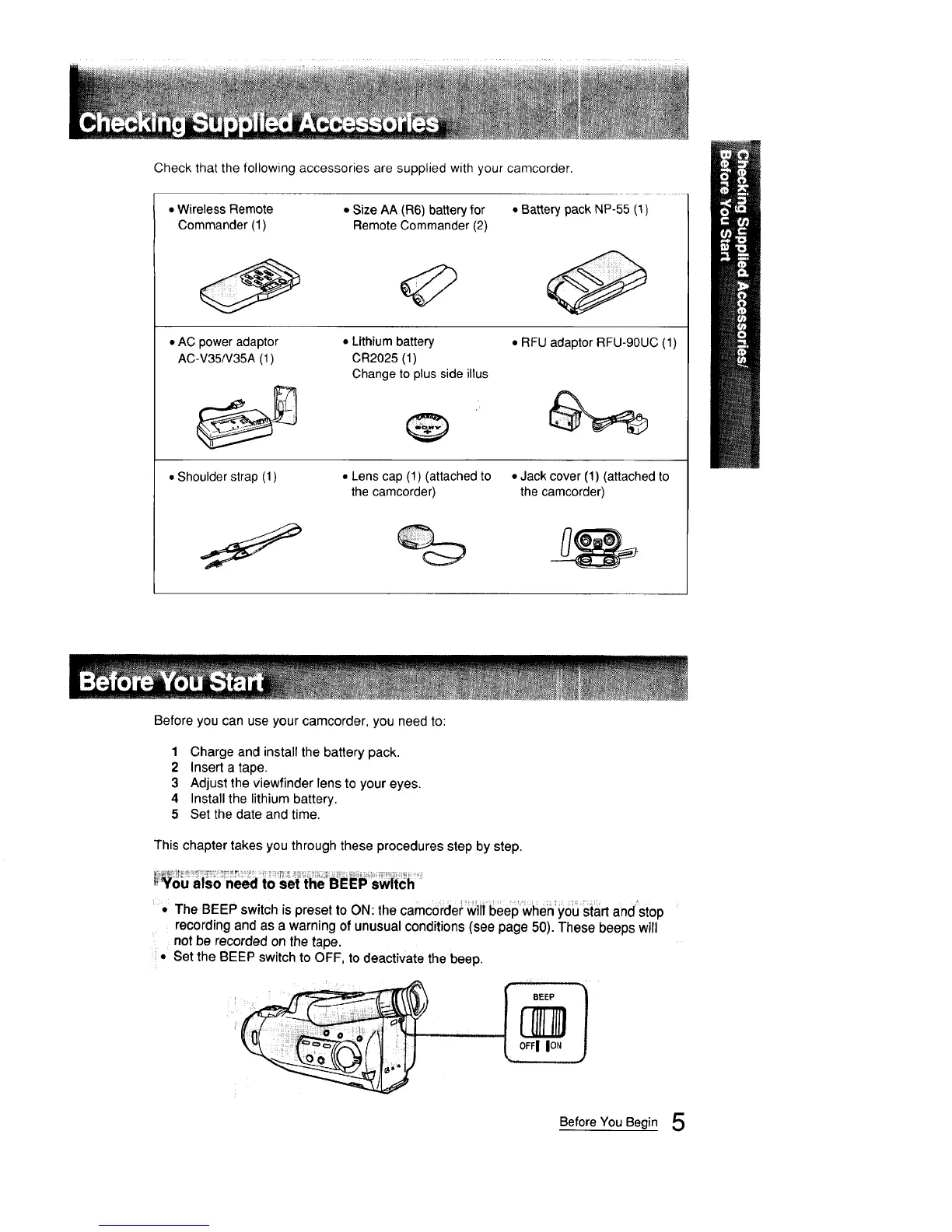
Check that the following accessories are supplied with your camcorder
• Wireless Remote
Commander (1)
• Size AA (R6) battery for • Battery pack NP-55 (1)
Remote Commander (2)
• AC power adaptor
AC-V35/V35A (1)
• Lithium battery
CR2025 (1)
Change to plus side illus
• RFU adaptor RFU-90UC (1)
• Shoulder strap (1) • Lens cap (1) (attached to • Jack cover (1) (attached to
the camcorder) the camcorder)
Before you can use your camcorder, you need to:
1 Charge and install the battery pack.
2 Insert a tape.
3 Adjust the viewfinder lens to your eyes.
4 Install the lithium battery
5 Set the date and time
This chapter takes you through these procedures step by step
You also need to set the BEEP switch
• The BEEP switch is preset to ON: the camcorder will beep when you start and'stop
recording and as a warning of unusual conditions (see page 50). These beeps will
not be recorded on the tape.
• Set the BEEP switch to OFF, to deactivate the beep.
Before You Begin 5



 To Next Page