HBD-E280/T28
23
11. Log: Error Log (Output of each Log)
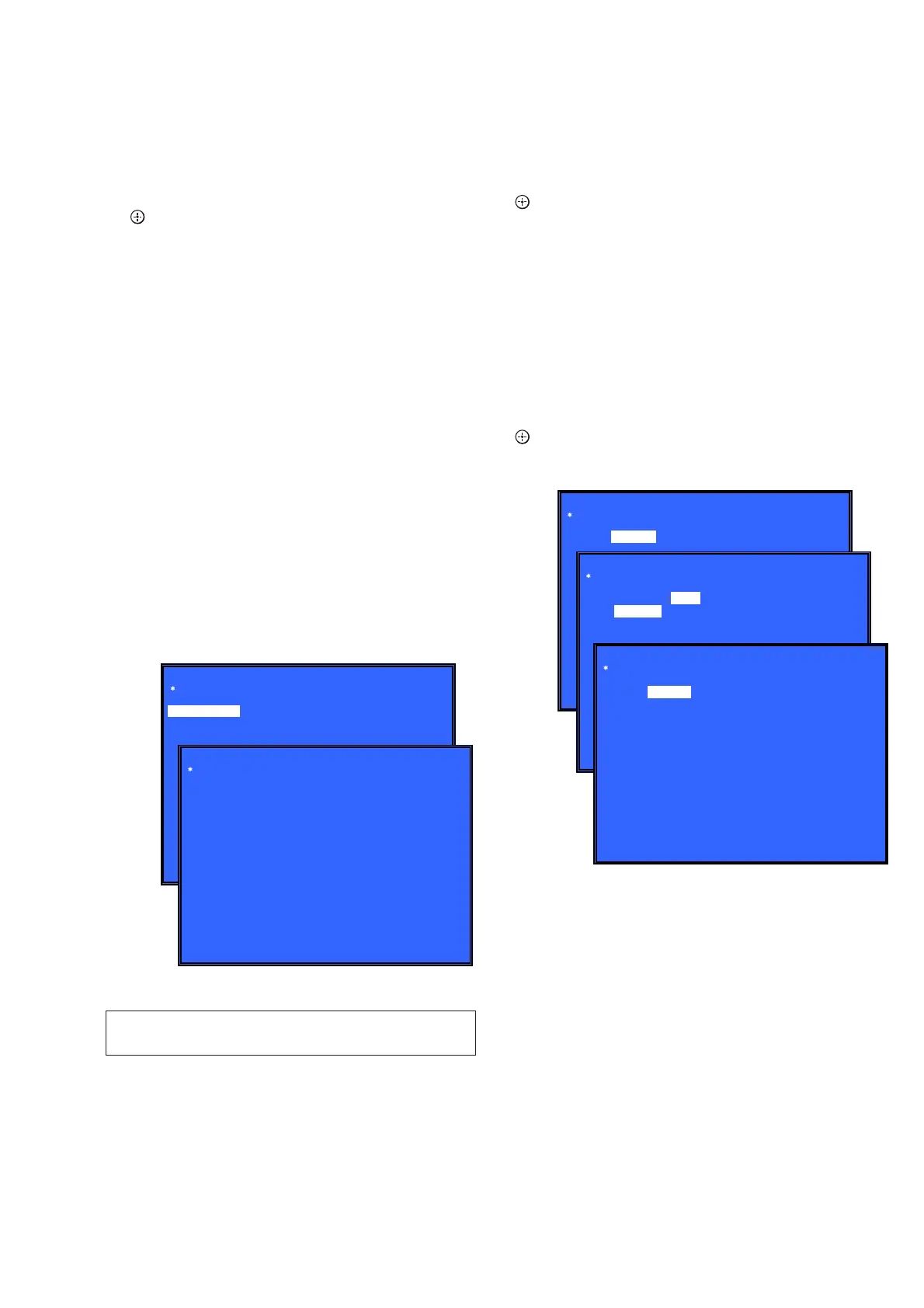
This screen displays the contents of each log.
Note: Do not refer to the displayed date.
Screen 1: Selects log
Operation:
[1]/[ ] Moves to the Error Log output screen
[RETURN] Returns to the top menu of the service mode
Screen 2: Displays the Error Log
Operation:
[
<
] Returns to the previous page
[
,
] Moves to the next page
[RETURN] Returns to the screen (Screen 1) that selects the log
type
[RED] Writes the log contents to an USB memory device
• Viewing the log display
Error Log:
08/01/01 00: 53: 19: [ErrCode: 080400000000]
[Date] [Time] [Error code]
About copying log to USB memory device:
Press the [RED] button in each log display screen with the USB
memory device inserted into the unit.
Note: Please do not press the [RED] button immediately after USB mem-
ory is inserted.
Please do not pull out USB memory immediately after the [RED]
button was pressed.
Error Log:
When “getErrLogFile.trm fi le” exists in the USB memory de-
vice, errlog.log fi le is output.
Select Log
HELP : [DOWN][ENT][(NUM)]
Error Log
08/01/01 00: 53: 19: [ErrCode: 080400000000]
08/01/01 00: 53: 45: [ErrCode: 080400252100]
08/01/01 00: 54: 00: [ErrCode: 080400005555]
:
:
[1] Error Log
(Screen 1)
(Screen 2)
12. Factory Initialize (Factory Settings)
There is a possibility that this mode cannot be correctly execut-
ed. Never use this mode.
13. Network (Network Test Diagnosis Screen: Ifconfi g)
Network menu for the wired ethernet.
Screen 1: Ifconfi g Test
Operation:
[
] Activate Ifconfi g (Display network setting)
[,] Select ping test
[RETURN] Returns to the top menu of the service mode
Screen 2: Ping Test
Operation:
[
<
] Select Ifconfi g test
[RETURN] Returns to the top menu of the service mode
(The details of a Ping test are “14. Network (Network Test Diagno-
sis Screen: Ping)”)
Screen 3: Ifconfi g Test Active
Display Ifconfi g command results.
Operation:
[ ] Ifconfi g retry
[,] Select Ping Test
[RETURN] Returns to the top menu of the service mode
Network
Test: Ifconfig Ping
HELP : [DOWN][ENT][(NUM)]
(Screen 1)
Network
HELP : [DOWN][ENT][(NUM)]
Network
(Screen 2)
(Screen 3)
Test: Ifconfig Ping
[START]
Ping To:
Test: Ifconfig Ping
IP 192. 168. 11. 2 MAC 00-16-01-85-21-A3
HELP : [ENT]: Re/Exe [RIGHT]
14. Network (Network Test Diagnosis Screen: Ping)
Ping test for the wired ethernet.
Screen 1: Ping Test
Operation:
[
<
] Select Ifconfi g test
[
m
] Ping execution preparation
[RETURN] Returns to the top menu of the service mode


 To Next Page