HBD-E280/T28
25
16. Drive
This menu is used to operate the drive using drive-related diagnos-
tic and tools.
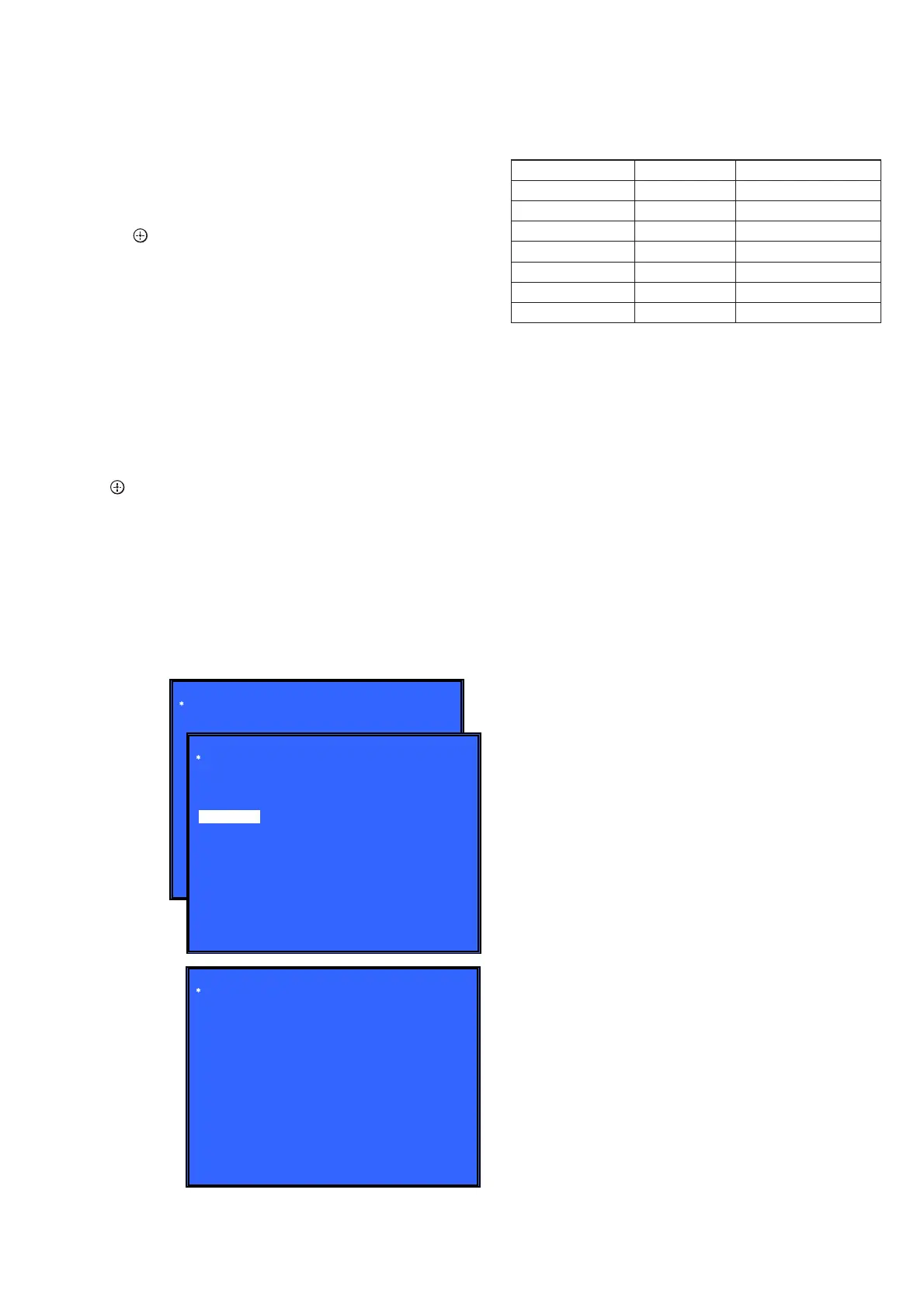
Screen 1: Selecting items under *Drive
Operation:
[
<
]/[
,
] Selects the category
[
m
]/[ ] Activate the selected category
[RETURN] Returns to the top menu of the service mode
[1] Drive OP data Write
[2] Servo Parameter Check Menu (Not used)
[3] Servo Signal Check Menu (Not used)
[4] S-Curve Check Menu (Not used)
[5] Readability Check Menu (Not used)
[6] OP Position Check Menu (Not used)
[7] OP Check Menu (Not used)
[8] Load Eject Aging (Not used)
[9] Spindle Control Check Menu (Not used)
[10] FA Test Mode (Not used)
Screen 2: To start OP data Write
Operation:
[ ] Starts
Screen 3: Show OP data Write result
Operation:
NG - USB is not fi nd
NG - File (Butada.txt) is not fi nd
OK - OP data write
• Drive Test
For drive operating check. Service is only use Drive OP data write
to rewrite OP data after change of new CPU.
Drive
[1] Drive OP data Write
Drive OP data Write
Insert USB StorageDevice ...
Remove DISC and Close tray.
HELP: [ENT] [RET]
[ENT] Start
(Screen 1)
(Screen 2)
(Screen 3)
HELP: [ENT] [RET]
Drive OP data Write
Insert USB StorageDevice ...
Remove DISC and Close tray.
NG - USB is not find
NG - File(Butada.txt) is not find
OK - OP data write
[ENT] Start
CONFIRMATION ITEM
1. Playback Operation Confi rmation
1-1. Test Disc
Part No. Description Layer
J-6090-199-A BLX-104 Single Layer
J-6090-200-A BLX-204 Dual Layer
J-2501-307-A CD (HLX-A1)
J-2501-305-A HLX-513 Single Layer (NTSC)
J-2501-306-A HLX-514 Dual Layer (NTSC)
J-6090-077-A HLX-506 Single Layer (PAL)
J-6090-078-A HLX-507 Dual Layer (PAL)
Note: Refer to the service manual of BDP-BX1/S350 (Part No. 9-883-
989-1[]) (page 1-3 to 1-14E) for the use of BLX-104/204.
Operation and Display:
1. BLX-104
Procedure:
1. Select 23.976Hz/1080p.
2. Play “4.Motion picture”.
3. Check whether player can play back or not.
4. Check each outputs.
Video:
Composite/S Video/component/HDMI.
Audio:
Speaker out.
* When 1080/24p monitor is nothing, 1080i (59.94Hz or 50Hz)
can use instead of 1080/24p.
However this is temporary correspondence.
* When the output of HDMI is 1080p, the signal of Composite/S
Video/Component are not output.
It is necessary to lower the output of HDMI to 1080i or less.
2. BLX-204
Procedure:
1. Select 1080i (59.94Hz or 50Hz).
2. Play “4.Motion picture”.
3. Check whether player can play back or not.
(Check the picture and sound output)
3. CD (HLX-A1)
Procedure:
Check whether player can play back or not.
(Check the sound output)
4. HLX-513/514 (NTSC), HLX-506/507 (PAL)
Procedure:
1. After displayed Main Menu, select “1.Video Signal”.
2. Play “1.Color bar 100%”.
(Check the picture and sound output)
3. Return to Menu.
4. Play “Demonstration 4:3” or “Demonstration 16:9”.
(Check the picture and sound output)


 To Next Page