8
HCD-EX200
Setting the time
1
Turn on the system.
2
Press CLOCK/TIMER SET on the
remote.
Proceed to step 4 when you set the clock for
the first time.
3
Press . or >
.>
.>
.>
repeatedly to select
“CLOCK SET”, then press ENTER on
the remote.
The day indication flashes.
4
Press or repeatedly to set the
day, then press ENTER on the remote.
The hour indication flashes.
5
Press or repeatedly to set the
hour, then press ENTER on the remote.
The minute indication flashes.
6
Press or repeatedly to set the
minute, then press ENTER on the
remote.
The clock starts working.
Tip
If you made a mistake or want to change the time,
start over from step 1.
Turning off the clock display
in standby mode
Press DISPLAY on the remote while the
system is off.
To turn on the clock display, press DISPLAY
on the remote again.
Notes
• When the Daily Timer is set, you cannot turn off the
clock display.
• The clock display will appear when you set the
Daily Timer during turning off the display.
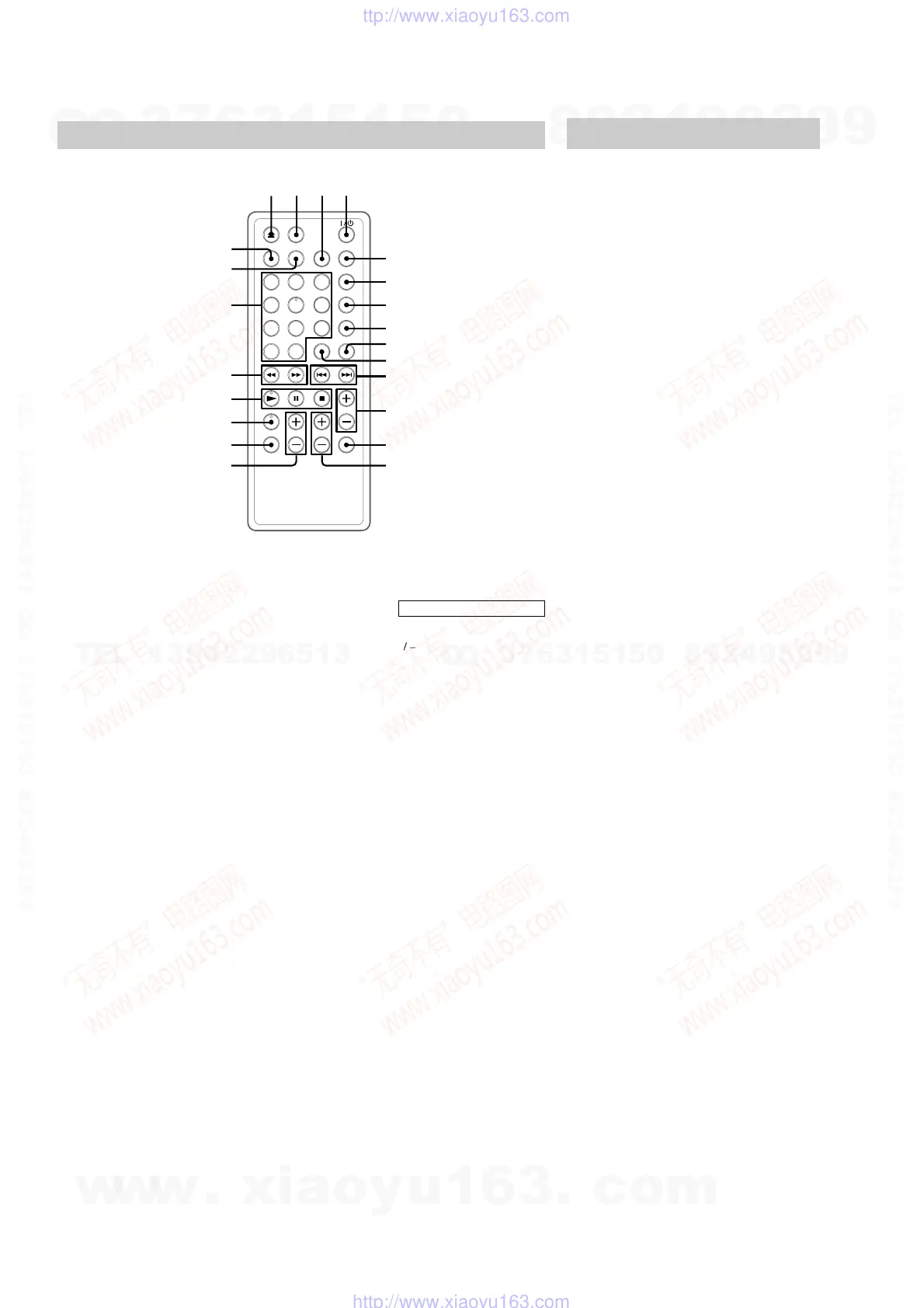
Remote Control
qg
qh
ql
qk
qj
w;
12
34
wa
ws
6
7
8
9
5
qf
0
qd
qa
qs
BASS +/– qg (15)
CD N qk (11)
CLOCK/TIMER SELECT 6
(17)
CLOCK/TIMER SET 7 (10, 16)
DISPLAY 5 (10, 13)
DSG qd (15)
ENTER 8 (10, 12, 13, 16)
FM MODE 3 (14)
FUNCTION ws (11, 17)
MEMORY 9 (13)
Number buttons w; (12)
OPEN/CLOSE Z 1 (11)
PC/TAPE q; (17)
PLAY MODE wa (11, 12)
REPEAT 3 (12)
SLEEP 2 (16)
SURROUND qh (15)
TREBLE +/– qf (15)
TUNER BAND qj (13)
TUNING MODE wa (13)
VOL +/– qs
BUTTON DESCRIPTIONS
@/1 4
+
/
– qa
. qa
> qa
X qk
x qk
m ql
M ql
w
w
w
.
x
i
a
o
y
u
1
6
3
.
c
o
m
Q
Q
3
7
6
3
1
5
1
5
0
9
9
2
8
9
4
2
9
8
T
E
L
1
3
9
4
2
2
9
6
5
1
3
9
9
2
8
9
4
2
9
8
0
5
1
5
1
3
6
7
3
Q
Q
TEL 13942296513 QQ 376315150 892498299
TEL 13942296513 QQ 376315150 892498299
http://www.xiaoyu163.com
http://www.xiaoyu163.com




 To Next Page