Installation and Connections
Connections
58
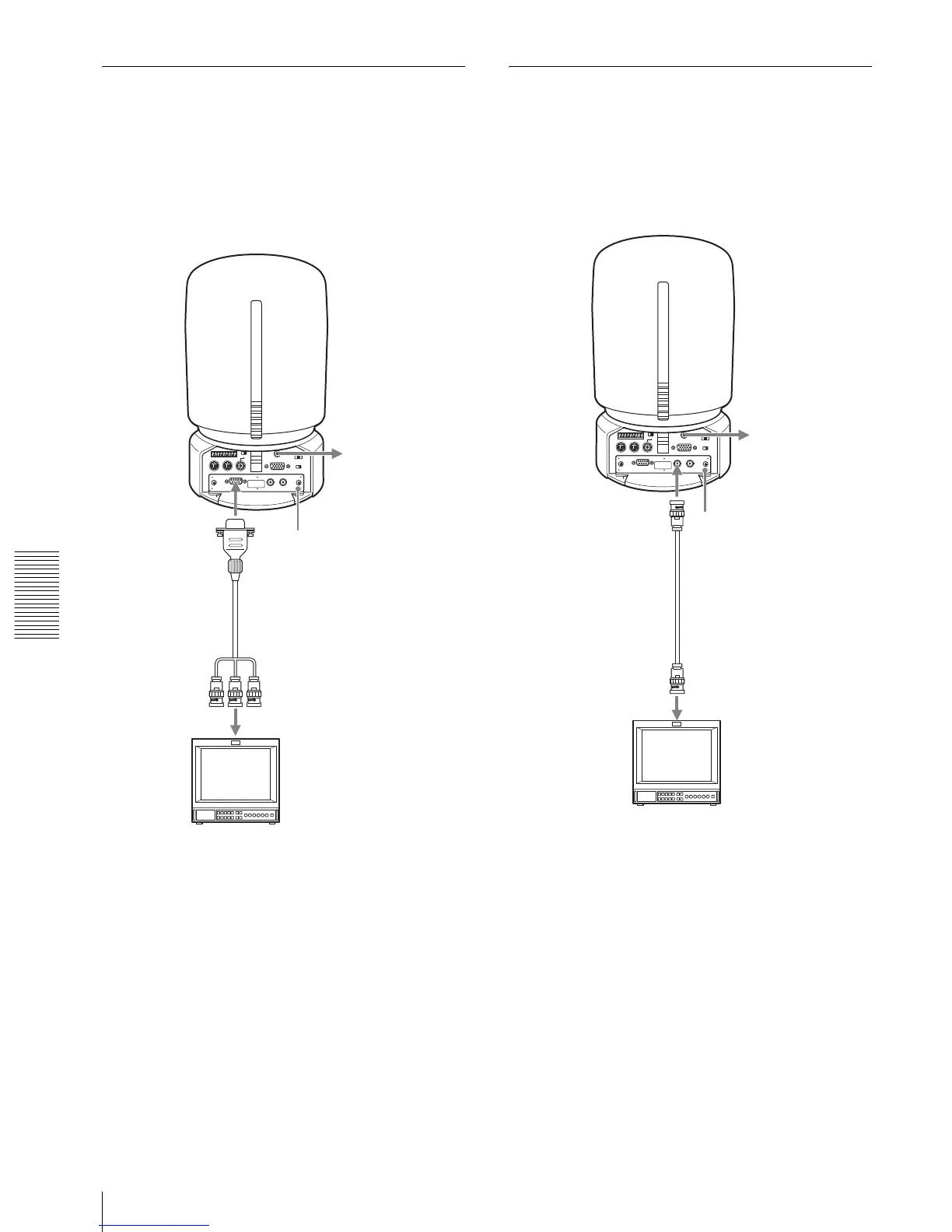
Connecting a Video Monitor
Equipped with Analog RGB/
Component Connectors
When you install an optional HFBK-SD1 SD Interface
Board into the camera, you can output the signal from
the camera by converting it into component video, RGB,
composite video or S-video signal.
For details on how to attach the HFBK-SD1 SD
Interface Board, see page 50.
To select the output signal, use the D-SUB OUT1 and D-
SUB OUT2 items in the DOWN CONVERTER menu
(page 36).
Connecting a Video Monitor, VTR,
etc. Equipped with Composite
Video Input Connector
When you install an optional HFBK-SD1 SD Interface
Board into the camera, you can output the signal from
the camera by converting it into composite video signal.
to AC outlet
MONITOR
HFBK-SD1 SD
Interface Board
CCXC-9DD/9DBS,
CCMC-9DS cable, etc.
(not supplied)
to component
input
Video monitor, etc.
to AC outlet
VIDEO
HFBK-SD1 SD
Interface Board
75-ohm coaxial
cable
Video monitor, VTR, etc.
to composite video input


 To Next Page