72
HVR-V1E/V1P
2-887-521-12(1)
L:\SONY\PV\CX91030\1130insatuPDF\2887521121_GB\2887521111HVRV1UVIN\01GB06MEN
.fm
b Note
• If you adjust the iris manually, you cannot
obtain the effect of [AT IRIS LMT].
You can set the auto white balance
operation under a reddish light source such
as an incandescent lamp or candle, or under
a blueish light source such as in outdoor
shade.
B INTELLIGENT
Adjustment is automatically performed to
achieve a natural atmosphere according to
the brightness of the scene.
HIGH
Redness or blueness will decrease.
MIDDLE
LOW
Redness or blueness will increase.
b Notes
• This is only effective when white balance is
adjusted automatically.
• [ATW SENS] is not effective under a clear sky
or the sun.
B ON
Select to record under normal conditions.
Flickering of the screen under a light
source such as fluorescent lamps will be
reduced.
OFF
Select when you do not want to reduce
flickering of the screen.
b Note
• Flickering may not be reduced depending on the
light sources.
You can change the zoom speed of handle
zoom switch positions H and L (p. 37).
x H
You can select the zoom speed of position
H of the handle zoom switch from 1 (slow)
through 8 (fast) (the default setting is 6).
x L
You can select the zoom speed of position
L of the handle zoom switch from 1 (slow)
through 8 (fast) (the default setting is 3).
You can set [TRANS TIME], [TRANS
CURVE], [START TIMER] and [REC
LINK]. See page 52 for details on using the
shot transition function.
x TRANS TIME
You can select transition time ([3.5sec] to
[15.0sec], the default setting is [4.0sec]).
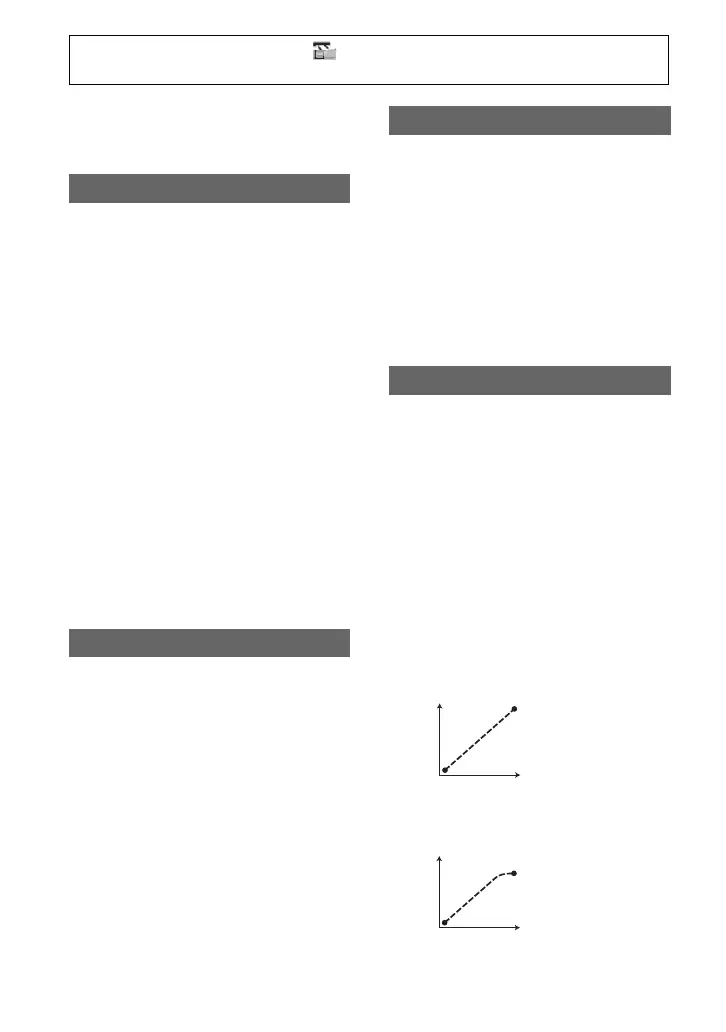
x TRANS CURVE
You can select the transition curve. The
transition curve changes as follows.
*1: parameter level
*2: transition of time
LINEAR
Make the transition linearly.
B SOFT STOP
Make the transition slowly at the end.
ATW SENS
FLCKR REDUCE
HANDLE ZOOM
SHOT TRANS
*1
*2
*1
*2
Press the MENU button t select the (CAMERA SET) by turning the SEL/PUSH EXEC
dial.



 To Next Page