Help Guide
IC Recorder
ICD-UX570F / ICD-UX575F
Connecting the IC recorder to a computer
To exchange files between your IC recorder and a computer, connect the IC recorder to the computer.
Related Topic
Disconnecting the IC recorder from the computer
5-006-945-11(1) Copyright 2019 Sony Corporation
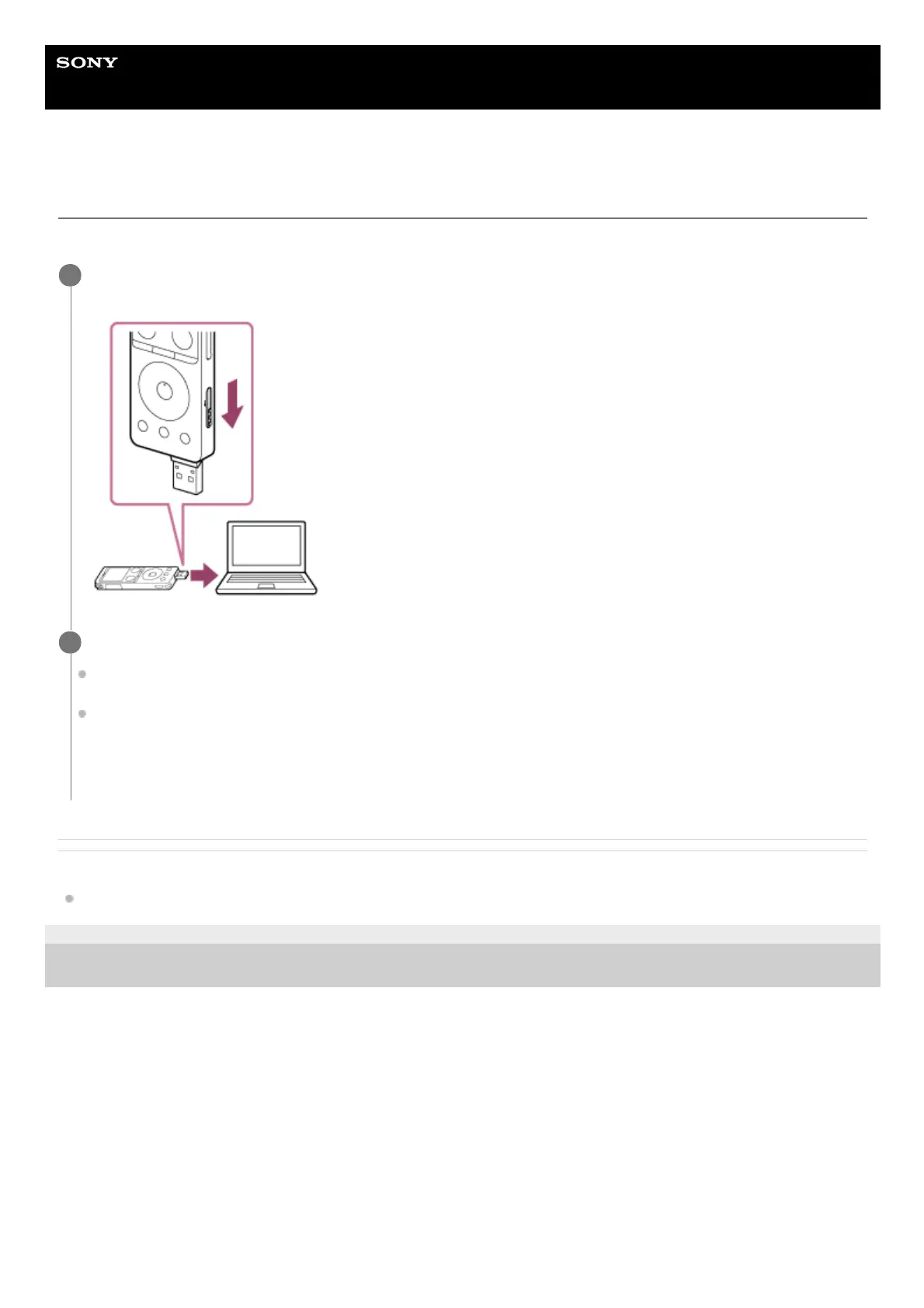
Slide the USB slide lever on the side of the IC recorder downward to push out the USB connector, and
insert it into the USB port on a running computer.
1
Make sure the IC recorder is successfully detected by the computer.
On the Windows computer, open [Computer] or [PC], and make sure that [IC RECORDER] or [MEMORY CARD] is
detected.
On the Mac, make sure that [IC RECORDER] or [MEMORY CARD] drive appears on the Finder.
The IC recorder is detected by the computer as soon as a connection is made. While the IC recorder is connected
to the computer, [Connecting] appears on the display window of the IC recorder.
2



 To Next Page