Help Guide
IC Recorder
ICD-UX570F / ICD-UX575F
Adjusting the playback speed – the DPC (Digital Pitch Control) function
You can adjust the playback speed in a range from 0.25 times to 3.00 times. Changing the playback speed does not
affect the playback audio. Files will play in natural tones, thanks to digital processing.
Hint
To resume the normal playback speed, select [OFF] in step 3.
5-006-945-11(1) Copyright 2019 Sony Corporation
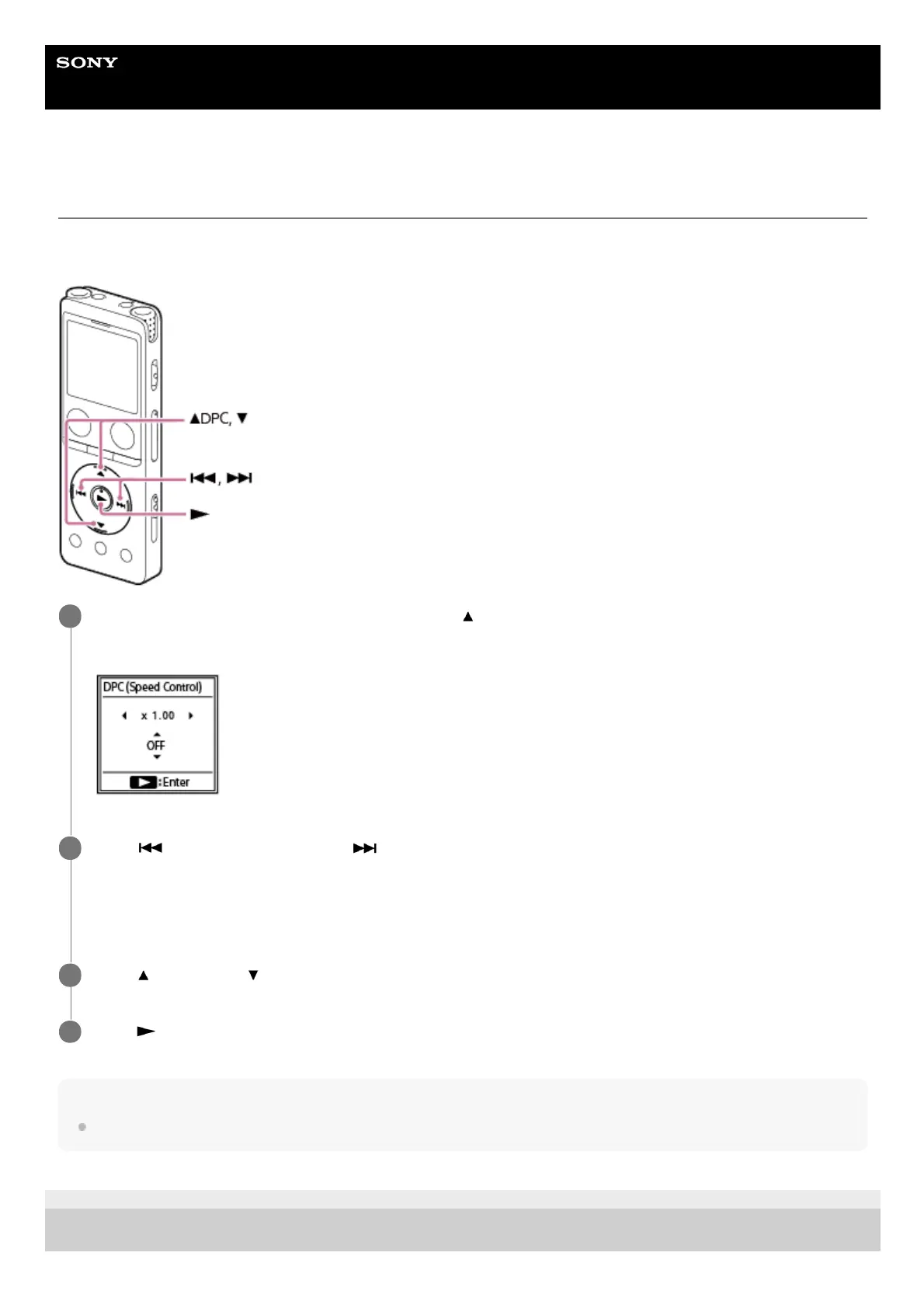
While playback is on standby or in progress, press
(move up)/DPC.
The DPC setting screen is displayed.
1
Press
(review/fast backward) or (cue/fast forward) to adjust the playback speed.
The speed decreases by 0.05 times (from x 0.25 to x 1.00).
The speed increases by 0.10 times (from x 1.00 to x 3.00).
The playback speed is set to [x 1.00] by default.
2
Press
(move up) or (move down) to select [ON].
3
Press
(play) to select the playback speed.
4



 To Next Page