Help Guide
IC Recorder
ICD-UX570F / ICD-UX575F
Using the recording delay function
You can set your IC recorder to start recording automatically when the specified period of time expires.
Note
During the countdown, OPTION, T-MARK,
(play), STOP, (move up), (move down), (review/fast backward) and
(cue/fast forward) are disabled.
During the countdown, if you turn the power off or the time period specified for the sleep timer expires, your IC recorder will turn
off.
During the countdown, your IC recorder does not turn off even when the period of time specified for the Auto Power Off function
expires.
Hint
To cancel the recording delay function setup process, press BACK/HOME during the countdown, press
(move up) or (move
down) to select [Yes], and then
(play).
If you press
REC/PAUSE during the countdown, the recording delay function is cancelled, and recording starts.
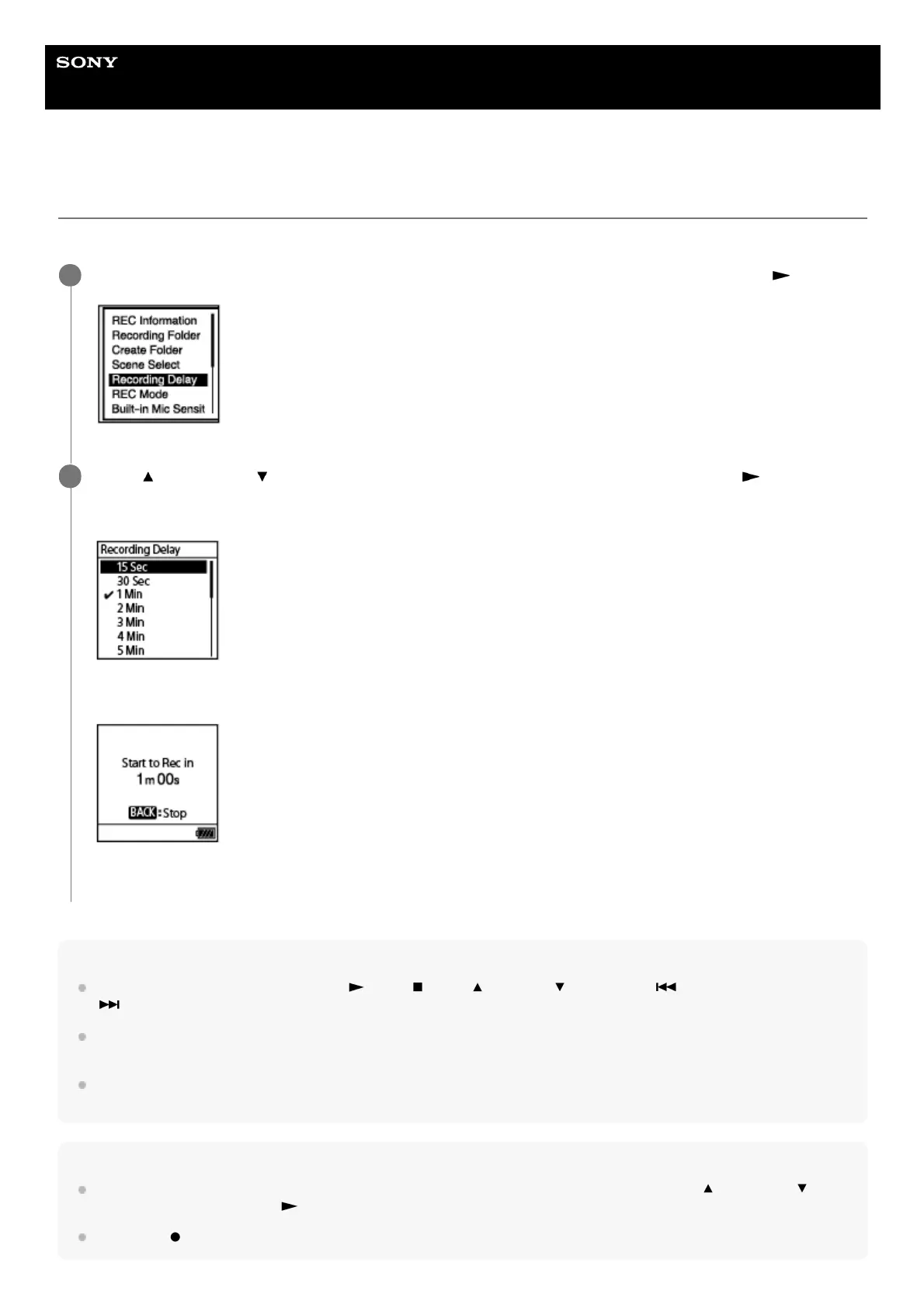
While recording is on standby, select [Recording Delay] on the OPTION menu, and then press
(play).
1
Press
(move up) or (move down) to select the desired period of time, and then press (play).
You can select from [15 Sec] to [60 Min].
The countdown screen is displayed.
When the specified period of time expires, recording starts.
2



 To Next Page