Help Guide
IC Recorder
ICD-UX570F / ICD-UX575F
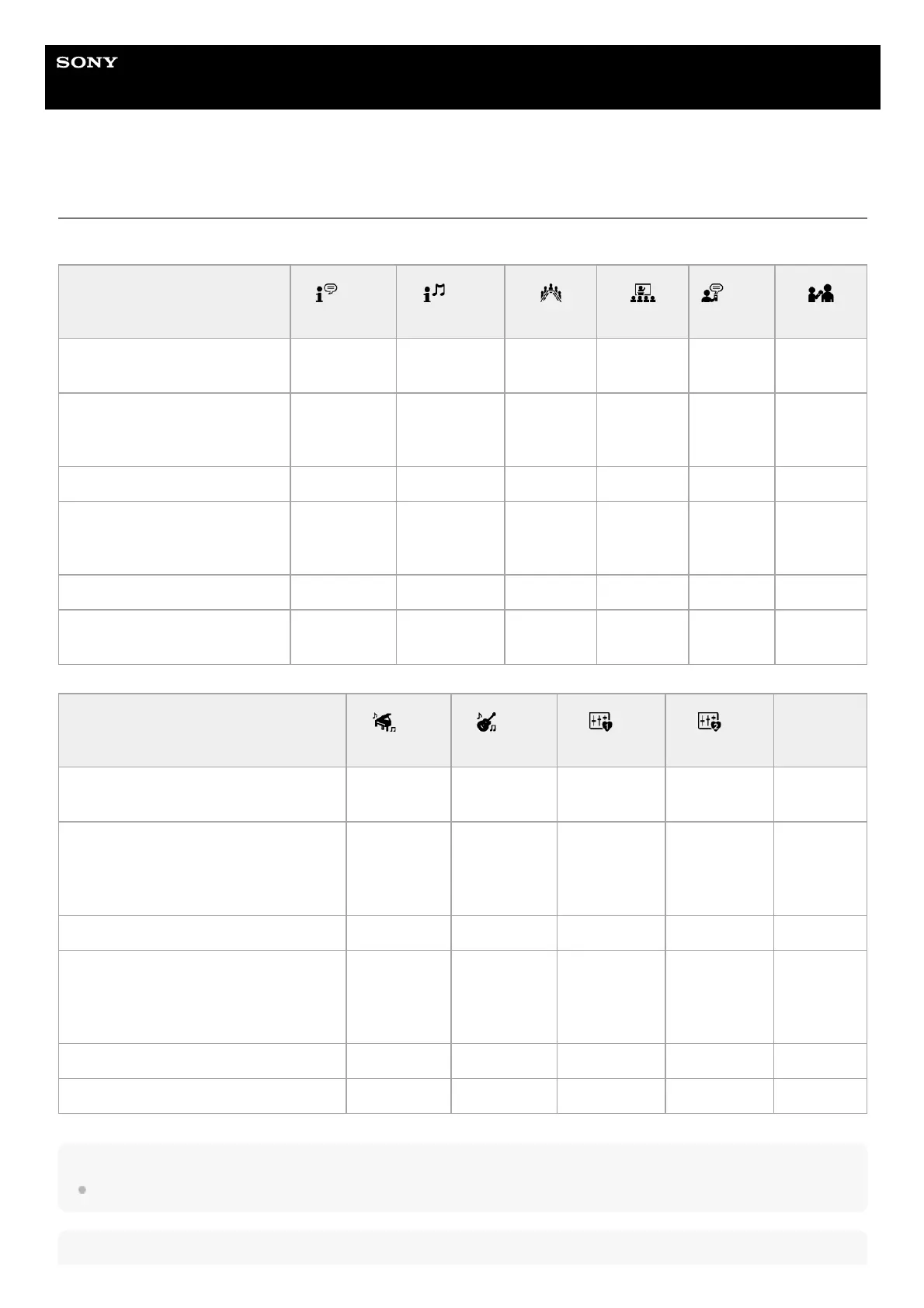
Default settings for the recording scenes of the Scene Select function
By default, the settings for the recording scenes of the Scene Select function are as follows:
Note
Assigned scenes are not necessarily supported by all environments.
Hint
Recording menu items and
recording scenes
Auto
Voice Rec
Auto
Music Rec
Meeting Lecture
Voice
Notes
Interview
REC Mode
MP3
192kbps
MP3
192kbps
MP3
192kbps
MP3
192kbps
MP3
128kbps
MP3
128kbps
Built-In Mic Sensitivity
For Voice
Auto
For Music
Auto
For Voice
Medium
For Voice
Medium
For Voice
Low
For Voice
Medium
Focused/Wide OFF OFF Wide Focused OFF OFF
Ext. Input Setting (MIC IN)
For Voice
Auto
For Music
Auto
For Voice
Medium
For Voice
Medium
For Voice
Low
For Voice
Medium
VOR OFF OFF OFF OFF OFF OFF
Recording Filter OFF OFF
NCF(Noise
Cut)
NCF(Noise
Cut)
LCF(Low
Cut)
NCF(Noise
Cut)
Recording menu items and recording
scenes
Soft
Music
Loud
Music
My
Scene 1
My
Scene 2
OFF
REC Mode
MP3
192kbps
MP3
192kbps
MP3
192kbps
MP3
192kbps
MP3
192kbps
Built-In Mic Sensitivity
For Music
Medium
(Music)
For Music
Low (Music)
For Voice
Medium
For Voice
Medium
For Voice
Medium
Focused/Wide OFF OFF OFF OFF OFF
Ext. Input Setting (MIC IN)
For Music
Medium
(Music)
For Music
Low (Music)
For Voice
Medium
For Voice
Medium
For Voice
Medium
VOR OFF OFF OFF OFF OFF
Recording Filter OFF OFF OFF OFF OFF



 To Next Page