11
KLV-32L400A/37L400A
KLV-32L400A/37L400A
Viewing the Self Check Diagnostic List
1. TV must be in standby mode. (Power off).
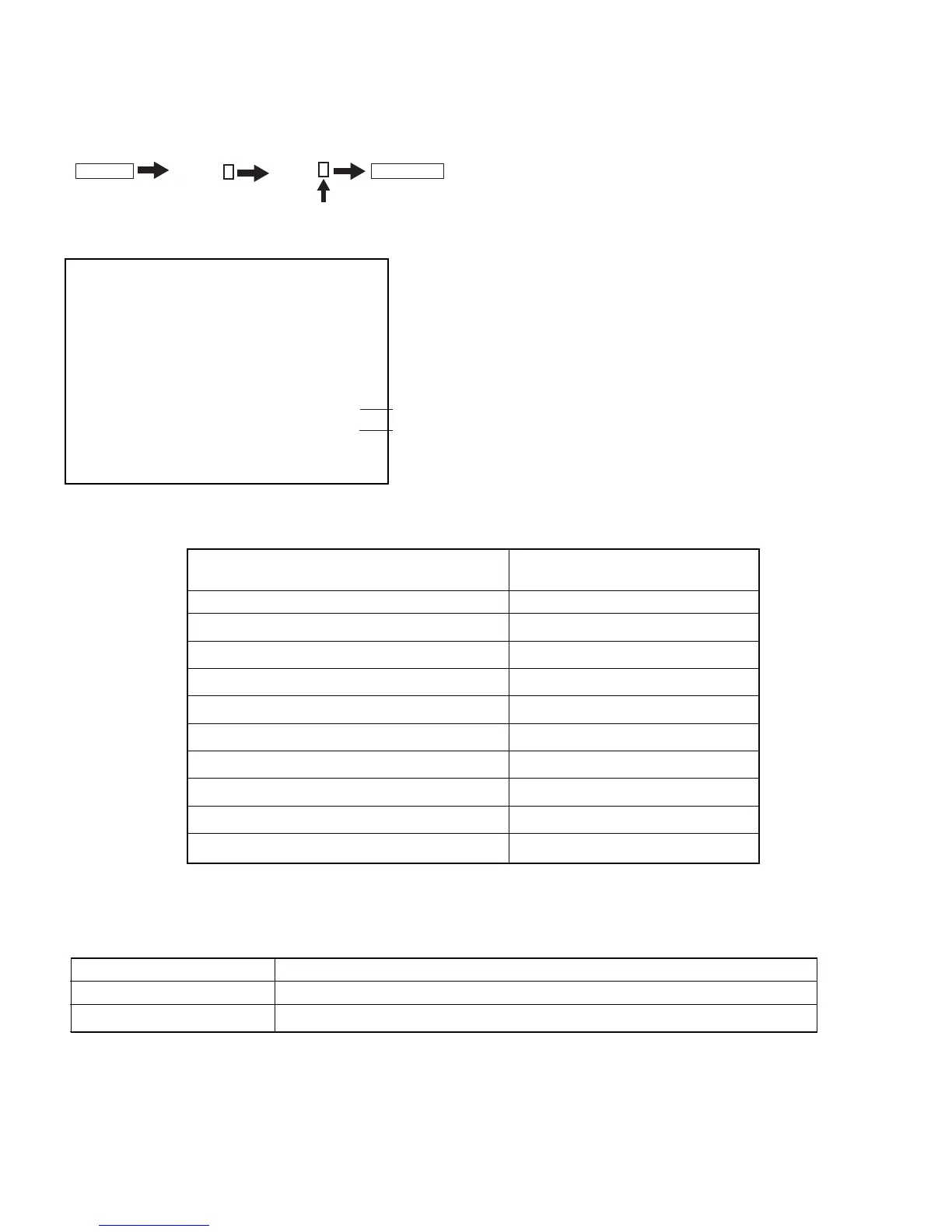
2. Press the following buttons on the Remote Commander within a second of each other:
DISPLAY
Channel
5
Volume
-
TV POWER
.
The Self Check list displays. This differs from accessing Service Adjustments.
Results for all of the following diagnostic items are displayed on screen. No error has occurred if the screen displays a “0”
TV
DC_DET 0
DC_ALERT1 0
DC_ALERT2 0
DC_ALERT3 0
BACKLIGHT 0
TEMPERATURE 0
AUDIO 1
DFE 0
B-ENGINE 0
HFR 0
Failure LED Displays
MONITORING ITEMS NUMBER OF STANDBY LED
(RED) BLINKING TIMES
Main power supply voltage error 2
DC_ALERT 1 3
DC_ALERT 2 4
DC_ALERT 3 5
Backlight error 6
Internal temperature error 7
Audio error 8
Fan error (HFR model only) 9
Digital FE error 10
Trident error 11
*Each of the above blinking is repeated every 2 seconds
LED Displays during Aging
Condition LED Displays
When AGING_TIMER > 0 Green (0.5 Sec) t Off (0.5 sec) t Green (0.5 sec) t Off (0.5 sec)
When AGING_TIMER = 0 Green (3.0 sec) t Off (3.0 sec) t Green (3.0 sec) t Off (3.0 sec)
Clearing the Self Check Diagnostic List
1. In Service Mode, turn the TV off, then on.
“1” is displayed when an error is detected one or more times.
“0” is displayed when no error has been detected
.





 To Next Page