MHC-V50/V50D
22
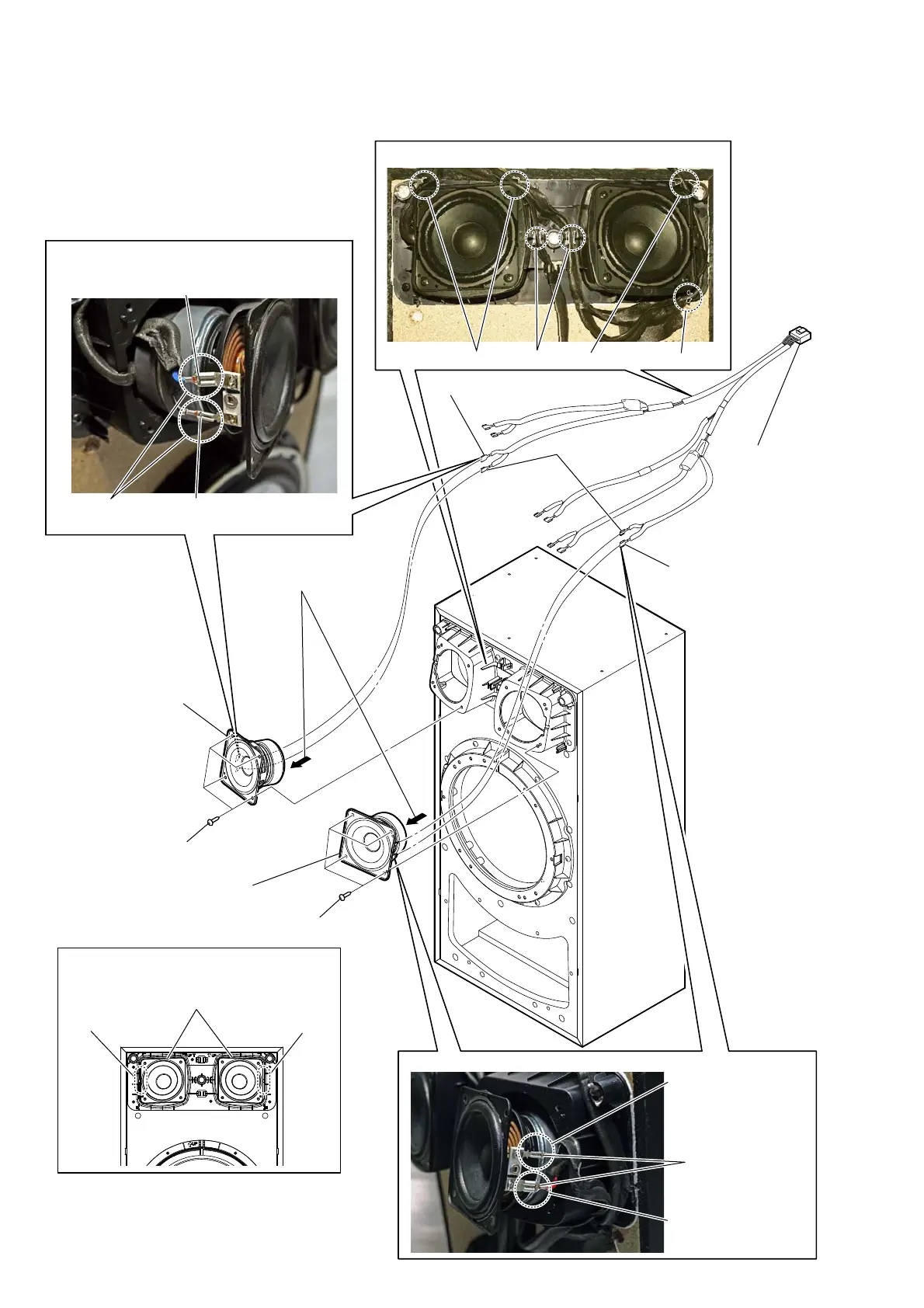
2-14. LOUDSPEAKER (8CM)
:LUHVHWWLQJ
ribhook hook
rib
protrusion
:LUHVHWWLQJ
:LUHVHWWLQJ
4 Push the protrusion, and remove
the terminal (wide side).
4 Push the protrusion,
and remove the
terminal (wide side).
4 Push the protrusion,
and remove the
terminal (narrow side).
protrusion
4 Push the protrusion, and remove
the terminal (narrow side).
–)URQWYLHZ–
loudspeaker (8CM)
terminal position terminal position
,QVWDOODWLRQGLUHFWLRQIRUWKHORXGVSHDNHU
&0
terminal (narrow side)
terminal (wide side)
terminal (wide side)
1 Remove the
speaker cable.
2 four screws ((3.5 x 14), TAPPING)
2 four screws ((3.5 x 14), TAPPING)
3 Remove the loudspeaker
(8CM) in the direction
of the arrow.
5 loudspeaker (8CM)
5 loudspeaker (8CM)



 To Next Page