18
RCD-W1
CD-R LD Power Setting
(VRDC/VWDC1 Resetting)
The optical pick-up and ICs in the circuit have a characteristics individually. In this routine, the parameters related to the
recording/playback power are actually measured and set properly.
The parameters are VRDC, VWDC1, VWDC2, VWDC2 Offset and so on. The reading power and playback power are set
properly by computing the related parameters on the basis of actually measuring values.
The preset parameters are used on power setting in case of performing Read/Write CD-R, CD-RW and so on.
Actual operation: The microcomputer receives serial data, then executes the related performances, and send parameter values to PC.
PC checks its related parameters and judges OK/NG.
Description of each parameter
VRDC: Used on the Read Power setting in case of
reading CD-RW and CD-R. (DAC value on 100mW.)
VWDC: There is VWDC1 (Write power) pin in the optical pick-up block. The recording power is set by it and VWDC2
(Over drive) pin. Used on setting VWDC1 pin power on recording. (Unit: DAC value/10mW)
VWDC2: Used on setting VWDC2 (Over drive) pin power on recording. (Unit: DAC value/5mW)
VWDC2 Offset: Used on setting VWDC2 (Over drive) pin power with VWDC2 parameter on recording. (Unit: DAC value)
Specification of each parameter
20<read power<200
100<write power<2000
30<VRDC<150
48<VWDC1<150
50<VWDC2<126
VWDC2 Offset<35
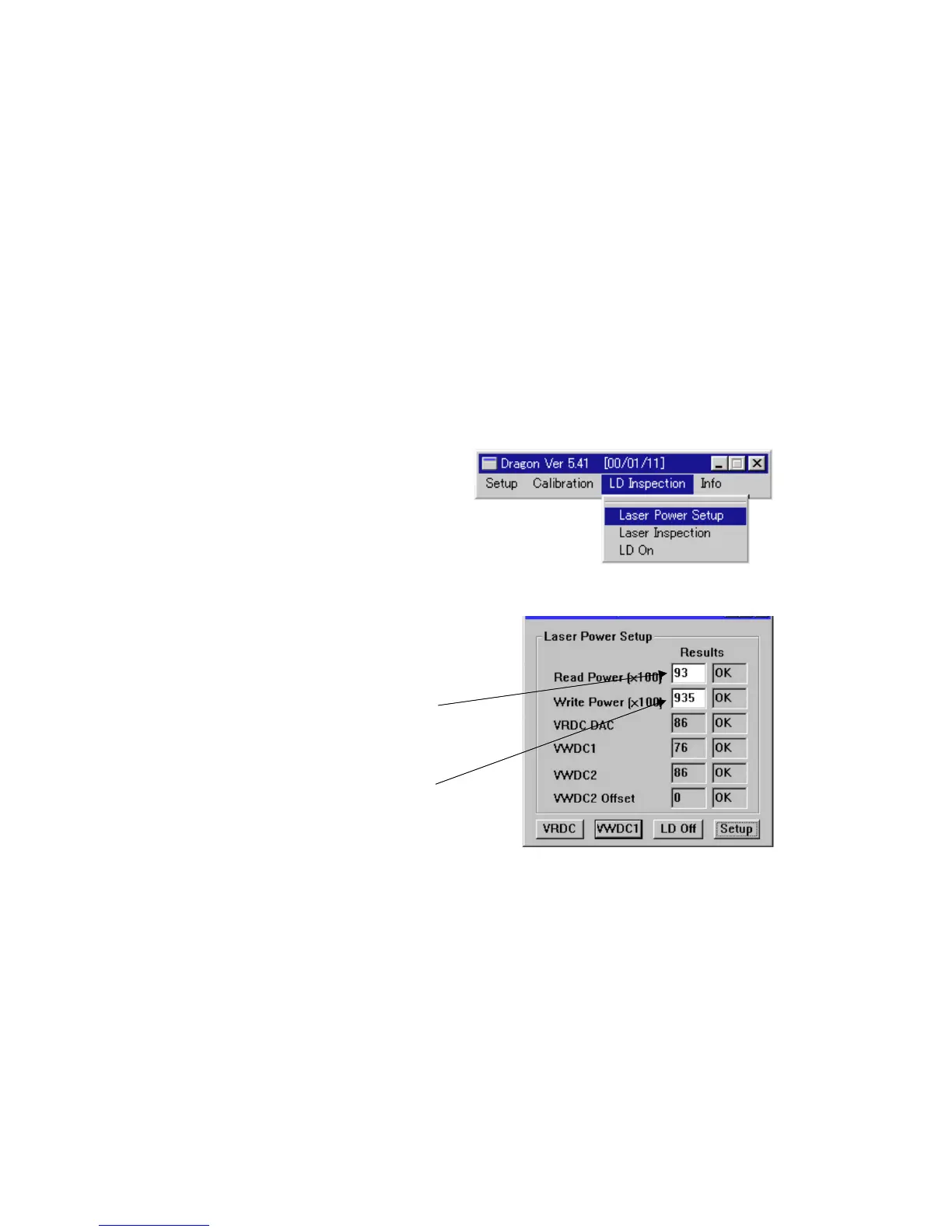
Fig 5 : LD inspection menu windows
Fig 6 : Laser power setup window
Procedure:
1. Eject a disc from CD-R.
2. Select “Laser Power Setup” on “LD Inspection” pull-down
menu, then “Laser Power Setup (Manual)” window is open.
3. Click VRDC, then Pick-up moves outward and LD turns on.
4. Measure the LD power with a LD power meter. Write its value
to the blank of “Read Power” column.
(Write a value to two decimal places. Ex: Write “93” in case of
0.93mW.)
5. Click VWDC1, then LD turns on.
6. Measure the LD power with a LD power meter. Write its value
to the blank of “Write Power” column.
(Write a value to two decimal places. Ex: Write “1234” in case
of 12.34mW.)
7. Click LD Off to turn LD off.
8. Click Setup, then setting is over and a result is displayed.
(“OK”/“NG” is displayed for every items.)
9. Click X to close “Laser Power Setup (Manual)” window.


 To Next Page