21(E)
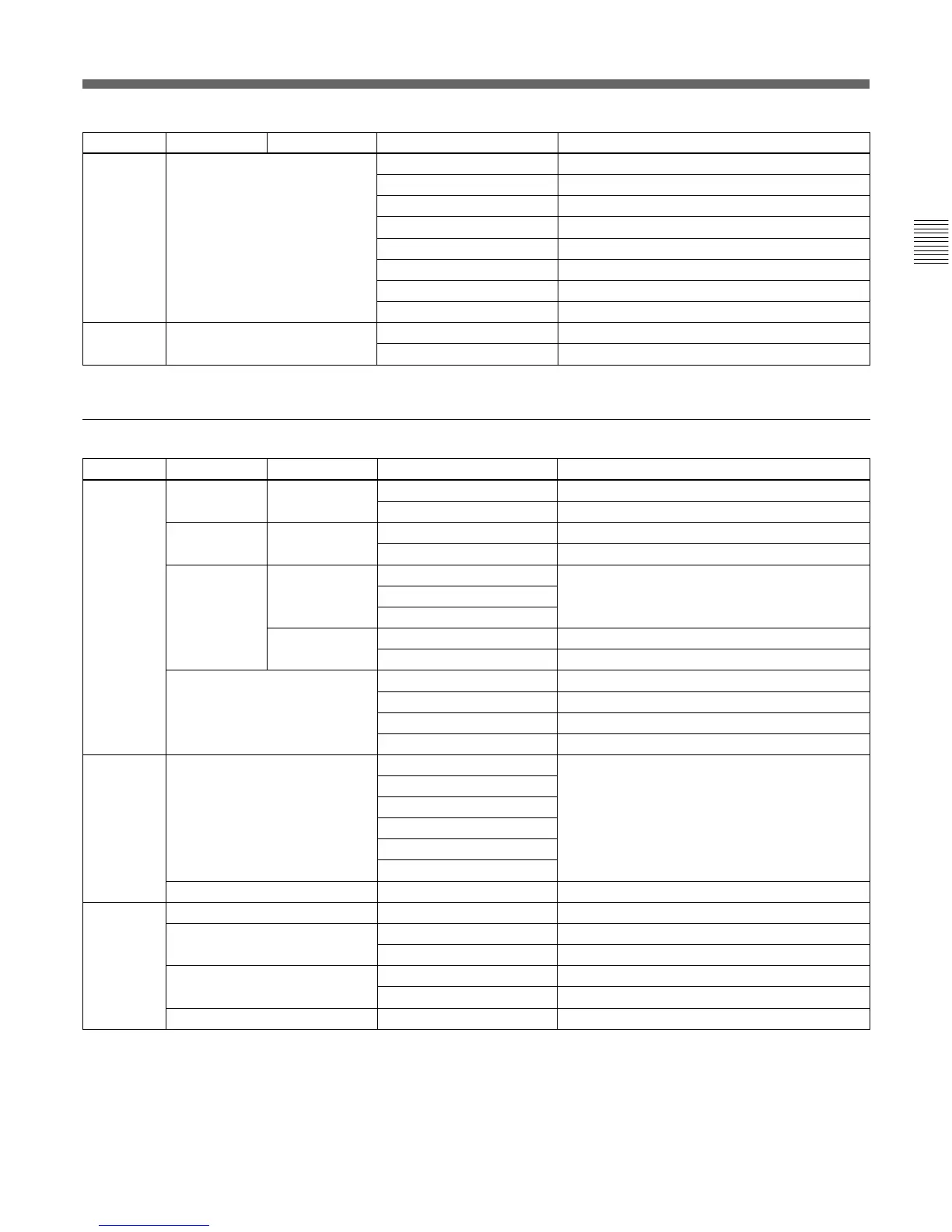
Page Menu Submenu Control item Function
Paint 6 ECS/S-EVS z SLS Adjusts the slow-shutter speed.
(Continued)
z Shutter Adjusts the shutter speed.
z ECS Adjusts the ECS frequency.
z S-EVS Adjusts the Super EVS.
Slow Shutter Turns the slow-shutter mode ON/OFF.
Shutter Turns the shutter mode ON/OFF.
ECS Turns the ECS mode ON/OFF.
S-EVS Turns the Super EVS mode ON/OFF.
Paint 7 Noise Suppression z Level Adjusts the noise suppression level.
Noise Sup Turns the noise suppression ON/OFF.
Maintenance menu
Menu 2ndary menu Submenu Control item Function
Adjusting Black Shading R/G/B z H Saw/H Para/V Saw/V Para Adjusts the black shading.
Auto B Shading Executes the auto black shading.
White Shading R/G/B z H Saw/H Para/V Saw/V Para Adjusts the white shading.
Auto W Shading Executes the auto white shading.
Phase H Phase z H Step Adjusts the H phase.
z H Coarse
z H Fine
SC Phase z SC Adjusts the SC phase.
z BF Adjusts the black burst signal phase.
Auto Iris z Pattern Adjusts the auto iris patterns.
z Level Adjusts the auto iris level.
z APL Ratio Adjusts the auto iris APL ratio.
z Iris Gain Adjusts the auto iris gain.
Camera Config Preset Matrix SMPTE-240M Sets the preset matrix.
ITU-709
SMPTE Wide
NTSC
EBU
ITU-601
16:9 t 4:3
b)
Crop Turns the crop in aspect conversion ON/OFF.
File Reference File Store
b)
Stores a reference file.
Reference File Transfer
b)
CAM t MS Transfers a reference file (from a camera to a Memory Stick).
MS t CAM Transfers a reference file (from a Memory Stick to a camera).
Scene File Transfer CAM t MS Transfers a scene file (from a camera to a Memory Stick).
MS t CAM Transfers a scene file (from a Memory Stick to a camera).
OHB File Store
b)
Stores a OHB file.
b) This function becomes operable if enabled with g) (page 23(E)) or in Engineer mode only.











 To Next Page