22
KDL-40XBR4/40XBR5/46XBR4/46XBR5
KDL-40XBR4/40XBR5/46XBR4/46XBR5
The screen displays the fi rst category in the selected service menu.
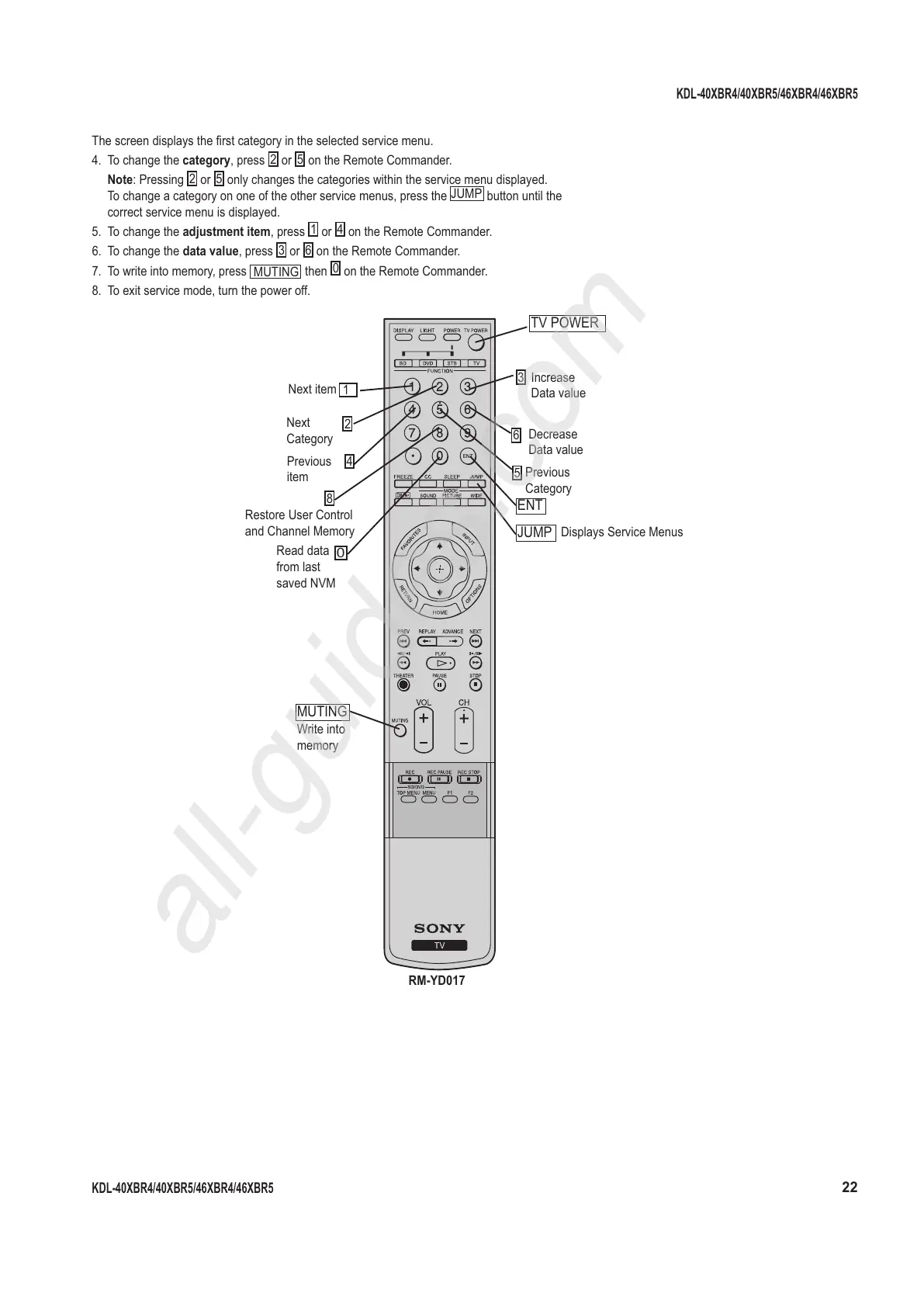
4. To change the category, press
2
or
5
on the Remote Commander.
Note: Pressing
2
or
5
only changes the categories within the service menu displayed.
To change a category on one of the other service menus, press the
JUMP
button until the
correct service menu is displayed.
5. To change the adjustment item, press
1
or
4
on the Remote Commander.
6. To change the data value, press
3
or
6
on the Remote Commander.
7. To write into memory, press
MUTING
then
0
on the Remote Commander.
8. To exit service mode, turn the power off.
6
Decrease
Data value
ENT
0
Read data
from last
saved NVM
3
Increase
Data value
RM-YD017
5
Previous
Category
MUTING
Write into
memory
1
Next item
2
Next
Category
4
Previous
item
8
Restore User Control
and Channel Memory
TV POWER
JUMP
Displays Service Menus




 To Next Page