— 7 —
4. HOW TO DIAGNOSE HDD FAILURE
4-1. Defective HDD
There are four symptoms of defects in the HDD.
1. “E01” is displayed on the FLD.
(The HDD is not recognized or is not authorized.)
2. “E02” is displayed on the FLD.
3. When playing a video, MP3, or JPG, contents freeze.
4. Irregular noises from the HDD
4-2. HDD Recognition status
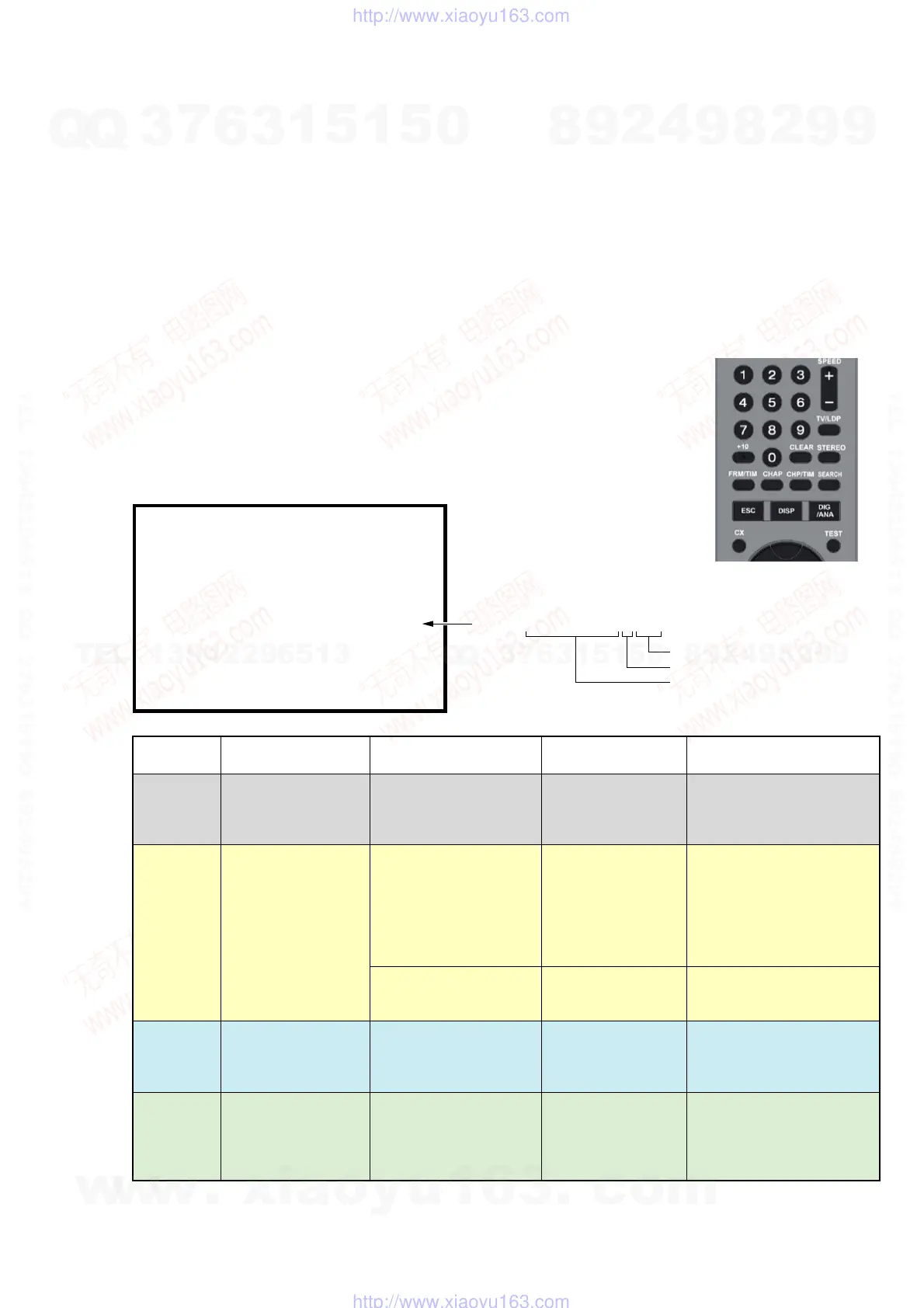
How to enter Recognition status and sub screen mode.
• While the GUI screen is not displayed, use the service remote controller and press “ESC” key followed by “DISP” key.
• While the first screen is displayed, press “DIG/ANA” key repeatedly until the desired subscreen is displayed.
The subscreens change.
MRX-1635/EC1 VERSION : 1.01
: RELEASE 104
Rev. 1. 5895
: 1.178 OK
: DVD-RW DVR-L12X OK
1.00 OK
: 000800004940
: WDC WD2500AAJS 9 250
DEVICE : E2R-FEx1.0 FLASH : 64M
REGION : 2 C : 0000400259
HDCP : 0000400259
SYSCON
TUNERCON
DRIVE
PIC SERIAL
HDD INT
• Details on HDD data are described below:
HDD : WDC1023456 # 160
Capacity of the HDD (unit: Gbytes)
HDD identification error indication
HDD model name
Service remote controller
(Part code: J-6090-203-A)
HDD identification
conditions
Failure to physically
identify the HDD (no
connection, defective
HDD, interface error).
Physical identification of
HDD possible, but not
identified
Physical identification of
HDD possible, HDD
identified, but failure in
logical formatting.
Physical identification of
HDD possible, HDD
identified, and correct
logical formatting (HDD
correctly identified).
Details on HDD data
are described below.
Blank space
WDC 10234564 # 160
WDC 10234564 ! 160
WDC 10234564 160
Remarks
Check the connection to the
SATA cable and power cable.
Replace the SATA cable or
power cable.
Replace the HDD.
Replace the FE or part in the
SATA/ATA communication.
“#” indicates that the HDD is
not recognized.
“!” indicates an HDD
authorization error. Initialize
the HDD.
FL Display
REPAIR
E01
E02
Normal
OS Display
“Repaining the HDD”.
r
“HDD repair is
complete”.
An error occurred.
Please consult your
nearest Sony dealer.
Note that contents on
the HDD may be
erased when servicing
this unit.
The Hard Disk Drive
info is incorrect.
Use the Disk Setup
menu to reformat.
w
w
w
.
x
i
a
o
y
u
1
6
3
.
c
o
m
Q
Q
3
7
6
3
1
5
1
5
0
9
9
2
8
9
4
2
9
8
T
E
L
1
3
9
4
2
2
9
6
5
1
3
9
9
2
8
9
4
2
9
8
0
5
1
5
1
3
6
7
3
Q
Q
TEL 13942296513 QQ 376315150 892498299
TEL 13942296513 QQ 376315150 892498299
http://www.xiaoyu163.com
http://www.xiaoyu163.com



 To Next Page