1-2
3. MODEL NAME SETTING METHOD WHEN ENGINE IS REPLACED
Required equipment:
• Remote controller (RMT-D246A/D249P/D250P)
• Service remote controller (J-6090-203-A)
•Monitor
Model name delete method
1. Turn the main POWER ON.
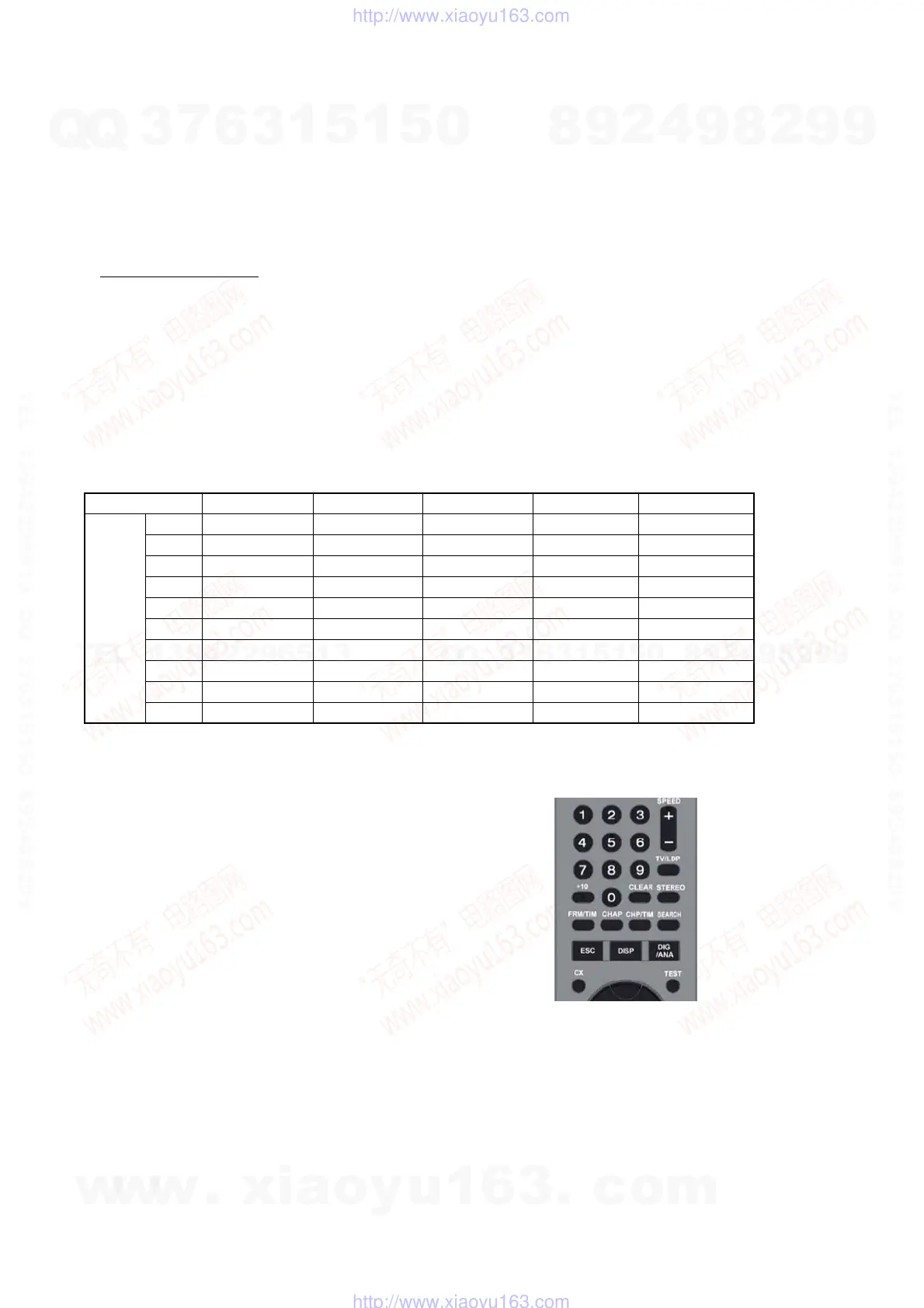
2. Press the following buttons on the service remote controller in this order.:
“ESC” k “CHAP” k “1”
* Confirm that the above operation is performed in the state that the screen has exited all settings such as “Home Menu” or “Simple
Setting”.
3. Turn the main POWER OFF.
4. Turn the main POWER ON.
5. Find out the tentative model name from the Correspondence Table (Table 1) for the client machine. Then, enter the 4-digit “Input No.”
on the screen using the service remote controller.
6. The model name setting method is complete. (Screen disappears.)
* Upon completion of the model name setting, be sure to press both “ENTER” and “3” simultaneously on the service remote controller
without fail. It sets the remote control code “3”.
Table1 Correspondence table between tentative model name and final product name
Model name RDR-HX680 RDR-HX780 RDR-HX785 RDR-HX980 RDR-HX1080
AEP1 MRX-1730/CEK MRX-1735/EC1 MRX-1735/EC1 MRX-1755/EC1 MRX-1799/EC1
AEP2 MRX-1720/EC2 MRX-1730/EC2 — MRX-1750/EC2 —
AEP3 MRX-1730/CEK — — — —
UK — MRX-1730/CEK — — —
CND — MRX-1790/CA2 — — —
AUS — MRX-1730/AU2 — MRX-1750/AU2 —
RUS — MRX-1730/RU3 — MRX-1750/RU3 —
SP — MRX-1730/SP7 — MRX-1750/SP7 —
TH — MRX-1730/SP7 — MRX-1750/SP7 —
E32 — MRX-1790/E32 — — —
Tentative
model
name
Service remote controller
(Part code: J-6090-203-A)
[Symptom]
If the following operation is performed, set won’t be able to be restored.
[Remedy]
Must not be performed the following operation using service remote.
If it is performed, set won’t be able to be restored.
And if set is broken by the operation, we can’t guarantee the set when
pressing in order of the following button.
* [ESC]--> [STEREO]
([ESC]--> [Any button which is not described in SM])
w
w
w
.
x
i
a
o
y
u
1
6
3
.
c
o
m
Q
Q
3
7
6
3
1
5
1
5
0
9
9
2
8
9
4
2
9
8
T
E
L
1
3
9
4
2
2
9
6
5
1
3
9
9
2
8
9
4
2
9
8
0
5
1
5
1
3
6
7
3
Q
Q
TEL 13942296513 QQ 376315150 892498299
TEL 13942296513 QQ 376315150 892498299
http://www.xiaoyu163.com
http://www.xiaoyu163.com



 To Next Page