7-1
SECTION 7
ADJUSTMENTS
RDR-HX680/HX780/HX785/HX980/HX1080
7-1. Video System Adjustment
Preparing for Adjustment
1. Equipments
• Oscilloscope
• Reference Disk
HLX-507 (PAL single layer disc) J-6090-077-A
HLX-506 (PAL dual layer disc) J-6090-078-A
HLX-505 (NTSC signal layer disc) J-6090-089-A
HLX-504 (NTSC dual layer disc) J-6090-088-A
PAL model Except HX780: Canadian, E model
NTSC model HX780: Canadian, E model
1. Video Output Level Check
<Purpose>
This check is made to satisfy the PAL/NTSC signal standard, If it is
adjusted incorrectly, brightness will be too bright or too dark.
Mode PLAY
Signal 100% Color bars
Test point Output (VIDEO) connector
(terminated in 75Ω)
Instrument Oscilloscope
Specification 1.0 V± 0.07 Vp-p
Check method:
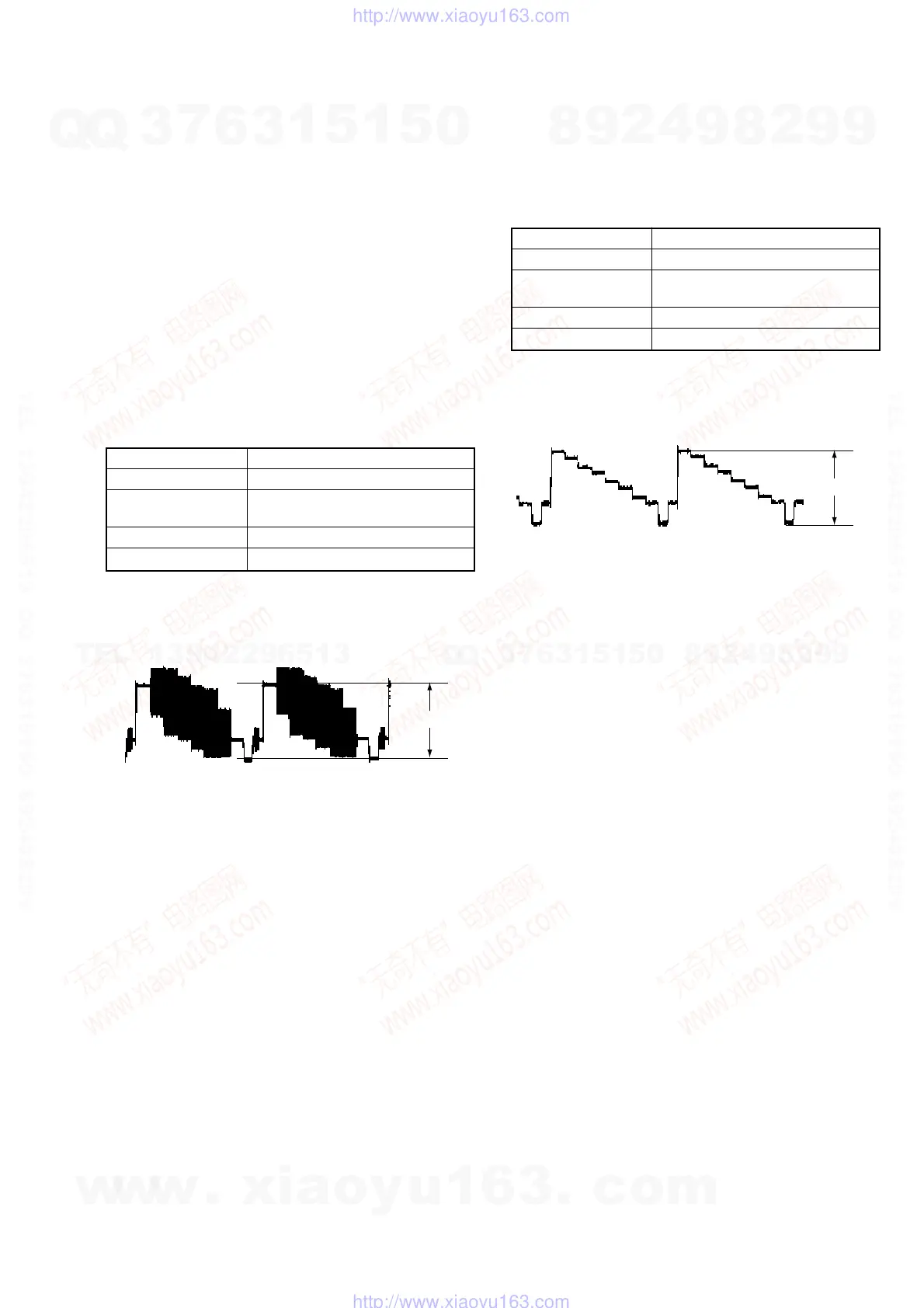
1) Insert the PAL/NTSC reference disc and play back the 100%
color bars.
2) Confirm that the video level is 1.0 V±0.07 Vp-p.
Fig. 7-1
1.0
±
0.07 Vp-
2. S-Video Output S-Y Check
<Purpose>
This check confirms that the S-video Y-signal output has the rated
amplitude. If it adjusted incorrectly, the playback video signal will
not be displayed corrected even when the S-video cable is connected.
Mode PLAY
Signal 100% Color bars
Test point S-VIDEO OUTPUT (S-Y) connector
(terminated in 75Ω)
Instrument Oscilloscope
Specification 1.0 V±0.07 Vp-p
Check method:
1) Insert the PAL/NTSC reference disc and play back the 100%
color bars.
2) Confirm that the video level is 1.0 V±0.07 Vp-p.
Fig. 7-2
1.0
±
0.07Vp-
w
w
w
.
x
i
a
o
y
u
1
6
3
.
c
o
m
Q
Q
3
7
6
3
1
5
1
5
0
9
9
2
8
9
4
2
9
8
T
E
L
1
3
9
4
2
2
9
6
5
1
3
9
9
2
8
9
4
2
9
8
0
5
1
5
1
3
6
7
3
Q
Q
TEL 13942296513 QQ 376315150 892498299
TEL 13942296513 QQ 376315150 892498299
http://www.xiaoyu163.com
http://www.xiaoyu163.com



 To Next Page