6-10
6-2-8. ATA/ATAPI History - ERR
Use the following operations to display “ATA/ATAPI Error History”.
Press “ESC” key, followed by “DSP”, “2”, “DIG/ANA”, and “FRM/TIM” key.
6-2-9. How to confirm HDD Access Flow
Use the following operations to display “ATA/ATAPI History - All”.
Press “ESC” key, followed by “DSP”, “2”, and “FRM/TIM” key.
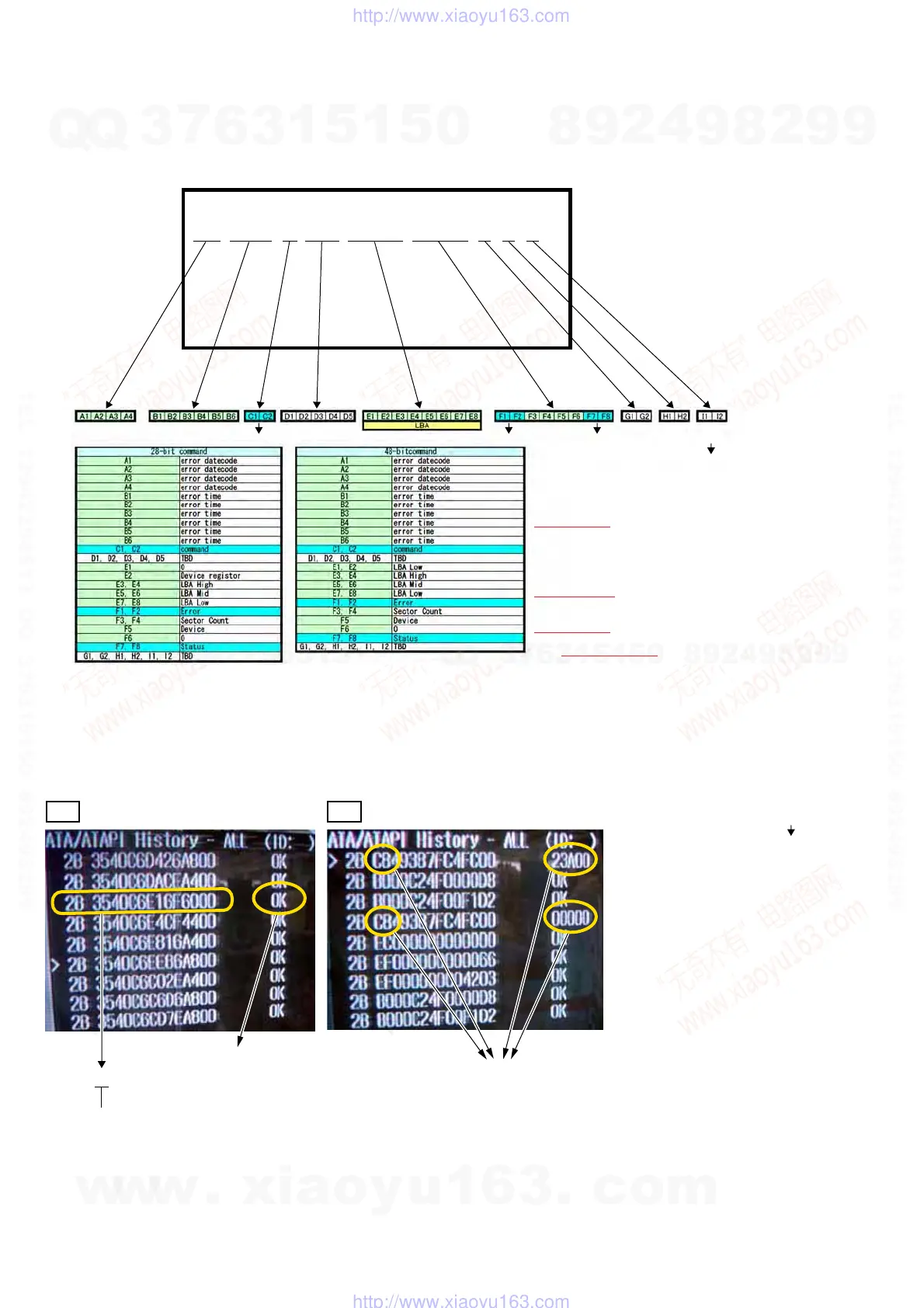
Confirm whether the result is OK or NG in the screen below. If it is NG, check the error in the command table to the lower right.
ATA/ATAPI History - ERR
0223 151843> C8 00013 09387FC4 40FC4051 2B 3C 01
0000 000000 00 00000 00000000 00000000 00 00 00
0000 000000 00 00000 00000000 00000000 00 00 00
0000 000000 00 00000 00000000 00000000 00 00 00
0000 000000 00 00000 00000000 00000000 00 00 00
0000 000000 00 00000 00000000 00000000 00 00 00
HDD ERR is Selected.
x ATA/ATAPI ERR History display specification
Command CommandError register Status register
EXECUTE DEVICE DIAGNOSTIC 90
FLUSH CACHE E7
IDENTIFY DEVICE EC
IDLE E3
READ DMA C8
READ DMA EXT 25
SET FEATURES EF
SMART B0
STANDBY E2
STANDBY IMMEDIATE E0
WRITE DMA CA
WRITE DMA EXT 35
IDLE IMMEDIATE E1
Read Verify EXT 42
Only use performance and factory check
Note: **EXT: 48bit command
OK NG
2B 3540C6E16F6000
READ DMA Error Occurred (NG)
No problem
Command
Command
EXECUTE DEVICE DIAGNOSTIC 90
FLUSH CACHE E7
IDENTIFY DEVICE EC
IDLE E3
READ DMA C8
READ DMA EXT 25
SET FEATURES EF
SMART B0
STANDBY E2
STANDBY IMMEDIATE E0
WRITE DMA CA
WRITE DMA EXT 35
IDLE IMMEDIATE E1
w
w
w
.
x
i
a
o
y
u
1
6
3
.
c
o
m
Q
Q
3
7
6
3
1
5
1
5
0
9
9
2
8
9
4
2
9
8
T
E
L
1
3
9
4
2
2
9
6
5
1
3
9
9
2
8
9
4
2
9
8
0
5
1
5
1
3
6
7
3
Q
Q
TEL 13942296513 QQ 376315150 892498299
TEL 13942296513 QQ 376315150 892498299
http://www.xiaoyu163.com
http://www.xiaoyu163.com



 To Next Page