HT-MT300/MT301
22
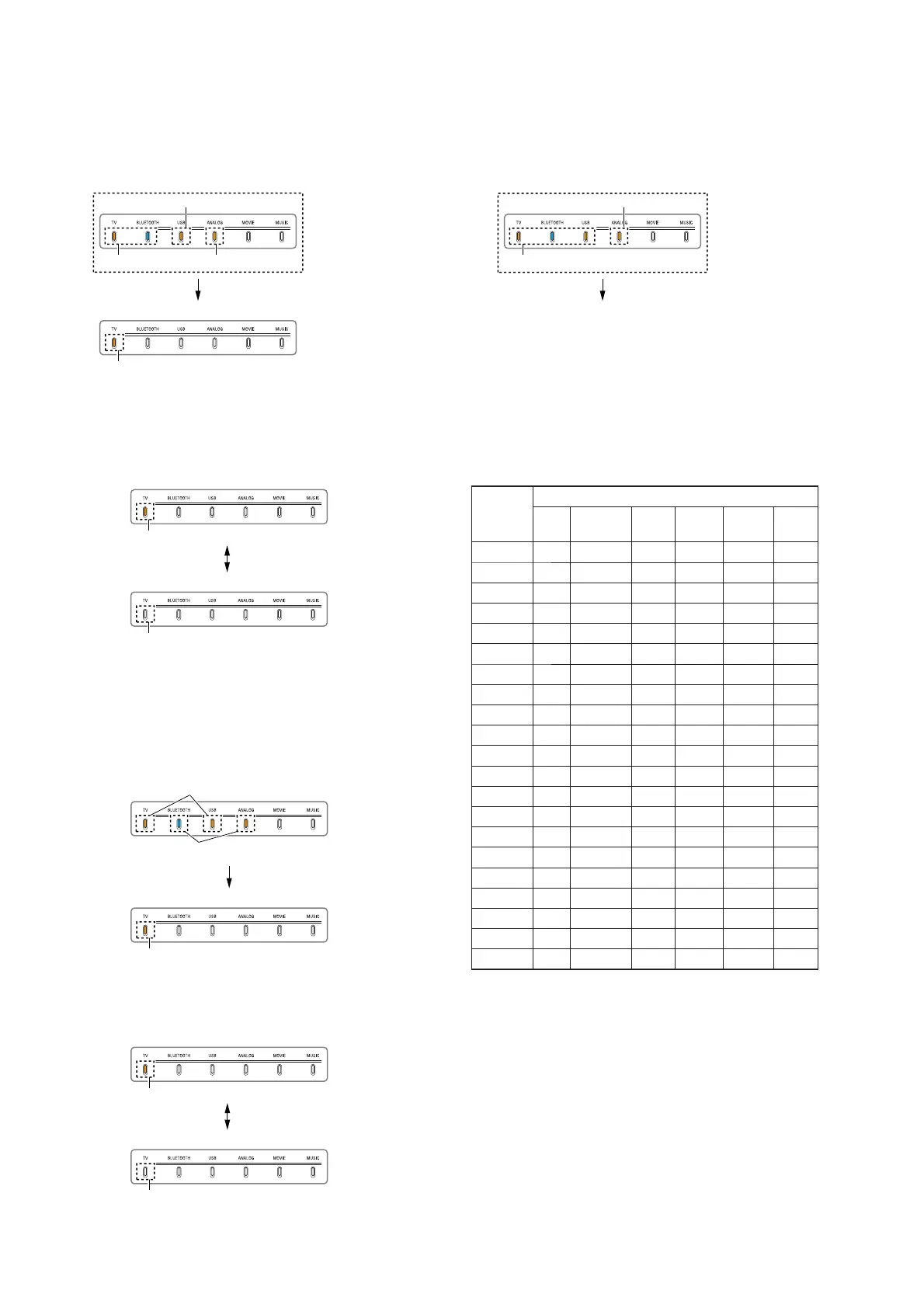
VACS setting:
1. Press the [CLEAR AUDIO+] button on the remote control.
2. The VACS setting mode is entered, then the LEDs light up/
fl ash as shown in the following fi gure.
Light up
VACS setting: ON
Light up
(See Note)
Flash 3 times
Light up
Note: This display is displayed only for the fi rst time. Not displayed when
entering this item after other item preformed.
3. Each time the [CLEAR AUDIO+] button on the remote control
is pressed, VACS on/off setting is changed.
Light off
VACS setting: OFF
VACS setting: ON
Light up
4. Perform other AMP test items or release the AMP test mode.
DRC setting:
1. Press the [>] button on the remote control.
2. The DRC setting mode is entered, then the LEDs light up/fl ash
as shown in the following fi gure.
Light up
DRC setting: ON
Flash 3 times
Light up
3. Each time the [>] button on the remote control is pressed,
DRC on/off setting is changed.
Light off
DRC setting: OFF
DRC setting: ON
Light up
4. Perform other AMP test items or release the AMP test mode.
GAIN adjust:
1. Press the [VOICE]/[NIGHT] buttons on the remote control.
2. The gain adjust mode is entered, then the LEDs light up/fl ash
as shown in the following fi gure.
For the next displayed gain value,
refer to the next step.
Light up
(See Note)
Flash 3 times
Note: This display is displayed only for the fi rst time. Not displayed when
entering this item after other item preformed.
3. Each time the [VOICE] button on the remote control is pressed,
gain value increase. Each time the [NIGHT] button on the re-
mote control is pressed, gain value decrease.
GAIN values display:
GAIN
value
LED
TV
BLUE-
TOOTH
USB
ANA-
LOG
MOV-
IE
MU-
SIC
+1.0 ○○
+0.9 ○○
+0.8 ○
+0.7 ○○ ○
+0.6 ○○
+0.5 ○○
+0.4 ○
+0.3 ○○
+0.2 ○
+0.1 ○
0
–0.1 ○○
–0.2 ○○
–0.3 ○○○
–0.4 ○○
–0.5 ○○○
–0.6 ○○○
–0.7 ○○○○
–0.8 ○○
–0.9 ○○ ○
–1.0 ○○ ○
no mark: light off, ○: light up
4. Perform other AMP test items or release the AMP test mode.



 To Next Page