HT-MT300/MT301
23
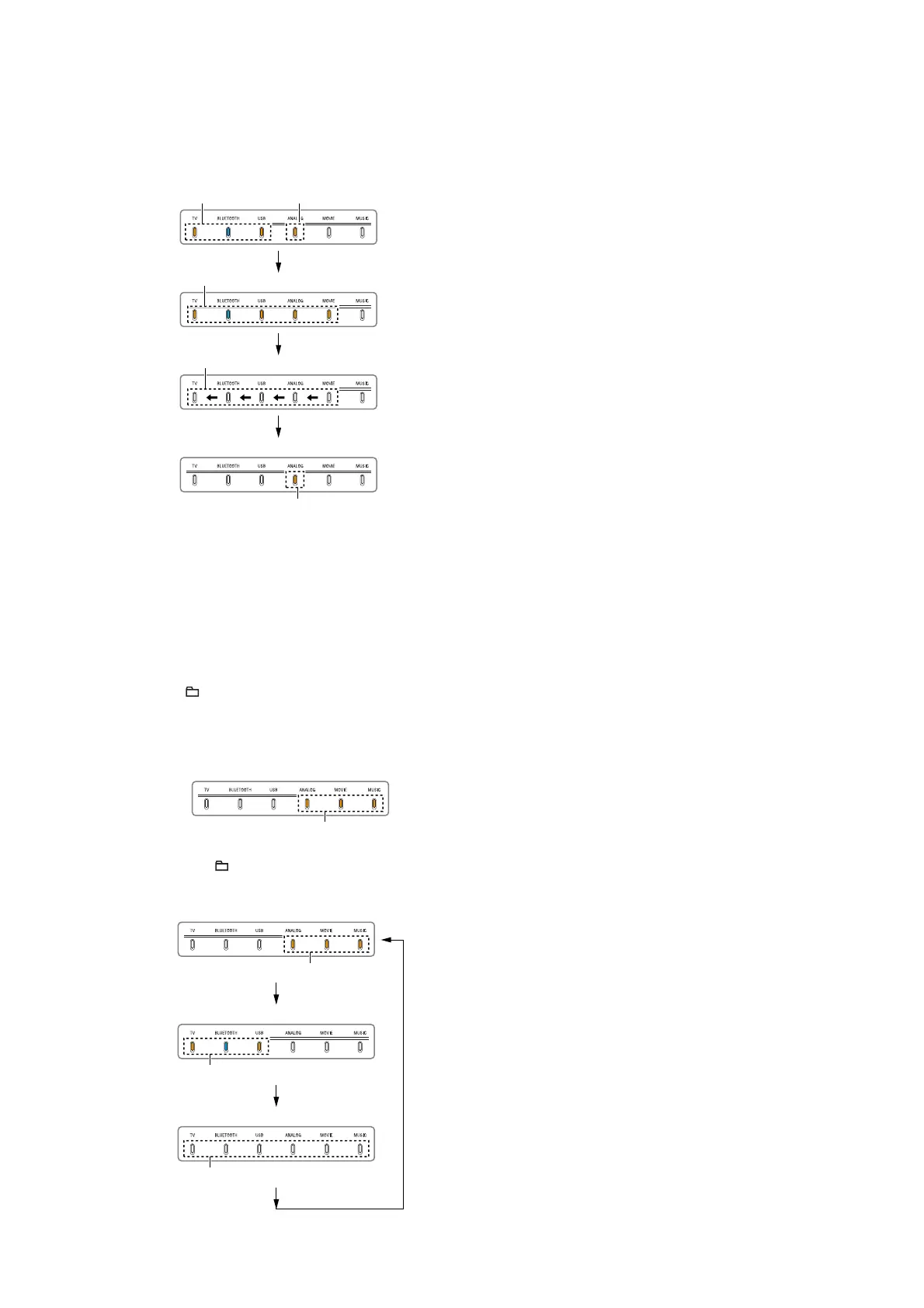
Vibration test:
1. Press the [
u] button on the remote control.
2. The vibration test mode is entered, then the LEDs light up/
fl ash/light off as shown in the following fi gure.
Flash 3 timesLight up
Light up
Light off in order from the right side
Normal display (function LED is light up)
Light up
3. It changes to the following setting.
• Volume : 30
• Subwoofer volume : 8
• Function : ANALOG
• Sound fi eld : CLEAR AUDIO+
4. Perform other AMP test items or release the AMP test mode.
L/R channel toggle:
1. Press the [
+] button on the remote control.
2. The L/R channel toggle mode is entered, then the LEDs light
up as shown in the following fi gure and changed to the R-ch
output only setting.
R-ch output only setting
Light up
3. Each time the [ +] button on the remote control is pressed,
L/R channel output setting is changed.
R-ch output only setting
L-ch output only setting
Light up
Light up
Normal output setting
Light off
4. Perform other AMP test items or release the AMP test mode.



 To Next Page