{}
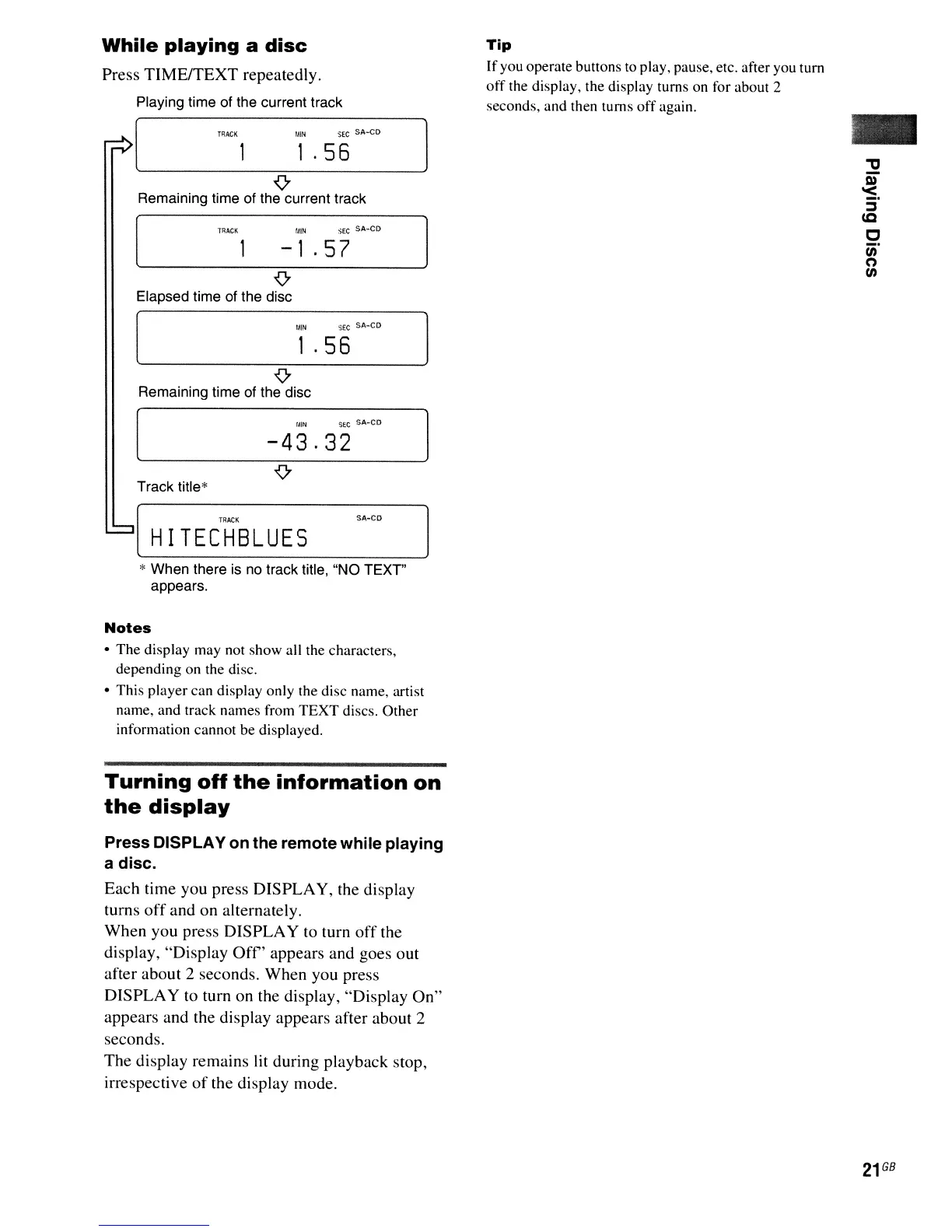
Remaining time of the current track
{}
Elapsed time of the disc
While
playing
a
disc
Press TIME/TEXT repeatedly.
Playing time of the current track
-
Tip
Ifyou operate buttons to play, pause, etc. after you
tum
otf
the display, the display turns on for about 2
seconds, and then turns
off
again.
:iEC
SA-CD
SEC
SA-CO
1
.56
fAIN
MIN
-1
.57
TRACK
T~ACK
1
.56
{}
Remaining time of the disc
-43.32
Track title*
[
HI
TEC'H'SLUES
SA-CO
* When there is no track title, "NO TEXT"
appears.
Notes
• The display may not show all the characters,
depending on the disc.
o This player can display only the disc name, artist
name, and track names from
TEXT
discs. Other
information cannot be displayed.
Turning
off
the
information
on
the
display
Press
DISPLA
Yon
the
remote
while
playing
a
disc.
Each time you press DISPLAY, the display
turns
off
and on alternately.
When you press DISPLAY to turn
off
the
display, "Display
Off'
appears and goes out
after about 2 seconds. When you press
DISPLAY to turn on the display, "Display On"
appears and the display appears after about 2
seconds.
The display remains lit during playback stop,
irrespective
of
the display mode.



 To Next Page