Connecting
a
component
with
BALANCED
input
jacks
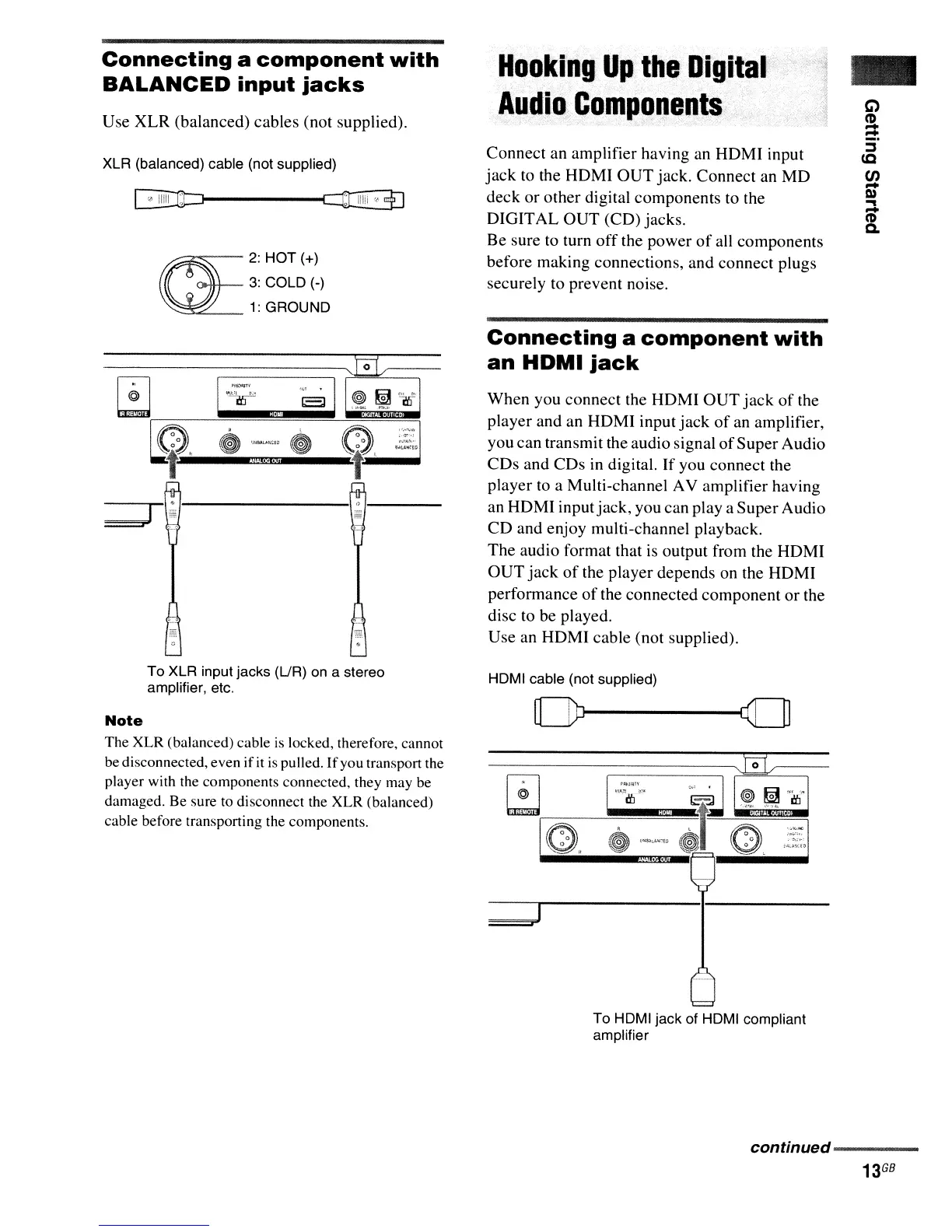
Use XLR (balanced) cables (not supplied).
XLR (balanced) cable (not supplied)
R1t:J------~
~
2:HOT(+)
3:
COLD (-)
1:
GROUND
To XLR input jacks (UR) on a stereo
amplifier, etc.
Note
The
XLR
(balanced) cable
is
locked, therefore, cannot
be disconnected, even
if
it
is
pulled.
If
you transport the
player with the components connected, they may be
damaged. Be sure to disconnect the XLR (balanced)
cable before transporting the components.
Hooking
Up
the
Digital
Audio
Components
Connect an amplifier having an
HDMI
input
jack
to the HDMI
OUT
jack. Connect an
MD
deck or other digital components to the
DIGITAL OUT (CD) jacks.
Be sure to turn
off
the power
of
all components
before making connections, and connect plugs
securely to prevent noise.
Connecting
a
component
with
an
HDMI
jack
When you connect the HDMI
OUT
jack
of
the
player and an HDMI input
jack
of
an amplifier,
you can transmit the audio signal
of
Super Audio
CDs
and CDs
in
digital.
If
you connect the
player to a Multi-channel AV amplifier having
an HDMI inputjack, you can
playa
SuperAudio
CD
and enjoy multi-channel playback.
The audio format that
is
output from the HDMI
OUT
jack
of
the player depends on the HDMI
performance
of
the connected component or the
disc to be played.
Use an HDMI cable (not supplied).
HOMI cable (not supplied)
==1
To HOMI jack of
HOMI
compliant
amplifier
-
continued
.......
---
13
G8



 To Next Page