Using
the
Display
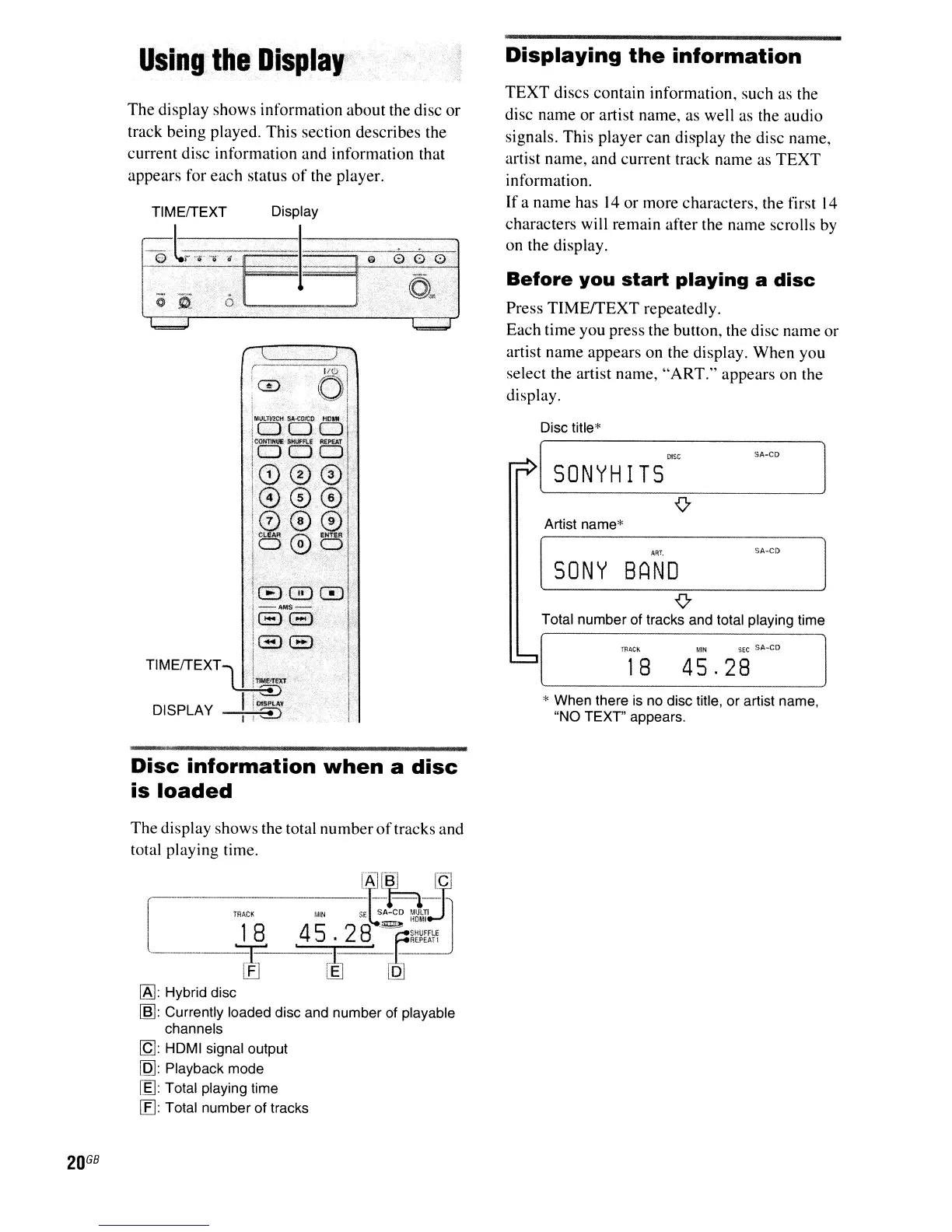
Displaying
the
information
SA-CD
SA-CD
SEC
SA-CO
MIN
ART.
BAND
TRACk
Artist name*
Disc title*
[
SONY
[
SONYH
I
TS
~
{7
Total number of tracks and total playing time
18
45.28
* When there
is
no disc title, or artist name,
"NO TEXT" appears,
Before
you
start
playing
a
disc
Press
TIMEITEXT
repeatedly.
Each time you press the button, the disc name
or
artist name appears on the display.
When
you
select the artist name,
"ART."
appears
on
the
display.
TEXT
discs contain information, such as the
disc name
or
artist name, as well as the audio
signals. This player can display the disc name,
artist name, and current track name as
TEXT
information.
If
a name has
14
or
more characters, the first
14
characters will remain after the name scrolls by
on the display.
(----~
'°01
,
~.=,
tMlILTIf.!Ci't
SA;(:OfCO
tio,*
I
1000
tcQtrnH~
SHUFFLE
R£P£AT
rOOD
1000
1@0@'
i0®®
t(:I.EAA
(;;\
ENTER
i,O
~
0
l '
t
I ,
1800
1-4MS-
188
1881
TIMEITEXT
"1
1",,:,EXf
I·,
DISPLAY !
!~
I
TIMEITEXT Display
'0(,
..
-.
..
0"0'
F
I~~G
0~.
O~0
-"",
L
~""
(ll
.0..
The
display shows information about the disc
or
track being played. This section describes the
current disc information and information that
appears for each status
of
the player.
Disc
information
when
a
disc
is
loaded
The
display shows the total
number
of
tracks and
total playing time.
D
R1'C-K8--Mlt'-S~~!D
fA,k-.:t
:.~=>.
"OMI
.4
5 . 2
8.'F~~~m~
.~.
~
[QJ
IA]:
Hybrid disc
[m:
Currently loaded disc and number of playable
channels
[Q]:
HDMI signal output
[Q]:
Playback mode
[f]: Total playing time
[fl Total number of tracks
20
GB



 To Next Page