-
(4)
(9)
(10)
*
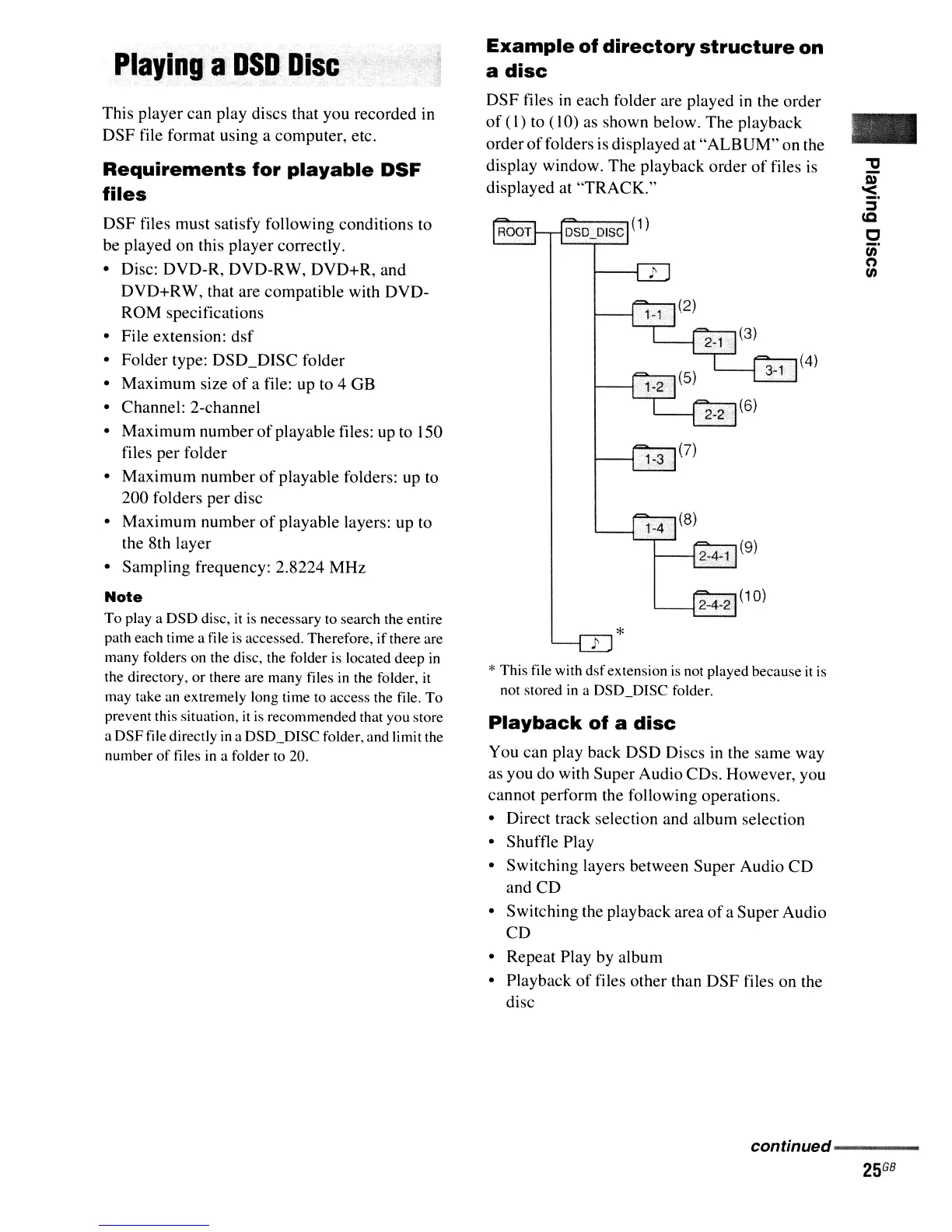
* This file with
dsf
extension
is
not played because
it
is
not stored
in
a DSD_DISC folder.
Playback
of
a
disc
You can play back DSD Discs
in
the same way
as you do with Super Audio CDs. However, you
cannot perform the following operations.
• Direct track selection and album selection
• Shuffle Play
• Switching layers between Super Audio
CD
and CD
• Switching the playback area
of
a SuperAudio
CD
• Repeat Play by album
• Playback
of
files other than
DSF
files on the
disc
Example
of
directory
structure
on
a
disc
DSF
files
in
each folder are played
in
the order
of
(I)
to (10) as shown below. The playback
order
of
folders
is
displayed at
"ALBUM"
on the
display window. The playback order
of
files
is
displayed at
"TRACK."
Playing
a
DSDDisc
DSF files must satisfy following conditions to
be played on this player correctly.
• Disc: DVD-R, DVD-RW, DVD+R, and
DVD+RW, that are compatible with DVD-
ROM specifications
• File extension:
dsf
• Folder type: DSD_DISC folder
• Maximum size
of
a file: up to 4 GB
• Channel: 2-channel
• Maximum number
of
playable files: up to 150
files per folder
• Maximum number
of
playable folders: up to
200 folders per disc
• Maximum number
of
playable layers: up to
the 8th layer
• Sampling frequency: 2.8224
MHz
Note
To
playa
DSD disc,
it
is
necessary to search the entire
path each time a file
is
accessed. Therefore, if there are
many folders on the disc, the folder
is
located deep
in
the directory,
or
there are many files in the folder, it
may take an extremely long time to access the file.
To
prevent this situation,
it
is
recommended that you store
a
DSFfile
directly
in
a DSD_DISC folder, and limit the
number
of
files in a folder to 20.
Requirements
for
playable
DSF
files
This player can play discs that you recorded in
DSF file format using a computer, etc.
continued
..........................
-



 To Next Page