Locating
a
Track
Directly
- Direct track selection
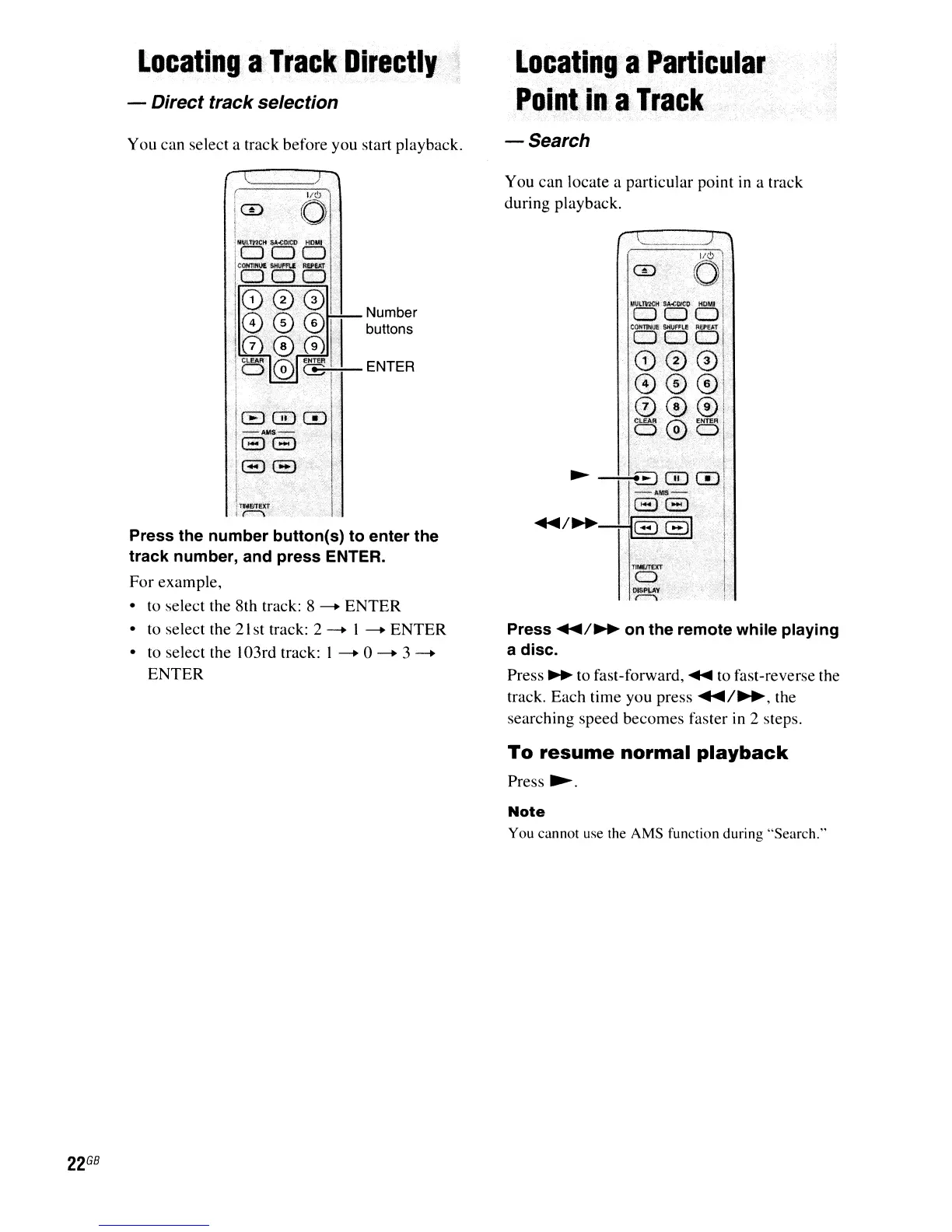
You can select a track before you start playback.
Locating
a
Particular
Point
in
a
Track
-Search
ICD
61
You can locate a particular point in a track
during playback.
22
GB
Number
buttons
ENTER
Press the number button(s) to enter the
track number, and press ENTER.
For
example,
•
to
select the 8th track: 8
-.
ENTER
•
to
select the
21
st track: 2
-.
I
-.
ENTER
• to select the 103rd track: I
-.0-.3
-.
ENTER
J/~
1 <
0
--"",1-
VI·
, !'
i
MUl'R7(:H
so\oCOIcg
HOMI
I
ODD!
COHl'tNUe:
StiUFFlf
Ref,."
'j
DOOr
0001
0001
000i
p
00
1
!
~
-1
1
8
0
..
'.'
0
.•........•.......•.•.•.•...•....
1
. -
AMS,-:--:.,'
j
88··········1'
....
/~-H8Gr
i
I.
I,
i
Press
....
/~
on the remote while playing
a disc.
Press
~
to fast-forward,
~
to
fast-reverse the
track. Each time you press
....
/~,
the
searching speed becomes faster
in
2 steps.
To
resume normal
playback
Press
~.
Note
You cannot use the AMS function during "Search."



 To Next Page