,
Getting
Started
D.,scriptions,of
Parts>a~d'
Controls
Further details are provided on the pages indicated in parentheses.
Instructions
in
this manual describe the controls on the player. You can also use the controls on the
remote
if
they have the same or similar names as those on the player.
Front
Panel
-
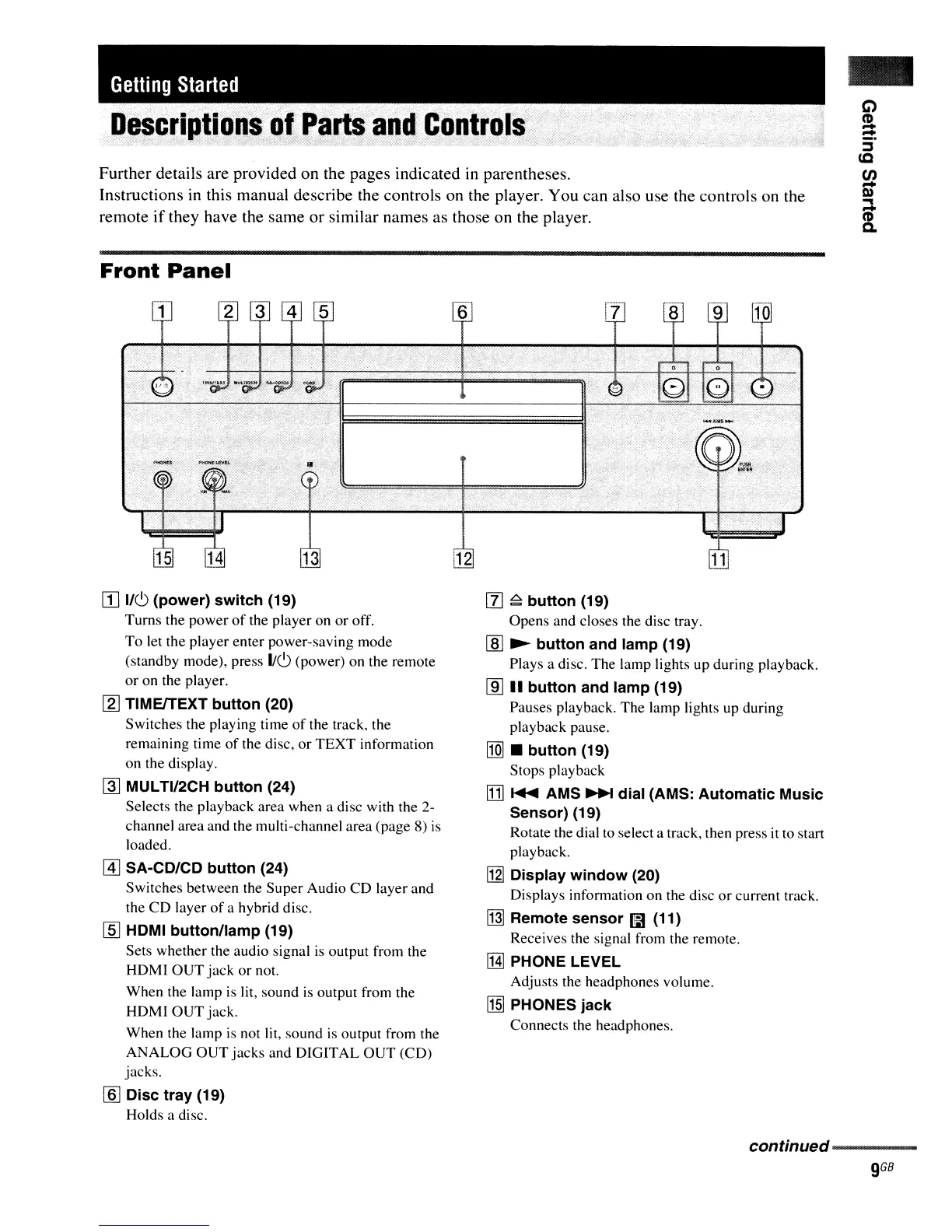
[I]
lie>
(power) switch (19)
Turns the power
of
the player on
or
off.
To
let the player enter power-saving mode
(standby mode), press
lie>
(power) on the remote
or on the player.
[2]
TIMEITEXT button (20)
Switches the playing time
of
the track, the
remaining time
of
the disc,
or
TEXT
information
on the display.
~
MULTI/2CH button (24)
Selects the playback area when a disc with the 2-
channel area and the multi-channel area (page 8)
is
loaded.
@]
SA-CD/CD button (24)
Switches between the Super Audio CD layer and
the
CD
layer
of
a hybrid disc.
[§] HDMI button/lamp (19)
Sets whether the audio signal
is
output from the
HDMI
OUT
jack
or not.
When the lamp is lit, sound
is
output from the
HDMI
OUT
jack.
When the lamp
is
not lit, sound
is
output from the
ANALOG
OUT
jacks and DIGITAL
OUT
(CD)
jacks.
[§] Disc tray (19)
Holds a disc.
[l]
~
button (19)
Opens and closes the disc tray.
[ID
~
button and lamp (19)
Plays a disc. The lamp lights up during playback.
lID
.. button and lamp (19)
Pauses playback. The lamp lights up during
playback pause.
[1Q]
• button (19)
Stops playback
!TIl
....
AMS
~
dial (AMS: Automatic Music
Sensor) (19)
Rotate the dial to select a track, then press it to start
playback.
1121
Display window (20)
Displays information on the disc
or
current track.
~
Remote sensor
I!i1
(11)
Receives the signal from the remote.
IHl
PHONE LEVEL
Adjusts the headphones volume.
~
PHONES jack
Connects the headphones.
continued----
9
GB



 To Next Page